

A facilities manager can usually spot the problem before opening the storage room: pallets of retired monitors from an office refresh, mixed with modern flat-panels, bulky CRTs, smart displays, loose stands, and unverified asset tags. Sending that load to the first available hauler isn't responsible recycling. It creates a classification problem, a data-security question, and a chain-of-custody gap that may surface only when an auditor asks where the glass, metals, embedded storage, and hazardous components went.
How to recycle computer monitors responsibly starts with a controlled decision at the loading table. Sort the equipment, identify what can be reused, isolate hazardous units, verify security requirements, and require documentation that follows every asset through final processing. Screens and monitors represented about 10% of global e-waste generated in 2022, or 5.9 billion kilograms, while only 25% of that category was formally collected and recycled, according to the Global E-waste Monitor 2024. For a business, “recycled” should mean more than a pickup receipt. It should mean verified downstream handling.
Table of Contents
- Why Responsible Monitor Recycling Starts With Triage
- Identifying CRT Versus Flat-Panel Displays
- Preparing Monitors for Transport and Processing
- Assessing Data and Security Risk on Smart Displays
- Choosing Recyclers, Donation, or Resale Channels
- Arranging Pickup, Drop-Off, and Documentation
- Building a Repeatable Monitor Recycling Program
Why Responsible Monitor Recycling Starts With Triage
The sorting table determines the compliance pathway. It also determines whether a unit is suitable for resale, refurbishment, material recovery, or controlled hazardous processing. Treating every display as interchangeable is the fastest way to create avoidable downstream liability.
Start with four physical groups:
- CRT monitors: Move bulky, deep-bodied displays into a separate stream immediately. Their glass contains lead, and discarded CRTs can fall under hazardous-waste requirements.
- Flat-panel displays: Keep LCD, LED, and OLED units together only until the exact technology and backlight type are confirmed.
- Smart and integrated displays: Flag all-in-ones, conferencing displays, signage panels, and monitors with operating systems or network functions for a separate security review.
- Damaged units: Isolate cracked screens, broken glass, leaking components, and displays with suspected CCFL backlights. Don't place them loose on a general pallet.
The distinction matters because older CRT processing and modern flat-panel processing aren't interchangeable. EPA-linked life-cycle modeling used CRT shredding and material recovery as a proxy for LCD recycling because real LCD-recycling data was limited. That limitation is a warning for facilities teams, not a processing recommendation. Modern LCDs need different disassembly and depollution controls, particularly where older CCFL backlights may contain mercury.
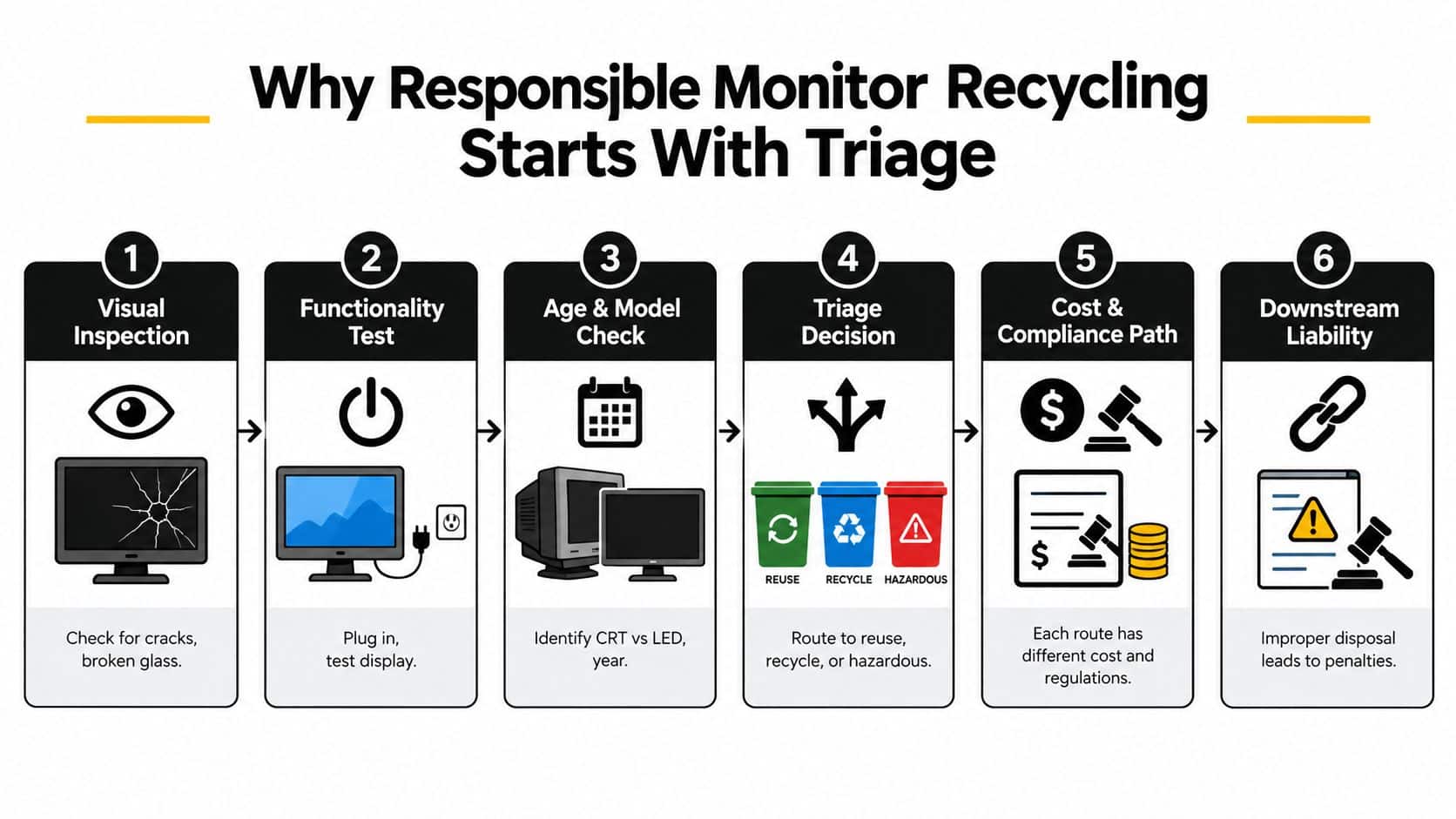
Make the first decision at the asset level
Record the make, model, serial number, asset tag, physical condition, and test result. A working display shouldn't enter a scrap stream because the business replaced it. Use an equipment condition assessment to support a consistent reuse or recycling decision.
EPA's CRT requirements trace back to a 2006 rule that optimized management of used CRTs and CRT glass under RCRA. The agency also states that televisions and color computer monitors contain an average of four pounds of lead, which is why CRTs mustn't be handled like ordinary trash. EPA's CRT rule guidance explains the regulatory foundation, while EPA's CRT waste guidance identifies CRT glass leachate with an average lead concentration of 22.2 mg/L, compared with a 5 mg/L toxicity characteristic threshold.
Practical rule: If the team can't identify the display type, condition, and security status, the unit isn't ready for shipment.
Identifying CRT Versus Flat-Panel Displays
CRT versus flat-panel identification is a compliance decision. A manifest that says “LCD monitors” while the pallet contains CRTs can send the load to the wrong processor and undermine the validity of the final certificate.
Use physical cues first. A CRT has a deep cabinet, substantial weight, a curved glass face, and often a rear yoke housing around the picture tube. Older units commonly use VGA connections, although adapters and mixed ports can complicate a quick inspection. A flat-panel display has a slim profile, a plastic bezel, and usually uses HDMI, DisplayPort, DVI, or USB-C connections. Don't rely on the connector alone. Confirm the model and inspect the rear housing.
| Characteristic | CRT Monitor | Flat-Panel (LCD/LED/OLED) |
|---|---|---|
| Profile | Deep, heavy cabinet | Slim housing |
| Screen | Curved glass picture tube | Thin panel behind a bezel |
| Primary concern | Lead-bearing glass | Backlight, electronics, and panel chemistry |
| Common legacy signal | VGA | HDMI, DisplayPort, DVI, or USB-C |
| Processing route | CRT-specific glass and material recovery | Panel disassembly and flat-panel recovery |
| Documentation need | CRT classification and controlled glass disposition | Panel type, backlight status, and downstream route |
Treat the middle cases carefully
Early LCDs can use CCFL backlights, which introduce mercury-handling concerns. LED-backlit monitors have a different risk profile, while OLED displays require their own material and component assessment. A unit labeled “flat-screen” isn't sufficiently described for a commercial recycling manifest.
The wrong assumption creates two failures. An LCD may be sent into a CRT-priced stream that lacks the right controls, or a flat-panel may be crushed at a facility that isn't equipped to manage its backlight components. For practical guidance on identifying and routing flat displays, use this flat-screen TV recycling guide, then confirm the processor accepts the exact models in your inventory.
The recycler should price and process CRTs and flat-panels separately. Your manifest must match the physical stream, and the final report should show the same classification. If the vendor offers only one generic line item for every screen, ask how it separates the material before accepting the quote.
Preparing Monitors for Transport and Processing
Loading day is where many clean inventory records become unreliable. Prepare each unit before the carrier arrives, not after the pallets are wrapped.
Photograph the serial number, asset tag, model label, and visible condition. Capture cracked glass, missing bezels, damaged ports, and other exceptions. These images support the handoff record when a unit arrives with new damage or when the recycler's manifest doesn't reconcile with the original list.
Remove stands, power cables, video cables, and detachable accessories unless the downstream route requires them. This reduces pallet volume, limits loose parts that can strike glass, and makes the asset list easier to reconcile. Keep accessories in labeled containers, not mixed into the monitor stack.
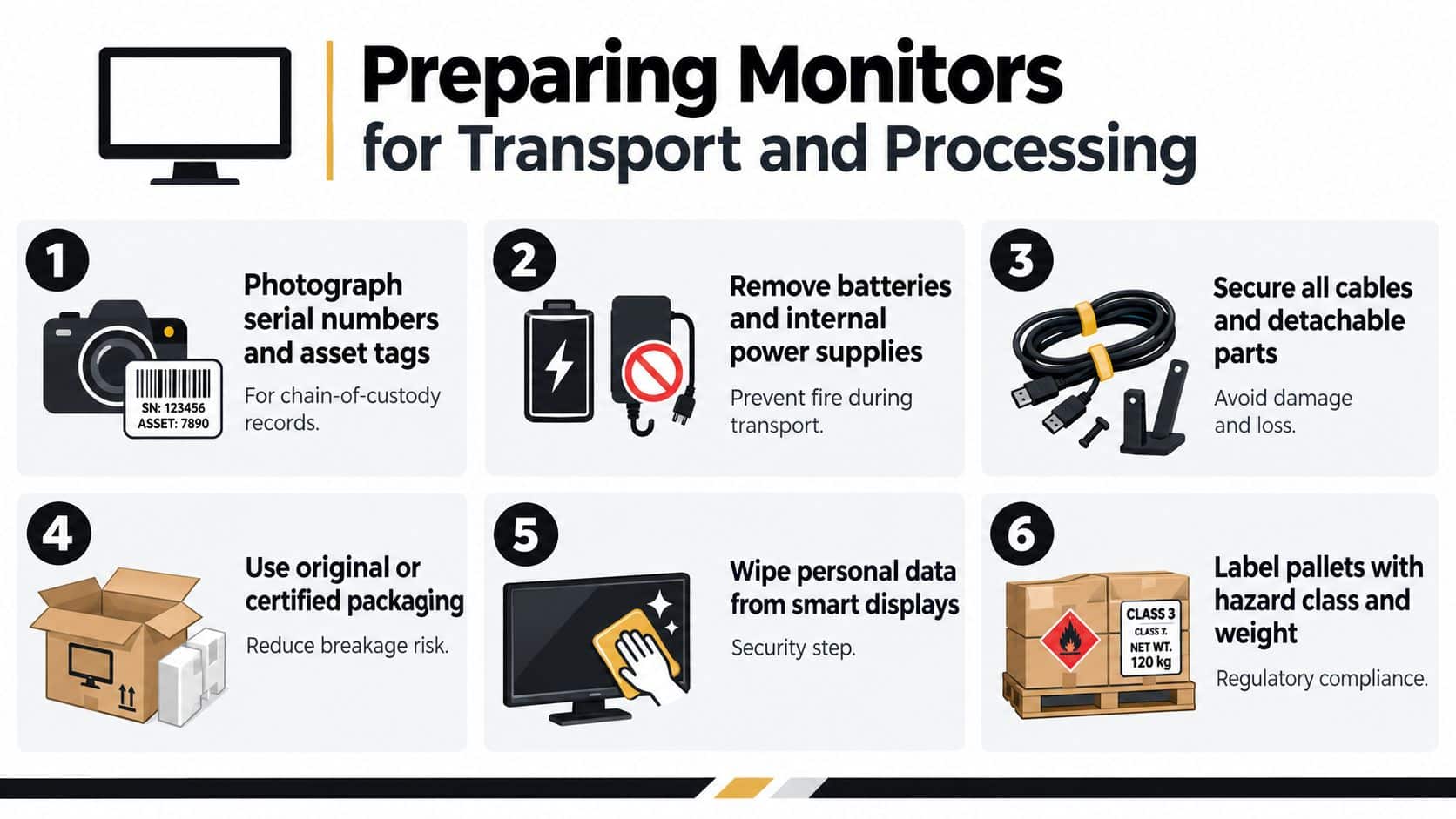
Prepare the load for safe handling
Use different packing methods for different display types:
- CRT pallets: Keep units upright and protect the face of each monitor. Don't place heavy equipment on top of the glass.
- Flat-panel pallets: Interleave screens with foam or suitable separators. Prevent edge contact and movement during transit.
- Damaged equipment: Use sealed containment with absorbent material where leakage is possible, and label the package for controlled handling.
- Loose components: Secure cables and stands separately so they don't shift into screens or disappear during unloading.
Smart displays and all-in-ones require a security checkpoint before leaving the building. Verify sanitization or route the device for approved data destruction. A factory reset alone isn't an acceptable assumption when the unit contains storage or retains credentials.
Record the pallet count, approximate weight, seal numbers, loading photographs, and carrier details. Keep the signed bill of lading with the serialized asset list. These records give the recycler a defensible starting condition and help an auditor connect loading-day evidence to the certificate issued later. This computer recycling preparation guidance provides a useful framework for removing accessories, documenting equipment, and preparing technology for an orderly handoff.
Assessing Data and Security Risk on Smart Displays
A conventional monitor often acts only as an output device. A smart display, all-in-one, conferencing panel, or digital-signage unit may contain storage, firmware, microphones, cameras, operating-system credentials, and network history. Handle those devices as information-bearing assets until the security review proves otherwise.
The storage locations teams miss most often include:
- Main-board eMMC or solid-state storage: This can retain operating-system data, settings, local accounts, or application information.
- Webcam and microphone modules: A peripheral module may have its own controller flash, especially in conferencing equipment.
- Wi-Fi and Bluetooth firmware partitions: Network credentials, paired-device lists, and configuration data may remain even after a user signs out.
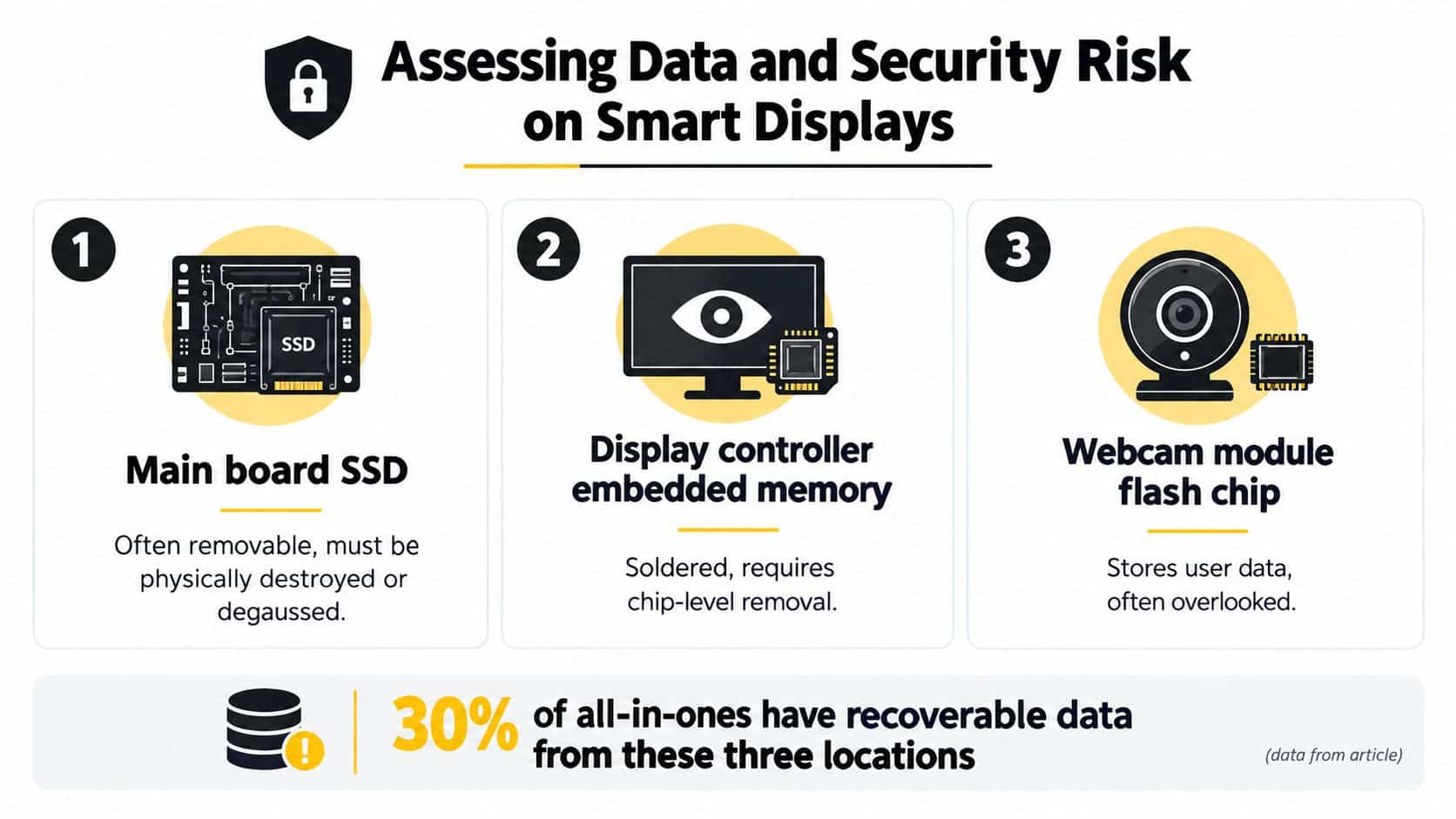
Match the method to the architecture
Enterprise-grade displays with Intel vPro features, MDM agents, or managed operating systems should follow the organization's approved NIST 800-88 purge workflow. Record the tool, method, operator, date, and verification result. If the system can't support a reliable purge, escalate to cryptographic erasure or physical destruction.
Consumer-oriented smart monitors need a different review. Verify the factory reset, revoke credentials through vendor portals, remove the unit from management platforms, and clear pairing lists. Android, ChromeOS, signage, and conferencing devices deserve extra scrutiny because they may combine local storage with network and account access.
Biometric peripherals, on-device AI cameras, and displays used for clinical or financial workflows shouldn't be placed in an ordinary monitor recycling batch. Inventory them separately, classify the data risk, apply the approved method, and retain proof. This data-security risk guide reinforces the central operational point: data destruction is a separate engineering task from material recycling.
A recycler's environmental certificate doesn't prove that an embedded storage device was sanitized.
Build a checklist that requires inventory, architecture classification, method selection, execution, verification, and certificate matching. If a vendor can't identify which storage locations it handles, don't release the unit.
Choosing Recyclers, Donation, or Resale Channels
Reuse, donation, and recycling aren't equivalent outcomes. Choose the route based on working condition, age, security profile, and residual market value.
Working flat-panel monitors should first receive a functionality and condition review. Units that pass testing and retain useful market value can move through structured resale or IT asset recovery. Older functional units may suit a vetted donation program, but the recipient must be able to use and support the equipment. Non-working, damaged, or end-of-life displays belong with a certified recycler that can document material recovery.
| Criteria | Certified Recycler | Donation Channel | Resale Broker |
|---|---|---|---|
| Best fit | Damaged or end-of-life equipment | Functional units with an appropriate recipient | Working units with residual market value |
| Primary control | Hazardous-material and downstream processing | Recipient and use verification | Testing, grading, and buyer documentation |
| Value outcome | Material recovery | Social benefit and possible accounting support | Financial recovery |
| Required evidence | Recycling certificate and downstream records | Acceptance and donation records | Asset-level disposition and settlement |
| Main risk | Weak downstream visibility | Recipient can't use or process the units | Units are resold without adequate sanitization |
Vet the vendor, not just the quote
Ask for current R2v3 or e-Stewards certification details, insurance certificates, downstream vendor audit reports, and proof that the provider is authorized to handle hazardous electronic waste. For data-bearing displays, request NAID or AAA-ADL accreditation where applicable, plus the exact destruction or sanitization method.
Require asset-level reporting. A weight-only summary doesn't prove what happened to a particular serial number, and it won't identify whether CRT glass reached an approved lead-recovery route. Historical monitor-processing outputs included 33.6% CRT glass for lead recovery, 20.2% steel carcass, and 25.1% reusable exports, illustrating why source-segregated streams matter. Those figures appear in EPA archived monitor-recycling material, but your own recycler should provide current, load-specific reporting rather than rely on historical averages.
Use this ITAD vendor selection guide to structure due diligence. The cheapest quote often excludes downstream verification, detailed reconciliation, or compliant handling of difficult fractions. Ask what the quote leaves out.
Arranging Pickup, Drop-Off, and Documentation
Physical transfer is a chain-of-custody event. Treat it like one.
Before pickup, create a serialized asset list with make, model, asset tag, condition grade, display type, and security status. Package the load on suitable pallets or in locked gaylords, apply tamper-evident seals, and record the seal numbers. The bill of lading should identify the shipment and state which recycling and destruction records the provider will issue.
The carrier's arrival should trigger a controlled handoff. Facilities staff should compare the pickup count with the prepared list, photograph the sealed load, record the driver's and carrier's details, and retain signed transfer evidence. Don't let an unverified driver collect an unsealed, uncounted pallet.
Demand a complete evidence package
A compliance officer should be able to request the following without a scramble:
- Serialized recycling certificate: Map each asset tag and serial number to its final recycling or disposition record.
- Data destruction certificate: Identify the device, method, operator, date, and verification result. Reference NIST 800-88 where that method applies.
- Category weight tickets: Separate CRT glass, flat-panel units, metals, plastics, and other relevant fractions.
- Downstream recovery report: Identify the processors receiving glass, metals, plastics, and other material streams.
- Manifest reconciliation: Close every line item, including exceptions, rejected assets, substitutions, and missing serials.
A certificate issued before pickup completion is a red flag. So is an aggregate certificate with no serial correlation or a report that names no downstream vendors. Those documents may look official while leaving the most important question unanswered: where did each asset go?
German data cited in an academic study estimated computer-screen collection at about 50%, below the 80% recovery and 70% preparing-for-reuse or recycling targets used in the EU regime for screens. The CRT glass issue paper also highlights the difference between collection and verified recovery. Your program should measure the handoff through final disposition, not stop at pickup.
Building a Repeatable Monitor Recycling Program
A one-time cleanout solves a storage problem. A repeatable program controls risk.
Assign ownership before the next refresh cycle. IT should classify assets and handle data decisions. Facilities should control segregation, staging, and loading. Compliance should approve the vendor and review certificates. Procurement should require downstream reporting, insurance, certification, and service-level commitments in the contract.
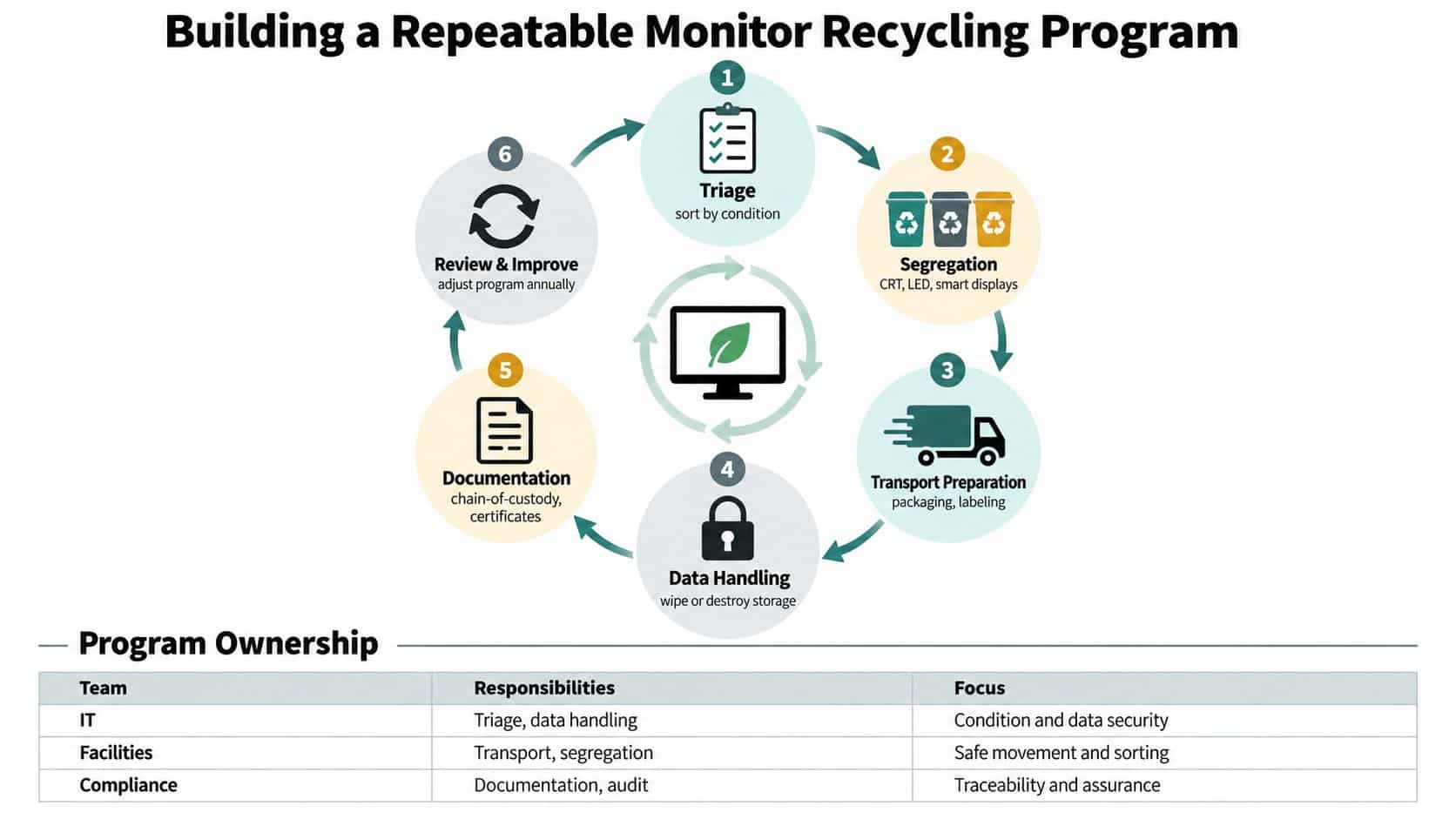
Turn each retirement event into a controlled cycle
Use lease end-of-life, refresh waves, lease-return milestones, and project closures as formal triggers. At each trigger, log the following milestones:
- Inventory: Record serial numbers, asset tags, models, condition, and display technology.
- Routing: Assign reuse, resale, donation, recycling, or secure destruction.
- Preparation: Photograph assets, remove accessories, package safely, and seal the load.
- Transfer: Record carrier details, timestamps, pallet counts, and signed custody evidence.
- Processing: Match certificates and weight records to the original manifest.
- Review: Record exceptions, rejected loads, missing records, and vendor findings.
A practical review rhythm includes monthly scrap-bay counts, quarterly vendor scorecards, and an annual policy refresh. Scorecards should cover on-time pickup, certificate turnaround, audit findings, rejected loads, and downstream reporting quality. The annual review should account for newly encountered monitor types, regulatory changes, and updated data-classification rules.
Define escalation before a failure
A failed sanitization certificate should suspend release of the affected asset record and trigger a security review. A rejected load should remain under controlled custody until the recycler provides a documented correction. If a third-party audit identifies a substandard downstream processor, compliance should freeze new shipments to that route, notify procurement, preserve affected manifests, and require corrective evidence before resuming.
The global scale makes this discipline necessary. Total e-waste reached 62 million metric tons in 2022, an 82% increase since 2010, while formal collection and recycling remained limited, according to the Global E-waste Monitor 2024. The Basel Convention's e-waste guidance defines e-waste broadly and identifies toxic materials such as lead, mercury, and brominated flame retardants as hazardous concerns.
Set internal performance targets for diversion above 95%, certificate retrieval within 10 business days, and zero unresolved data incidents. These targets are operational controls, not universal regulatory requirements. Track them consistently, investigate misses, and use the results to improve the next load.
Beyond Surplus provides business pickup coordination, monitor recycling, secure data destruction for integrated equipment, IT asset recovery, and certificates that support chain-of-custody records. If your organization has mixed monitors waiting in storage, start with a serialized inventory and a triage review, then visit Beyond Surplus to arrange a documented recycling and IT asset disposition service for the equipment that can't be reused.


