

Remote employee offboarding stops being a simple hardware issue the moment a laptop leaves your inventory with active data, uncertain custody, and no return path. Organizations without a structured process recover only 70 to 85% of company devices, and nearly half lose at least 5% of total device inventory during offboarding, while remote and hybrid workers are nearly 17% more likely to withhold equipment than on-site employees according to RemoAsset's laptop return analysis.
That's the wrong way to price the problem. The laptop is only the visible loss. The larger costs sit behind it: exposed credentials, audit gaps, delayed redeployment, replacement purchasing, staff time spent chasing returns, and legal cleanup if data on the device becomes part of an incident.
A strong offboarding program treats retrieval, data protection, and end-of-life processing as one operational workflow. That's how you reduce loss, protect regulated data, and keep equipment moving back into service or into certified disposition without guesswork.
The High Cost of Unrecovered Remote Assets
The number that should change how leaders view offboarding is simple: 70 to 85% recovery is what many organizations achieve when the process is loose, manual, or split across HR, IT, and operations with no real owner, according to RemoAsset's research on unreturned company laptops. That means the gap isn't a rounding error. It's an operating risk.
The hardware loss is only the first bill
When a laptop isn't returned, finance sees the replacement cost first. IT sees something else. They see an unmanaged endpoint that may still contain customer files, internal documents, tokens, cached credentials, browser sessions, and local copies of work that never made it into the proper system of record.
The damage spreads in three directions:
- Security exposure: A device outside your control creates unnecessary risk if access revocation and wipe actions lag.
- Compliance exposure: You can't prove proper handling if custody records, sanitization evidence, and intake logs are missing.
- Operational drag: Teams lose time replacing equipment, rebuilding inventory records, and provisioning a new device for the next hire.
Unreturned laptops create a blended loss. Asset value, security exposure, and downtime all hit at once.
Remote offboarding fails when nobody owns the whole chain
Most failed recoveries come from fragmented responsibility. HR sends the exit notice. IT disables access. A manager assumes shipping is already underway. Nobody confirms serial numbers, tracks the box, or follows up after the deadline.
That's why mature programs treat offboarding as a controlled business process, not a courtesy request. The laptop must move through a defined chain: notice, access shutdown, lock or wipe, shipping, receipt, verification, sanitization, and redeployment or disposal.
A weak process leaves too much open to interpretation. A strong one removes decisions from the moment of departure and replaces them with predefined actions, dates, and documented ownership.
Designing Your Bulletproof Remote Offboarding Policy
A weak offboarding policy turns every departure into an exception case. That is expensive. The laptop itself is usually the smallest part of the loss. The bigger exposure comes from delayed recovery, unclear enforcement, missing custody records, and extra labor across HR, IT, finance, and legal.
Policy sets the terms before a resignation, termination, or dispute puts pressure on the process. If ownership, deadlines, and enforcement are vague, managers improvise, employees push back, and recovery rates drop.
What the policy must include
The policy should answer the questions that create friction during real exits:
- What counts as company property: List laptops, chargers, docks, monitors, phones, tokens, headsets, and any assigned peripherals.
- When return is required: Cover termination, resignation, role changes, leave events, and hardware refresh cycles.
- How return happens: State who sends instructions, who pays shipping, what packaging method is approved, and where the asset must be sent.
- What happens to data: Define backup expectations, remote lock authority, wipe conditions, and intake verification steps.
- What happens if the asset is not returned: Explain escalation, replacement charges where legally permitted, and when legal review starts.
- Which records control the process: Tie the employee agreement to the asset register, serial numbers, and signed issue logs.
SHRM's guidance on recovering employer property at termination makes an important point many companies miss. Wage deductions and recovery actions depend on state law and written authorization. If legal does not review the policy by jurisdiction, enforcement can fail when you need it most.
Policy language has to hold up under pressure
Good policy is specific enough to use on a bad day.
That means plain language, named owners, and dates. HR should know when to trigger the process. IT should know which system records control the asset list. Operations should know when to release a shipping kit or hand the recovery to an ITAD vendor. Legal should define the boundary between acceptable follow-up and formal demand.
A practical framework usually looks like this:
- HR opens the offboarding case and captures a non-company email, phone number, and shipping address for post-exit communication.
- IT confirms the issued assets against the source of record, including serial numbers and high-risk accessories such as security keys.
- Operations or a recovery partner sends return instructions only after the asset list is verified.
- Legal approves enforcement language for each jurisdiction where the company employs remote staff.
For teams building the policy from scratch, this guide to an effective employee equipment return policy is a useful operational reference.
Practical rule: If the policy does not define ownership, timeline, enforcement, and data handling in plain language, the company absorbs the cost when recovery slips.
What weak policies get wrong
The same failures show up again and again.
Some policies say “equipment” without listing what was assigned. Some shut off company email, then rely on company email to send return instructions. Some mention deductions or repayment without confirming whether those terms are enforceable in the employee's state. Others never connect HR paperwork to the asset management system, so the company cannot prove what the employee received.
That last failure causes more problems than teams expect. If the signed agreement says one thing and the asset database says another, finance disputes the write-off, legal loses its advantage, and IT has to replace hardware without a clean audit trail. At that point, the cost includes replacement spend, staff time, redeployment delays, and a larger security and compliance problem if the device still holds company data.
A bulletproof policy reduces all of that. It gives each team a defined role, creates a record that stands up in a dispute, and makes managed recovery and certified disposition far easier if the asset never comes back directly to the company.
The First 48 Hours A Step-by-Step Offboarding Workflow
Speed matters most at the beginning. Recovery procedures should start within 24 to 48 hours of termination notification, and using MDM to enforce remote wiping before physical return reduces security breach risk by over 95% compared with wiping after receipt, according to Hello Retriever's offboarding best practices.
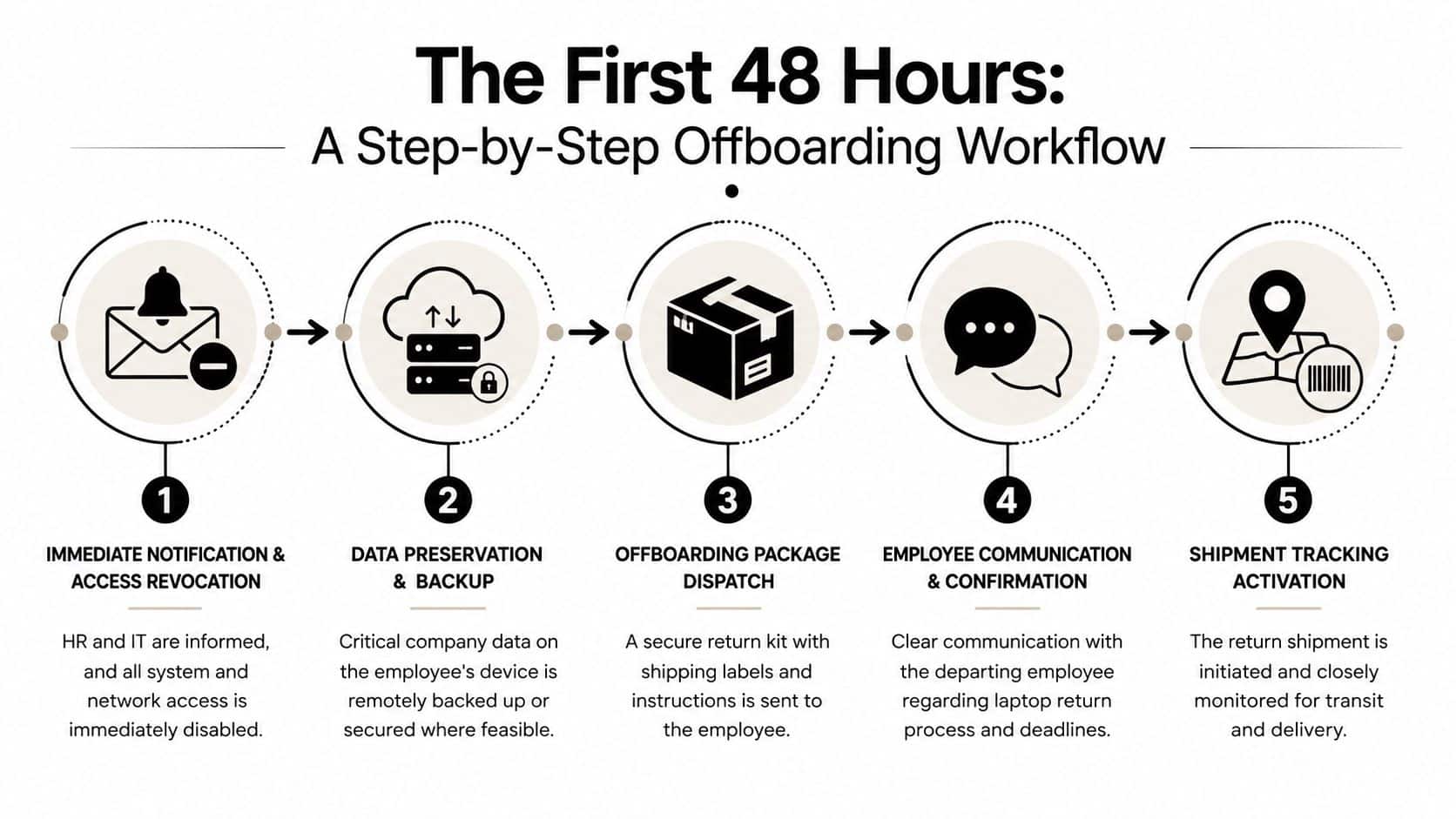
Lock down access first
The order matters. Don't start by emailing a label. Start by removing access.
In practice, the first actions should be:
- Disable email, VPN, SSO, cloud apps, and any admin tools.
- Remove or rotate shared credentials the employee could still reach.
- Flag the assigned device in your asset system as in offboarding status.
- Place the device under MDM control for lock, location status, or wipe action if policy permits.
If IT delays this sequence, the organization creates a window where the device is physically outside the company and logically still inside the network.
Preserve what the business needs
Not every departure is hostile. Many are routine. But routine exits still create data problems when work product sits locally on the laptop.
Before a wipe action, secure business files where feasible and provide the employee the approved backup window for personal data if your policy allows it. The point isn't convenience. It's avoiding unnecessary disputes while protecting corporate information.
A clean workflow separates three things:
- Company data that must be retained
- Personal data that may need a backup window under policy
- Access rights that must end immediately
Access revocation and data preservation should happen as parallel tasks, not as competing priorities.
Trigger retrieval without manual confusion
Once the asset record is verified, release return instructions to the employee's personal email and, if appropriate, by SMS. Keep the message short. Include the deadline, shipping method, what to return, and where to get help.
Use a checklist internally so no team guesses what happened:
| Action | Owner | Proof |
|---|---|---|
| Access revoked | IT | Timestamped log |
| Asset record confirmed | ITAM or operations | Serial match |
| MDM action issued | IT | Device status |
| Return communication sent | HR or operations | Email/SMS record |
Most offboarding failures in the first two days aren't technical. They come from bad sequencing and missing ownership.
Mastering the Logistics of Laptop Recovery
Once the device is secured digitally, physical retrieval becomes a logistics problem. That sounds simple until returns start stalling because the employee has no box, no printer, no tape, no drop-off plan, and no reason to prioritize your request.
A retrieval process works when it removes effort. It fails when it asks the departing employee to assemble the solution.
Build the return like a packaged service
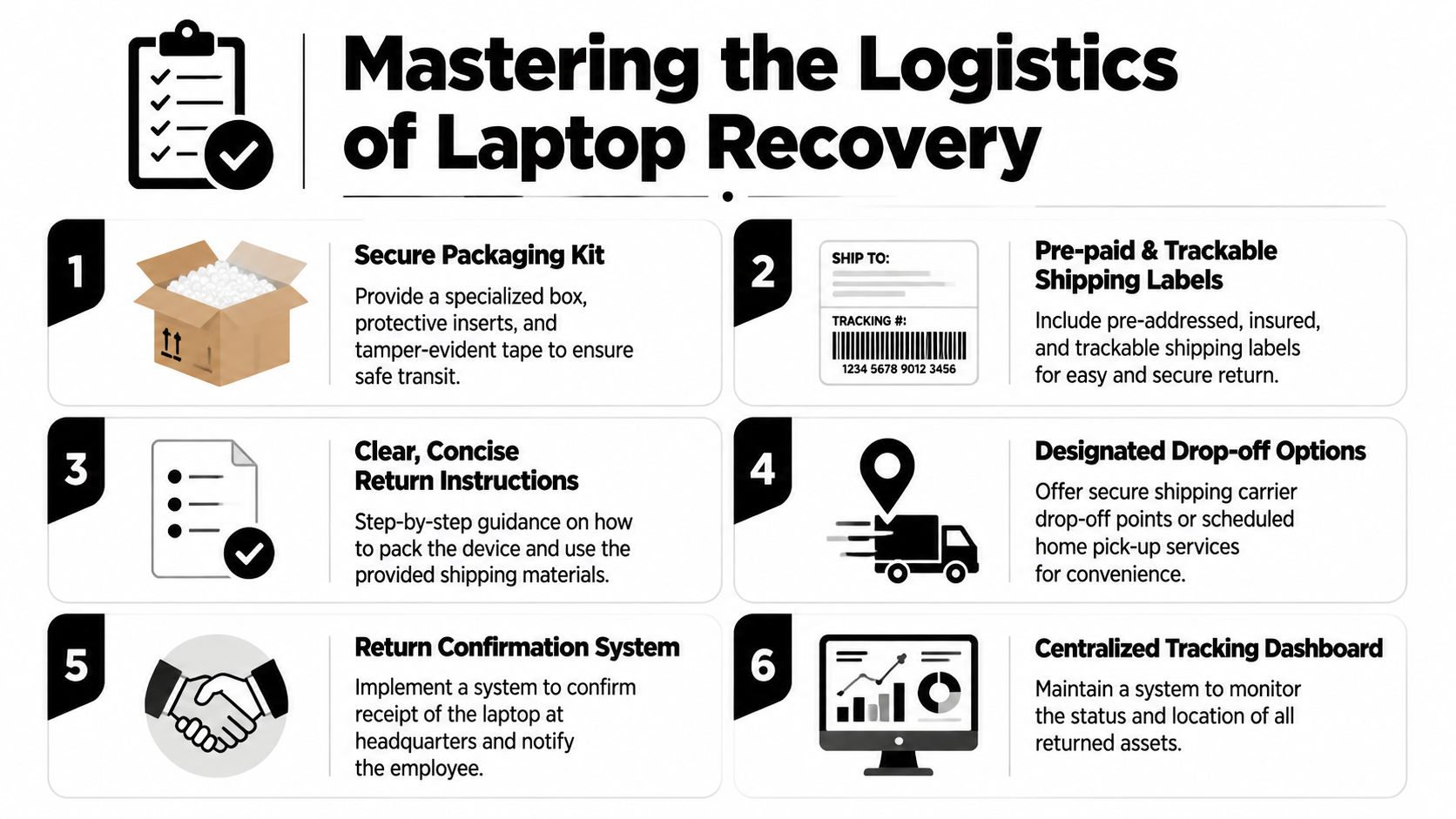
The most dependable recovery programs standardize the return kit and communication sequence. That means the employee receives one clear path, not a list of options they have to decode.
A workable logistics playbook includes:
- Prepaid packaging: Send a proper laptop box with inserts and return materials.
- Trackable shipping: Use a carrier workflow with visibility from label creation to delivery.
- Simple instructions: Show exactly how to pack the device and what accessories must be included.
- Convenient routing: Offer drop-off or pickup based on the employee's location and role.
- Receipt confirmation: Tell the employee when the asset arrives and closes out.
According to Beyond Surplus guidance on remote laptop return workflows, a mature process should tie the asset record to the return event before shipping instructions are released, and automated follow-ups at 3, 7, and 10 days materially improve return performance by reducing forgetfulness.
What actually improves compliance
The practical fixes are rarely glamorous. They're operational.
- Use QR-based carrier options when printing is a barrier: This removes one of the most common points of delay.
- Send one message to a personal address: Don't rely on the disabled company inbox.
- Automate reminders: Manual chasing is inconsistent and easy to deprioritize.
- Track every shipment in one dashboard: HR, IT, and operations need the same status view.
For organizations refining packaging and return shipping methods, these laptop return shipping practices map well to a repeatable process.
The easier the return feels to the employee, the less staff time your team spends escalating it.
Common breakdowns in the field
Laptop recovery usually goes wrong in predictable ways:
- The label is sent, but the employee can't print it.
- The employee returns the laptop and keeps the charger.
- The box arrives, but nobody updates the asset register.
- A reminder is sent once, then forgotten.
Good logistics solve these before they become exceptions. That's why standardized kits, clear timelines, and automated reminders beat ad hoc effort every time.
Securing Chain of Custody and Certified Data Destruction
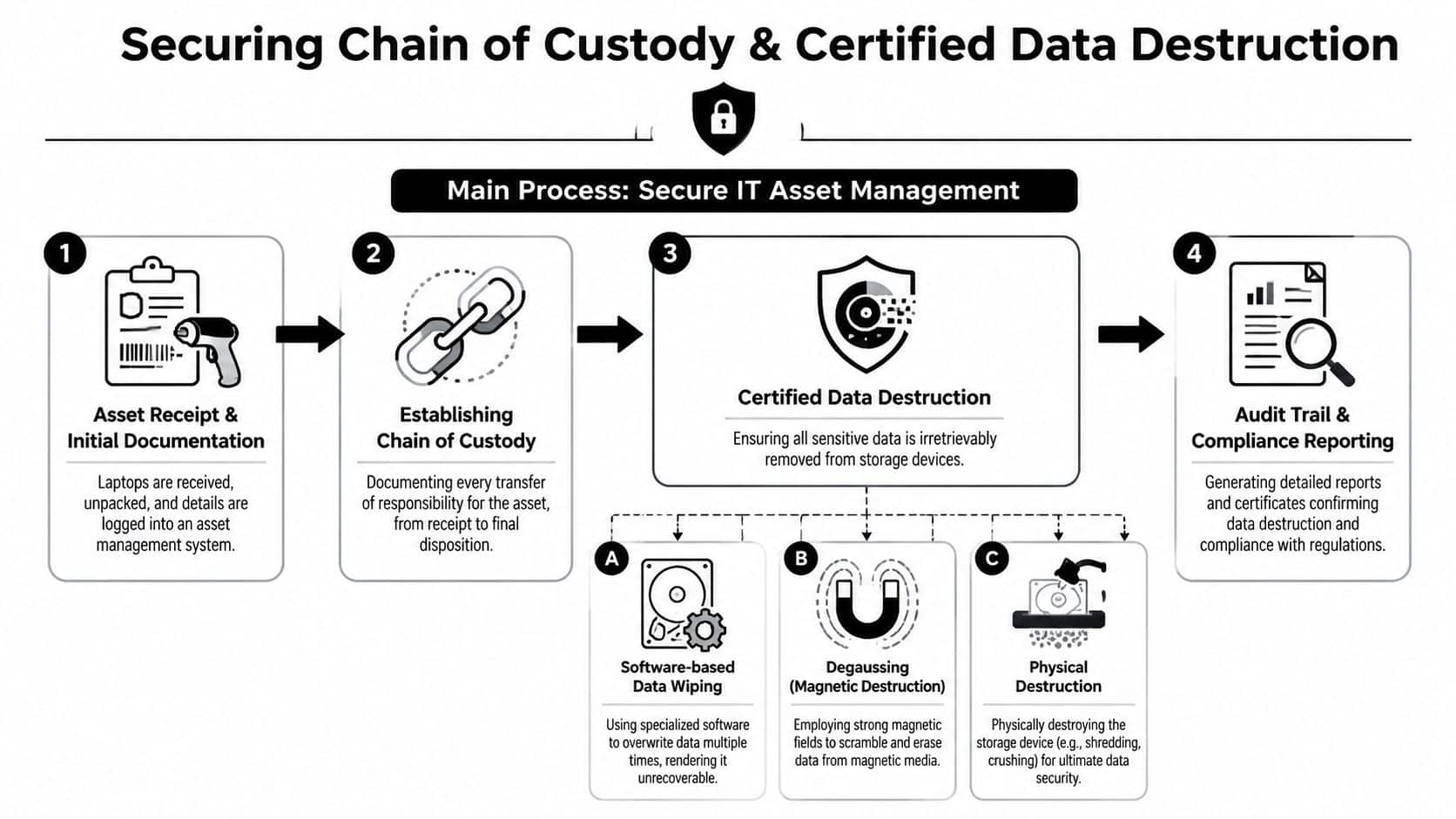
Recovery isn't complete when the box lands at your dock. It's complete when you can prove what arrived, who handled it, how data was sanitized, and what final disposition occurred. Without that record, you have possession of the asset but not control of the risk.
Intake has to be formal
The receiving team should verify serial number, inspect visible condition, note missing accessories, and update the asset register before the device moves anywhere else. If that step is skipped, chain of custody is already compromised.
What should be documented at intake:
- Serial verification
- Package and device condition
- Date and receiving personnel
- Accessory variance
- Routing decision for redeployment, repair, resale, or disposition
That documentation matters in disputes over damage, loss in transit, and audit review.
Certified sanitization is not optional
For commercial electronics recycling and ITAD, data destruction has to align with recognized standards. Reworx Recycling's guidance on NIST-based media sanitization states that professional services must adhere to NIST 800-88 for secure data wiping and destruction, which is the benchmark for meeting major data privacy and recycling requirements around storage media.
That standard gives IT and compliance teams a defensible framework. It also separates verified sanitization from casual factory resets and undocumented wipe attempts.
If you're refining internal controls, the Sheffield data security guide is a useful outside reference because it reinforces the practical side of limiting exposure before devices ever reach end-of-life processing.
For organizations handling remote returns at scale, protecting sensitive data during laptop returns is where retrieval and certified disposition need to meet.
Audit view: If you can't produce receiving records, sanitization evidence, and final disposition documentation, your process isn't complete enough for regulated environments.
Choosing Your Partner In-House vs ITAD Vendor
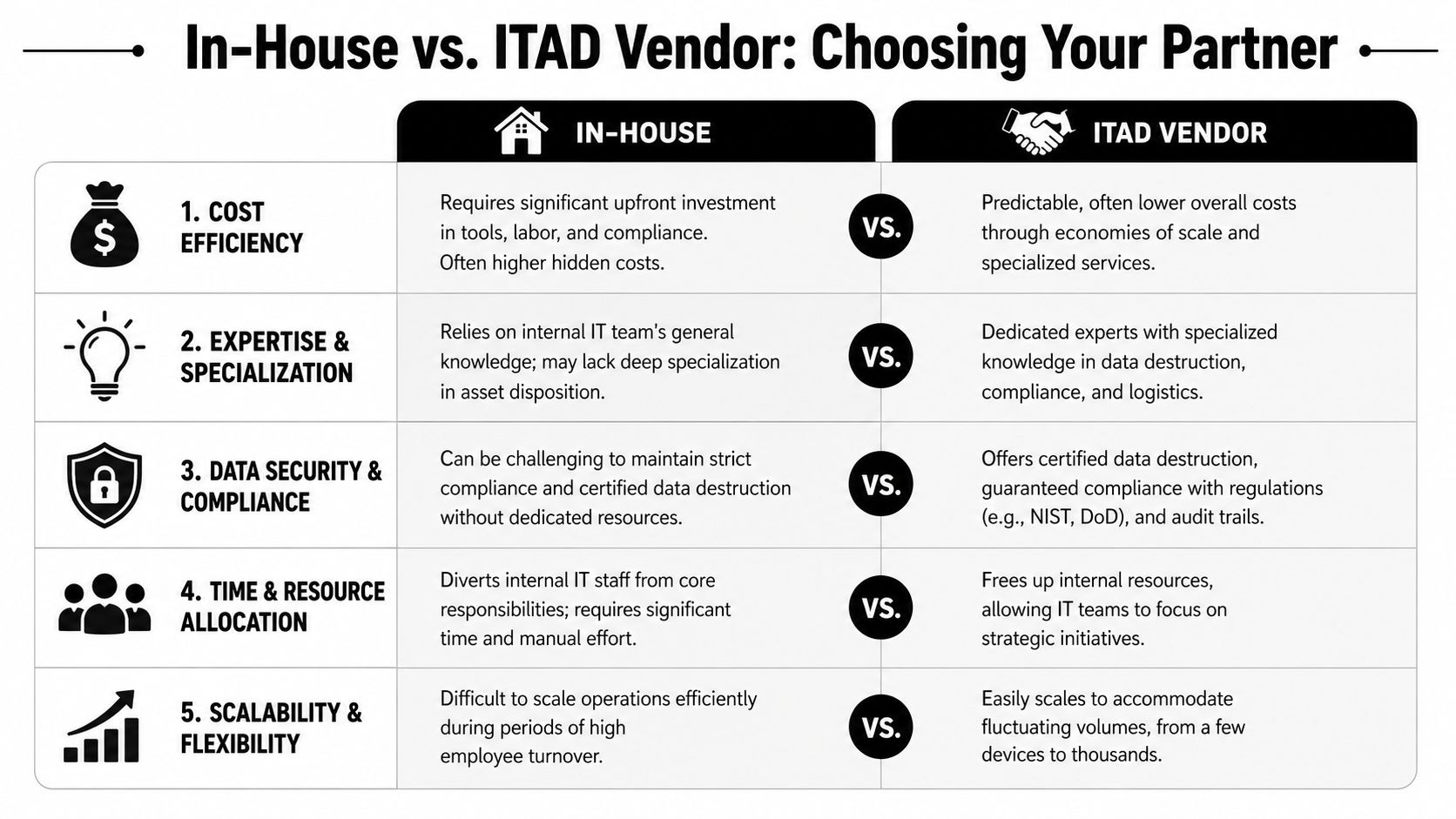
Asset recovery programs usually fail on labor, documentation gaps, and handoff errors. The invoice from a vendor is visible. The cost of a missed device, an unverified wipe, or a delayed replacement order is usually buried across IT, HR, legal, procurement, and security.
An internal team can run remote offboarding and recovery. I have seen that model work in smaller environments with low turnover and tight control over inventory. It gets harder once headcount is distributed, separation volume becomes unpredictable, or compliance requirements tighten. At that point, the decision is less about who can mail a box and more about who can run a repeatable process without dropped steps.
Where in-house programs break down
The problem is rarely effort. It is coordination.
IT disables access. HR manages the separation event. Someone has to contact the employee, issue return instructions, track the shipment, receive the device, validate the serial number, inspect condition, and route it for reuse or disposition. If those steps live across different teams and inboxes, delays stack up fast. So do exceptions.
A practical comparison looks like this:
| Decision area | In-house pressure point | ITAD vendor advantage |
|---|---|---|
| Logistics | Staff time spent arranging returns and chasing employees | Established recovery workflows and carrier coordination |
| Data handling | Internal teams must document every wipe or destruction event | Standardized certified processing with defined outputs |
| Recordkeeping | Multiple spreadsheets, tickets, and email trails | Centralized intake records and audit-ready reporting |
| Asset value recovery | Limited repair, resale, and recycling channels | Built-in downstream paths for redeploy, resale, or disposal |
The trade-off is control versus operating burden. In-house gives direct oversight, but only if the team has enough capacity and discipline to run the process every time. A good ITAD vendor reduces internal workload and closes process gaps, but you still need clear SLAs, intake standards, and reporting requirements.
Compare total exposure, not just service fees
The laptop's book value is only one line item. A failed recovery can trigger rushed replacement purchases, security review, legal involvement, inventory write-offs, and lost productivity while a replacement is provisioned. If regulated data may have been stored locally, the exposure can expand into breach assessment, customer notification, or compliance fines.
That is why I advise leadership teams to price the whole failure path, not just shipping and handling. The cheapest-looking option on paper often becomes the expensive one once a few devices go missing or come back without usable records.
Risk transfer matters too. When offboarding problems overlap with fraud or misuse of personal information, the discussion quickly moves beyond hardware. A resource on identity theft restoration and fraud coverage is useful context for understanding how employee separations can create downstream personal and business risk that has nothing to do with the resale price of the device.
Vendor selection should also include service quality. If you outsource, measure responsiveness, recovery outcomes, documentation quality, and issue resolution, not just pickup speed. A disciplined customer satisfaction measurement process for IT asset services helps separate vendors that can absorb volume from vendors that create more exceptions than they solve.
One practical option is using an ITAD provider such as Beyond Surplus for retrieval support, certified data destruction, and documented downstream disposition when internal teams do not want to build that operation themselves.
When outsourcing makes the most sense
An ITAD partner is usually the better fit under a few conditions.
- Your workforce is spread across multiple states or countries
- Turnover is steady, seasonal, or difficult to predict
- Devices may contain regulated, customer, or financial data
- Internal IT staff is already tied up with support and security work
- Finance expects asset recovery, remarketing, or recycling records
- Leadership wants one accountable partner from return through final disposition
For a small company with low device volume, in-house may be enough. For a distributed organization that cares about auditability, data handling, and asset recovery rates, a managed ITAD model is often the lower-cost choice over a full year because it cuts internal labor, reduces loss, and lowers the odds of an expensive exception.
Measuring Success KPIs for Your Offboarding Program
If you don't measure the program, you won't know whether it's controlled or just busy. The goal isn't more activity. It's fewer missing assets, faster closure, cleaner records, and less disruption to the business.
Track the few metrics that expose process weakness
Start with a short dashboard. Keep it operational.
The most useful KPIs are:
- Asset recovery rate: The percentage of assigned devices physically returned and verified.
- Time to recovery: How long it takes from termination notice to confirmed receipt.
- Time to disposition: How long receipt-to-wipe, wipe-to-redeploy, or wipe-to-recycle takes.
- Exception rate: Missing chargers, serial mismatches, damaged devices, disputed assignments, or incomplete records.
- Documentation completion: Whether every recovered asset has shipping proof, intake record, sanitization evidence, and final status.
Quarterly laptop audits are a smart control because they reveal inventory drift before it becomes permanent loss. They also expose assignment errors that will undermine any offboarding effort later.
Use the dashboard to improve the workflow
The dashboard should answer practical questions:
- Are delays happening before the label goes out or after?
- Are certain offices, managers, or role types creating more exceptions?
- Are devices sitting too long between receipt and sanitization?
- Are shipping methods causing damage or confusion?
That's where leadership can justify process changes, staffing decisions, or outsourcing support. You're not just reporting activity. You're proving reduction of risk and recovery of usable assets.
For teams building a formal feedback loop, customer satisfaction measurement in service operations is relevant because return workflows improve fastest when you measure friction, not just completion.
A mature offboarding program doesn't wait for missing laptops to reveal the weakness. The metrics show the weakness first.
Remote employee offboarding only works when policy, security, logistics, chain of custody, and final disposition operate as one system. If your team needs a commercial partner for certified electronics recycling, secure data destruction, and IT asset disposal tied to remote laptop recovery, contact Beyond Surplus.


