

You’re probably looking at one of two situations right now. Either you need to add handsets fast without paying new-equipment pricing, or you’re replacing an aging phone system and trying to decide whether used VoIP equipment for sale is a smart bridge or a mistake that creates more cleanup later.
Used VoIP gear can be a very good buy. It can also turn into a pile of phones that power on, won’t register, and create support tickets the minute users touch them. The difference usually isn’t the sticker price. It’s compatibility, support status, condition, and the labor required to make the hardware usable in your environment.
The secondary market exists for a reason. Enterprise telephony went through a long shift from analog PBX to IP calling, and that created a large installed base of business handsets. Cisco’s widely adopted IP Phone 7900 series dates to the late 1990s and early 2000s, and by the 2010s that installed base had created a durable resale market because companies could extend handset life and lower refresh costs, as noted in Network World’s look at the IP desk phone secondary market.
Understanding the Main Types of VoIP Hardware
Most buyers start with the model number. That’s useful, but it’s not the first thing to sort out. Start with the job the device needs to do inside your business. Once that’s clear, the used market becomes much easier to manage.
IP desk phones
These are the standard office handsets typically pictured first. They sit on desks, connect to the network, and usually rely on Power over Ethernet or an external adapter. In many offices, this is the biggest category of used VoIP equipment for sale because desk phones were deployed in large numbers during the move from analog systems to IP telephony.
They make sense when a business already runs a known phone platform and just needs more of the same endpoints. They also make sense in branch offices, warehouses, call-heavy departments, reception areas, and any environment where a dedicated handset still works better than softphones.
If you want a quick refresher on how current handsets differ from older generations, it helps to discover modern VoIP handset tech before you compare older resale inventory against newer deployments.
Conference phones and shared-space devices
Conference room phones fill a narrower but important role. They’re built for open audio pickup, speaker output, and shared use in meeting rooms, boardrooms, and training areas. In the used market, these can be attractive because conference devices often have longer refresh cycles than laptops or mobile devices.
That said, they also tend to expose compatibility problems faster. A desk phone with limited use might limp along in a quiet office. A conference phone with poor provisioning, bad firmware alignment, or audio issues will get noticed immediately by a room full of users.
A cheap conference phone isn’t cheap if every meeting starts with someone opening a ticket.
DECT and wireless business handsets
Wireless handsets are common in healthcare, hospitality, warehouse operations, facilities teams, and large campuses. Buyers often pursue used DECT gear when they need mobility but don’t want to replace an entire voice environment.
This category needs extra care. The handset, base station, charging accessories, and firmware all need to line up. A missing base or incompatible deployment model can turn a seemingly good purchase into dead inventory.
Analog Telephone Adapters and gateways
ATAs matter when a business wants to keep analog devices in service while moving voice traffic onto an IP network. Twilio notes that VoIP can involve a phone, computer, or adapter, and that analog handsets may require a gateway that converts analog telephone signals into IP data packets, as explained in Twilio’s overview of VoIP equipment requirements.
Typical business use cases include fax lines, elevator phones, overhead paging, legacy analog devices, and temporary migration projects where full endpoint replacement doesn’t make sense.
Why this market stays active
A healthy secondary market exists because enterprise phone hardware often outlasts the refresh cycle that removed it from service. Organizations replace systems for standardization, cloud migration, office moves, mergers, or support policy reasons. That doesn’t mean every device is worthless.
It also explains why telecom disposition has become a specialized workflow instead of a scrap process. If you’re retiring equipment at the same time you’re buying, this guide on what to do with old telecom equipment is worth reviewing before you decide what gets resold, redeployed, or recycled.
Confirming VoIP Compatibility and Interoperability
You buy a lot of used phones at a strong unit price, rack them for staging, and then the true cost shows up. Half will not register to your platform, some need a firmware path you cannot get anymore, and a few are tied to a carrier image that blocks normal provisioning. At that point, the savings are gone. You are paying in engineer time, delayed deployment, and unstable voice service.
Start with signaling, provisioning, and support status
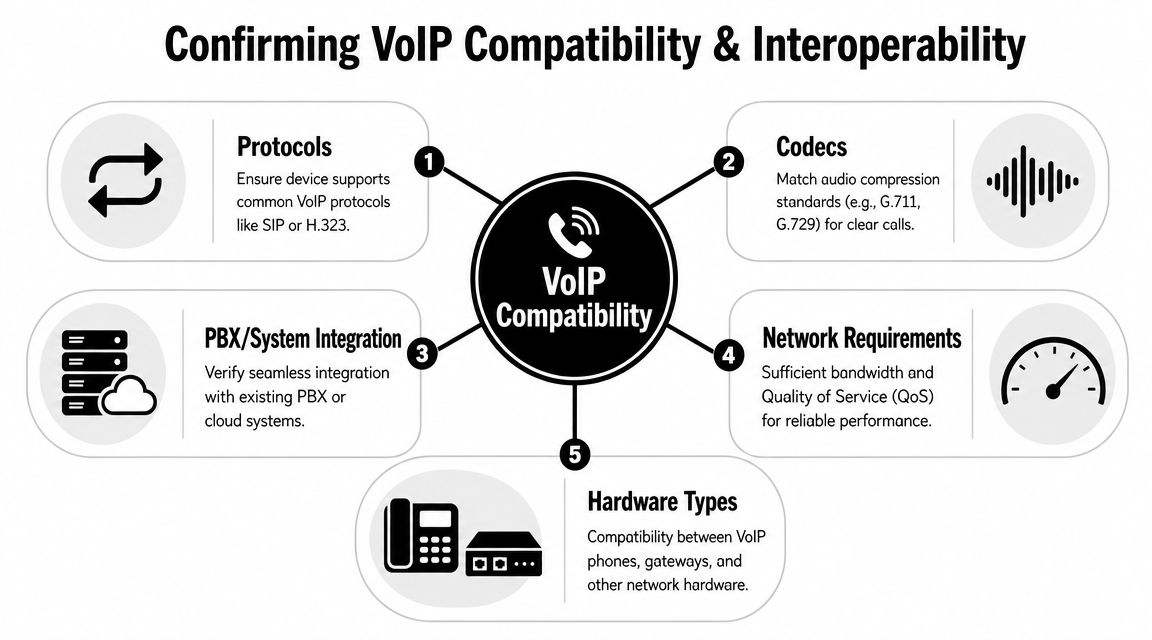
A used IP phone should be evaluated for SIP registration support, firmware compatibility, power method, and vendor lock status before purchase. A phone can power on and still be a poor fit for your PBX or hosted voice service.
The hidden problem is not always basic compatibility. It is supportability. If the firmware branch is at end of life, or the vendor no longer provides signed updates, you may be buying a device that works today but creates security and compliance problems later. Sellers rarely lead with that point because it does not help the sale. Buyers still own the risk.
What to verify before issuing a PO
Some checks take five minutes. Others need a bench test. All of them cost less than discovering a bad lot after rollout.
- Protocol support: Confirm the phone supports the call control your environment expects. If your system is standards-based SIP, verify the handset is not locked into a proprietary mode.
- Current firmware and upgrade path: Ask which firmware is installed, whether it can be upgraded, and whether the vendor still supports that release path.
- Provisioning method: Verify the device can be factory reset and pointed to your provisioning server or cloud platform without unsupported workarounds.
- Power method: Check whether the unit will run on your PoE standard or needs an external adapter. Missing power accessories create avoidable deployment delays.
- Codec support: Confirm the device supports the codecs your system uses so you do not introduce one-way audio, poor call quality, or failed transfers.
- Security features: Check for support for TLS, SRTP, certificate handling, and admin credential reset. Older handsets often fall short here.
Vendor lock can erase the savings
Carrier stock, hosted-service stock, and proprietary enterprise models cause the most trouble in used VoIP buying. The phone may boot, pass a basic test, and still refuse to join your environment without manual rework. In small quantities, that is annoying. In pallet quantities, it is a budget problem.
I treat one staged sample as required before approving a larger order. Reset it. Provision it. Register it. Place test calls. Reboot it. Then check whether the process is repeatable across the batch.
Interoperability includes the network around the phone
A phone that is technically compatible can still perform badly on your network. VLAN tagging, DHCP options, LLDP-MED behavior, NAT handling, and QoS policy all affect whether the endpoint works reliably in production. That is why a simple power-on test tells you very little.
Use an acceptance process that mirrors the actual deployment:
| Checkpoint | What to confirm |
|---|---|
| Staging test | Device boots, resets, and reaches provisioning service |
| Registration test | Phone registers to PBX or cloud voice platform |
| Call test | Inbound, outbound, transfer, hold, and voicemail work |
| Power test | PoE stability or external adapter reliability is confirmed |
| Security test | Admin access can be reset, default credentials are cleared, and supported encryption settings are available |
| User test | Display, buttons, speakerphone, and headset port behave normally |
If you are evaluating older Cisco lots, it helps to compare your shortlist against a secondary market view of used Cisco telecom equipment buyers and typical inventory considerations before committing to volume.
One final point matters more than buyers expect. Compatibility is not just about getting dial tone. It is about getting a device you can still support, secure, and replace without turning a cheap purchase into an expensive exception.
Evaluating Condition and Choosing a Reputable Seller
A used phone isn’t just used. It falls somewhere on a spectrum from clean pull and fully tested to cosmetically rough, incomplete, and sold strictly as-is. Buyers who don’t define that difference up front usually end up paying for it later in labor, returns, and missing accessories.
What condition really means
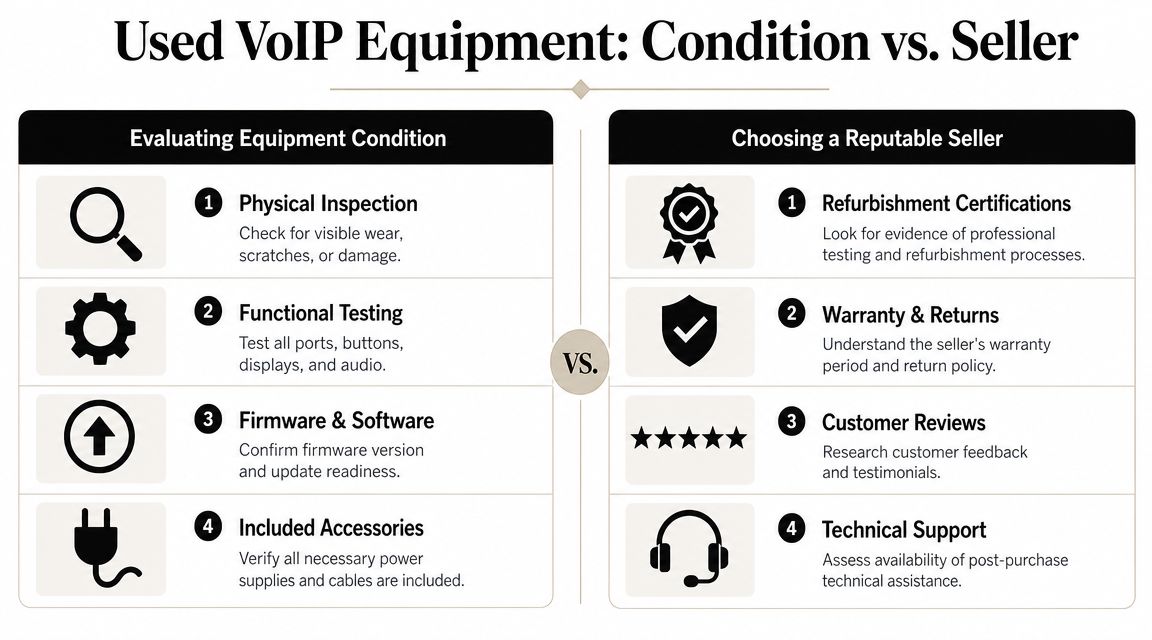
Condition is more than scratches. In telecom resale, value often depends on working versus non-working status, completeness, and logistics. Commercial buyback programs commonly ask for model lists, quantities, photos, and condition details before they issue a valuation, and some also offer flat-fee purchase, consignment, or disposal paths, which reflects a mature resale market according to Telecom Recycle’s overview of bulk phone equipment sales.
That same logic applies on the buying side. A handset with the correct cord, stand, and power option is easier to deploy than a cheaper unit missing key parts.
A practical inspection list
When I evaluate used voice hardware, I’m looking for what will slow deployment first, not what photographs best.
- Screen and housing: Check for cracks, heavy burn-in, broken bezels, and signs of impact.
- Buttons and navigation keys: Sticky or failed keys create immediate user friction.
- Ports and jacks: Inspect Ethernet, headset, and power connections for looseness or visible damage.
- Handset and cords: Make sure the handset, handset cord, and stand are included.
- Boot behavior: A phone that reboots intermittently should be treated as unstable even if it eventually comes online.
Marketplace seller versus specialized reseller
Online marketplaces can work if you already know exactly what you need and can absorb some variance. They’re useful for one-off expansions, lab units, or parts recovery. They’re less useful when you need consistent grading across dozens or hundreds of devices.
A specialized telecom or ITAD seller usually costs more per unit, but you’re paying for lower variance. Better testing, clearer model control, cleaner documentation, and less guesswork about asset history. One option in that category is telecom hardware buying and disposition support, where office phone, PBX, switch, and VoIP inventory can be evaluated for resale or proper end-of-life handling.
Buy from the channel that matches the business impact of failure. A one-phone mistake is annoying. A hundred-phone mistake becomes a project.
Questions that separate good sellers from risky ones
Ask direct questions and listen for direct answers.
| Seller question | Why it matters |
|---|---|
| Has the device been factory reset and tested for registration? | Confirms more than simple power-on status |
| Are accessories included? | Missing cords and adapters delay rollout |
| Is firmware version known? | Reduces compatibility surprises |
| Are mixed hardware revisions in this lot? | Helps avoid inconsistent behavior |
| What return process applies to non-functional units? | Protects procurement from dead-on-arrival risk |
If the seller can’t provide a consistent answer on model, quantity, condition, and included parts, assume you’ll be doing the sorting yourself after delivery.
Managing Security Risks and Data Compliance
Old phones don’t stop being network endpoints just because they’re cheap. They still hold configuration data, they still connect to your infrastructure, and they still introduce risk if they’re unsupported or poorly sanitized.
Support status matters as much as model number
This is the question many buyers skip. Not “what is it,” but “will it work securely with my provider and firmware policy?”
Major vendors like Cisco publicly post end-of-support notices for older IP phone families and firmware trains. That means a device can still function physically while becoming risky or unsupported in a modern environment, as discussed in this analysis of used business VoIP phone system support concerns.
A physically clean phone with no current support path is often the wrong purchase for regulated businesses, audited environments, or any team that expects stable patching.
Security review before deployment
Used voice gear belongs in the same risk conversation as switches, firewalls, or access points. Treat it like infrastructure.
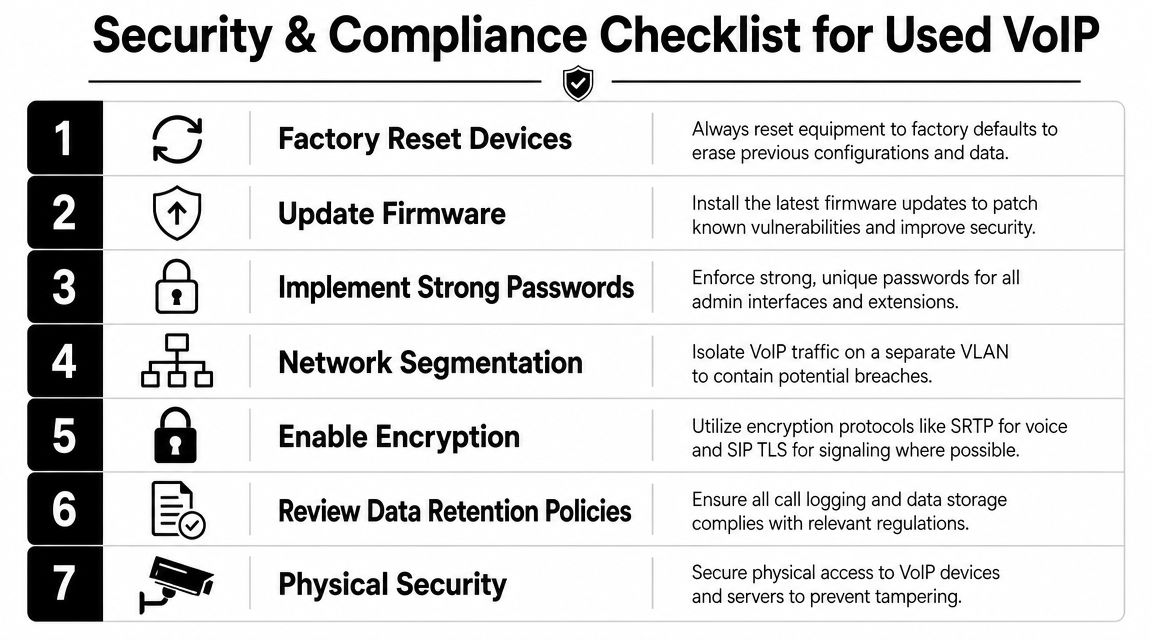
- Reset first: Return every device to factory defaults before any provisioning attempt.
- Patch before rollout: If current firmware is available and supported, apply it in staging.
- Lock administration: Change default credentials and restrict admin access.
- Segment traffic: Put voice endpoints on the VLAN and policy set your network team already trusts for telephony.
- Enable available protections: Use supported encryption options where your provider and phone model allow them.
If your team is tightening controls across the network, this guide to implementing network security best practices is a useful companion read because voice endpoints shouldn’t sit outside the broader security baseline.
Data handling is part of the deal
Even a desk phone can retain call history, directories, extension details, and prior configuration artifacts. If you’re buying, you want proof the prior environment has been removed. If you’re selling or disposing, you need documented chain of custody and a repeatable sanitization process.
That’s where ITAD support becomes operationally useful rather than administrative. Services such as ITAD telecom equipment handling are built around secure disposition, data treatment, and documented processing for equipment that still has residual business value or still presents data risk.
Unsupported firmware changes the conversation. What looked like savings on procurement can become exposure for security, audit, and operations.
The compliance angle buyers underestimate
Compliance issues usually don’t come from the phone itself. They come from poor process. No reset record, no asset trail, no policy for unsupported firmware, and no standard acceptance test before production use.
For enterprise teams, the safest practice is simple. Buy only what you can identify, reset, patch if supported, and place under existing operational controls. If you can’t do those four things confidently, the lowest price in the listing won’t matter.
When Buying Used VoIP Equipment is the Smartest Move
Used VoIP equipment for sale makes the most sense when the purchase is narrow, deliberate, and aligned to an existing platform.

A good example is a company with a stable on-premises or hosted phone system that needs to add more of the exact handset model already in production. The team knows the firmware family, the power method, the provisioning process, and the user experience. In that scenario, used inventory can be a practical way to expand capacity without reopening the entire voice architecture.
Another smart use case is temporary continuity. An organization may be in the middle of a phased office consolidation, merger, or branch refresh and need a short-term hardware bridge. If the phones are compatible and supportable for the period required, buying used can reduce waste and preserve budget for the eventual migration.
When it’s usually the wrong move
The bad scenario is buying legacy handsets while the business is already planning a move to cloud voice or UCaaS. In that case, the lower purchase price can hide a more expensive problem. Provisioning effort, limited support life, and another round of replacement once the migration lands.
That’s why transition timing matters. As organizations move from legacy on-premises telephony toward cloud communications and UCaaS, resale decisions become more about timing than bargain hunting. The key question is whether the hardware is a cost-effective bridge or a dead-end investment that complicates migration, as explained in this discussion of used VoIP phone resale and transition planning.
A simple way to decide
Use used gear when the answer to these questions is yes:
- Known platform: Are you extending a system you already run successfully?
- Known horizon: Do you have a clear reason to keep this hardware in service for a defined period?
- Known support path: Can the devices be managed without risky workarounds?
If those answers are fuzzy, the phones may be cheap for a reason.
A Final Checklist for Purchasing and Disposal
Before you buy, treat the purchase like any other infrastructure decision. The cheapest lot is not automatically the lowest-cost deployment.
Pre-purchase checklist
- Compatibility confirmed: Verify registration method, firmware fit, and power requirements.
- Support reviewed: Check whether the model and firmware still fit your security policy.
- Condition documented: Get a clear statement on testing, accessories, and physical grading.
- Pilot completed: Stage one or more units before approving volume.
- Return terms understood: Know what happens if units arrive incomplete or non-functional.
- TCO considered: Include labor, staging, support burden, and eventual retirement.
Disposal matters too
Most buying decisions are also disposal decisions. If you’re replacing one set of phones with another, you need a path for the outgoing assets. Some inventory still has resale value. Some belongs in certified recycling. Some should be wiped, documented, and removed from service under formal chain of custody.
Energy use belongs in that total cost discussion as well. ENERGY STAR certified VoIP phones use approximately 40% less energy than conventional models, which can matter in larger deployments when you’re assessing operating cost, not just purchase price, according to ENERGY STAR’s VoIP phone guidance.
For mixed telecom and network refreshes, it also helps to evaluate adjacent infrastructure through programs that handle used routers and switches resale and recovery, since voice projects often retire more than handsets alone.
A disciplined buyer asks one final question before signing. If this equipment fails in production, who owns the cleanup. If the answer is your help desk, your network team, and your project manager, it’s worth being much stricter before you buy.
If you’re replacing office phones, retiring telecom gear, or sorting through used VoIP equipment for sale as part of a larger refresh, Beyond Surplus can help with secure IT asset disposition, telecom equipment buyback, and certified recycling so the purchase side and the disposal side stay under control.


