

An unreturned laptop can look like a routine offboarding headache. It isn't. In 2024, data breaches caused by improper disposal of IT assets cost businesses an average of $4.88 million per incident, according to Asset IT Disposition reporting on IT asset disposal risk. That number changes the conversation immediately.
The hardware itself matters, but the bigger exposure sits in what the device still contains, what access it may still enable, and how much time your team burns trying to clean up a preventable problem. A former employee's laptop can hold customer files, saved credentials, local downloads, unsynced documents, and cached access to internal systems. If it never comes back, the cost doesn't stop at replacement.
Many companies still treat this as a write-off. That mindset is expensive. A better approach starts by seeing unreturned laptops as a financial, legal, and security risk that can be measured and managed. The operational side of remote employee laptop recovery and data security makes that clear. Recovery isn't just about getting a device back. It's about closing off risk before it spreads into payroll disputes, compliance issues, and emergency replacement purchases.
The True Cost of a Lost Laptop Is Not What You Think
If leadership asks, “How much do unreturned employee laptops cost your business?”, the wrong answer is the laptop's purchase price.
The first cost is obvious. The dangerous costs sit behind it. A missing device can force IT to replace hardware, revoke access, investigate data exposure, update asset records, coordinate with HR, and support a replacement user or role. If the laptop held regulated or confidential information, the issue can become a compliance event instead of a simple inventory loss.
Why the sticker price misleads
A laptop is a business endpoint, not a standalone object. It carries software, user identity, company data, security policies, and lifecycle value. When it disappears from your return process, several business functions get pulled in at once:
- IT operations lose asset visibility and redeployment options
- Security teams have to assess exposure and access risk
- HR and managers spend time chasing return compliance
- Finance absorbs write-offs, duplicate purchases, and sunk licensing costs
Practical rule: If a device leaves employment without a documented handoff, treat it as a live business risk until proven otherwise.
Risk rises faster than most teams expect
What makes unreturned laptops costly isn't one dramatic line item. It's the stack of smaller failures that follow. One missing charger or dock is annoying. One missing laptop with active business data is different.
That's why mature teams stop asking whether a missing laptop is “worth chasing.” They ask whether the company can afford an unmanaged endpoint outside its control.
Breaking Down the Direct Replacement Costs
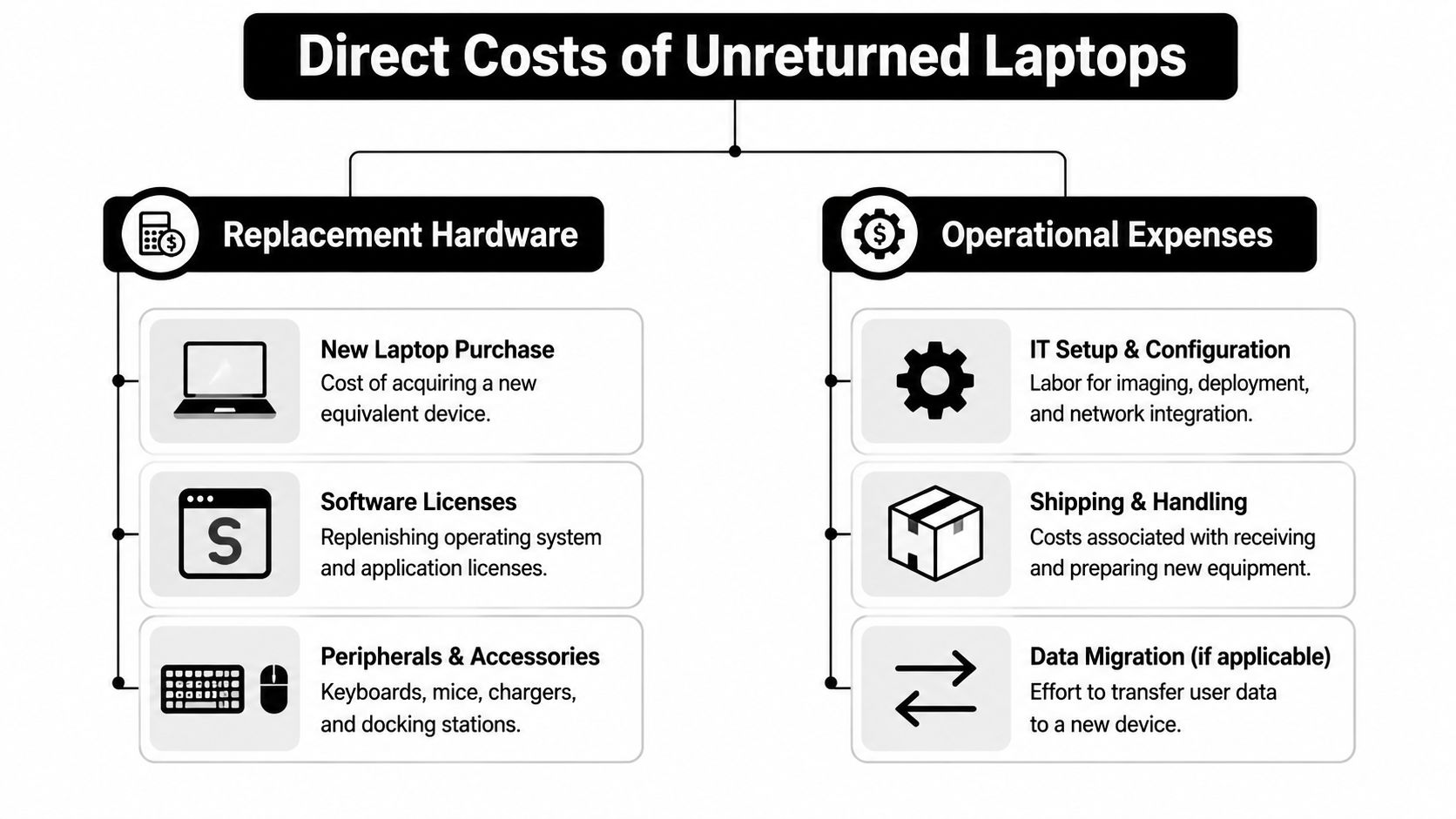
The hard-cost side is where most finance teams start. That's useful, but only if the list is complete. According to Beyond Surplus on the hidden costs of unreturned company laptops, the direct financial exposure of a single unreturned laptop usually includes four separate cost line items beyond the hardware price: replacement hardware purchase, configuration and deployment labor, stranded software licenses and accessories, and duplicate spend while the original asset remains unresolved.
What shows up on the invoice
A replacement device is the first hit. Then the supporting expenses start to stack up.
- Replacement hardware purchase means buying another business-grade laptop that matches the lost unit's role and specs.
- Configuration and deployment labor covers imaging, provisioning, policy enrollment, account setup, and handoff preparation.
- Stranded software licenses and accessories include anything assigned to the missing device that now has to be repurchased or reallocated.
- Duplicate spend happens when finance pays for a second asset before the first one is returned, wiped, or formally written off.
Why direct cost is broader than procurement thinks
Procurement often sees only the purchase order. IT sees the hidden labor behind it. Even if your team keeps standardized images and deployment workflows, a replacement still consumes technician time and coordination.
A single missing laptop can also trap usable accessories in the field. Docking stations, chargers, keyboards, mice, bags, and adapters aren't always tracked tightly enough to trigger a separate recovery effort, so they vanish along with the primary device.
A direct loss is rarely one SKU. It's a bundle of hardware, software, labor, and replacement urgency.
For organizations with remote or distributed workforces, shipping and receiving steps can make the replacement cycle slower and more expensive. The new unit has to be staged, packed, sent, tracked, and supported. Meanwhile, the unresolved original asset still sits in your books as a problem.
The Hidden Financial Drain of Administrative Burden
The direct replacement cost gets attention because it's easy to see. The administrative burden gets ignored because it spreads across people, calendars, and departments.

The work nobody budgets for
When a laptop isn't returned on schedule, someone has to chase it. Usually several people do.
HR sends reminders. IT checks assignment records. Managers confirm what equipment the employee received. Someone looks for shipping history. Someone else verifies whether the device was ever disabled, locked, or removed from inventory. If the records are weak, the team spends more time reconstructing the basics than solving the problem.
A documented employee equipment return policy stops being an HR formality and starts acting like cost control.
Operational drag spreads beyond offboarding
The bigger issue is delay. An unresolved laptop often blocks the next step in the asset lifecycle.
Consider the usual chain reaction:
- Redeployment slows down because IT can't reuse the missing asset for another hire
- Inventory accuracy degrades because assigned versus recovered status becomes unclear
- Purchasing accelerates because teams order replacements instead of waiting
- Onboarding gets disrupted when the next employee needs hardware immediately
When device recovery is sloppy, the business pays twice. Once for the missing asset and again for the process failure around it.
Administrative drag also weakens controls. If your team repeatedly writes off laptops because the recovery path is cumbersome, employees notice that. Expectations soften. Accountability drops. Over time, laptop recovery becomes optional in practice, even if policy says otherwise.
Navigating Security and Legal Compliance Minefields
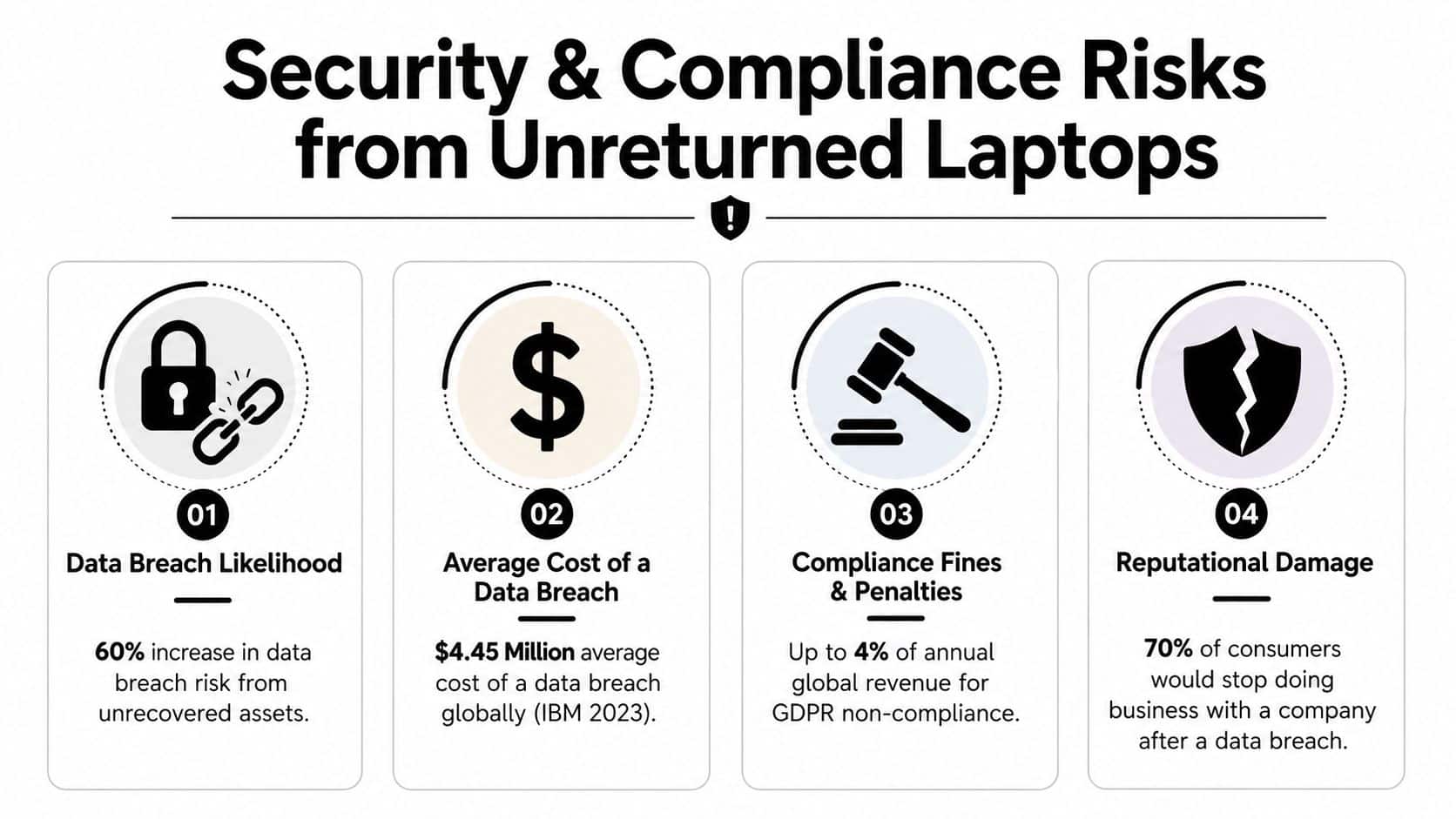
A single unrecovered laptop can trigger costs far beyond replacement. If that device still holds company data, saved credentials, or active access tokens, primary exposure sits in security response, legal review, and compliance fallout.
The data problem usually outweighs the hardware loss
An unreturned laptop is an uncontrolled endpoint. That matters even if the employee left on good terms. Local files, browser sessions, cached email, VPN profiles, customer records, source code, and synced cloud data may still be present. If IT cannot confirm remote lock, wipe, or full encryption status, the business is left with uncertainty, and uncertainty is expensive.
That is why unreturned company laptops create compliance risks. The device may be off your books operationally, but the liability tied to its data often stays with the employer.
The compliance angle depends on what was stored, where the employee worked, and which rules apply to your industry. Businesses handling regulated or confidential data can also face FTC Disposal Rule concerns if assets containing sensitive information are not securely handled at end of life. In practice, the question is not just, “What did the laptop cost?” It is, “What would it cost us if the data on it were exposed and we could not prove we handled the asset properly?”
Final-pay deductions can create a second liability
Many employers assume payroll can solve the problem. Often it cannot.
Under the Fair Labor Standards Act, employers may deduct for unreturned equipment only if the deduction does not reduce pay below minimum wage. State law can be stricter. Alucid Solutions' review of written agreements and final-pay deductions explains that states including California and New York prohibit such deductions almost entirely under many circumstances, which pushes employers toward civil recovery instead.
That creates a common failure point. A company loses the asset, makes a deduction it assumes is allowed, then inherits a wage claim on top of the original loss.
Documentation determines how much control you actually have
Recovery rights are shaped by state law, signed agreements, internal process, and timing. I have seen organizations discover too late that their equipment forms described employee responsibility in general terms but did not clearly support the collection steps, deduction approach, or escalation path they planned to use.
Three records matter most:
- Signed equipment assignment records that show exactly what the employee received
- Acknowledged return and offboarding terms that explain obligations and deadlines
- Security control evidence showing the device was encrypted, monitored, and capable of remote action
If one of those records is missing, your position weakens quickly. If two are missing, recovery often turns into a legal and operational judgment call instead of a defined process.
The highest-cost laptop loss is the one tied to sensitive data, weak documentation, and no proof of sanitization.
This is also where TCNR becomes more useful than a simple replacement estimate. Once security review, legal review, potential notification work, and compliance exposure enter the picture, the hardware price becomes only one line item.
How to Calculate Your Total Cost of Non-Recovery
A useful internal metric is Total Cost of Non-Recovery, or TCNR. It turns a vague annoyance into a number leadership can evaluate.
The floor is hardware replacement. According to Device Rescue on employee refusal to return company laptops, the direct financial cost of a single unreturned enterprise laptop typically ranges from $1,200 to $2,500. That gives you the starting point, not the finished calculation.
Build your worksheet
Use four categories:
Direct device replacement
Include the laptop and any bundled accessories or software tied to that asset.Administrative labor
Count the internal time spent by IT, HR, security, procurement, payroll, and management.Operational disruption
Add the cost of delays, duplicate purchasing, emergency staging, or missed redeployment.Value not recovered
Include residual value that disappears when the device never returns to your disposition stream.
Here's a simple worksheet structure.
Sample TCNR Calculation Worksheet
| Cost Category | Low Estimate | High Estimate |
|---|---|---|
| Direct device replacement | $1,200 | $2,500 |
| Administrative labor | Enter your estimate | Enter your estimate |
| Operational disruption | Enter your estimate | Enter your estimate |
| Value not recovered | Enter your estimate | Enter your estimate |
| Total TCNR | Add all rows | Add all rows |
How to use it in practice
Take one department with frequent offboarding. Pull a list of laptops not returned on time. For each one, estimate the hard replacement cost, then ask the teams involved how much time they spent chasing the issue and replacing the asset.
If your inventory records are messy, that's part of the cost too. Teams that improve inventory optimization for IT assets usually discover that the non-recovery number was understated because they were only counting hardware purchases.
Working advice: Start with one quarter of offboarding events, not the full year. A smaller sample is usually enough to expose the pattern.
Building a Proactive Laptop Recovery and Disposition Strategy
Most laptop losses don't start with theft. They start with a weak process. The fix is operational discipline.
Put controls in place before offboarding starts
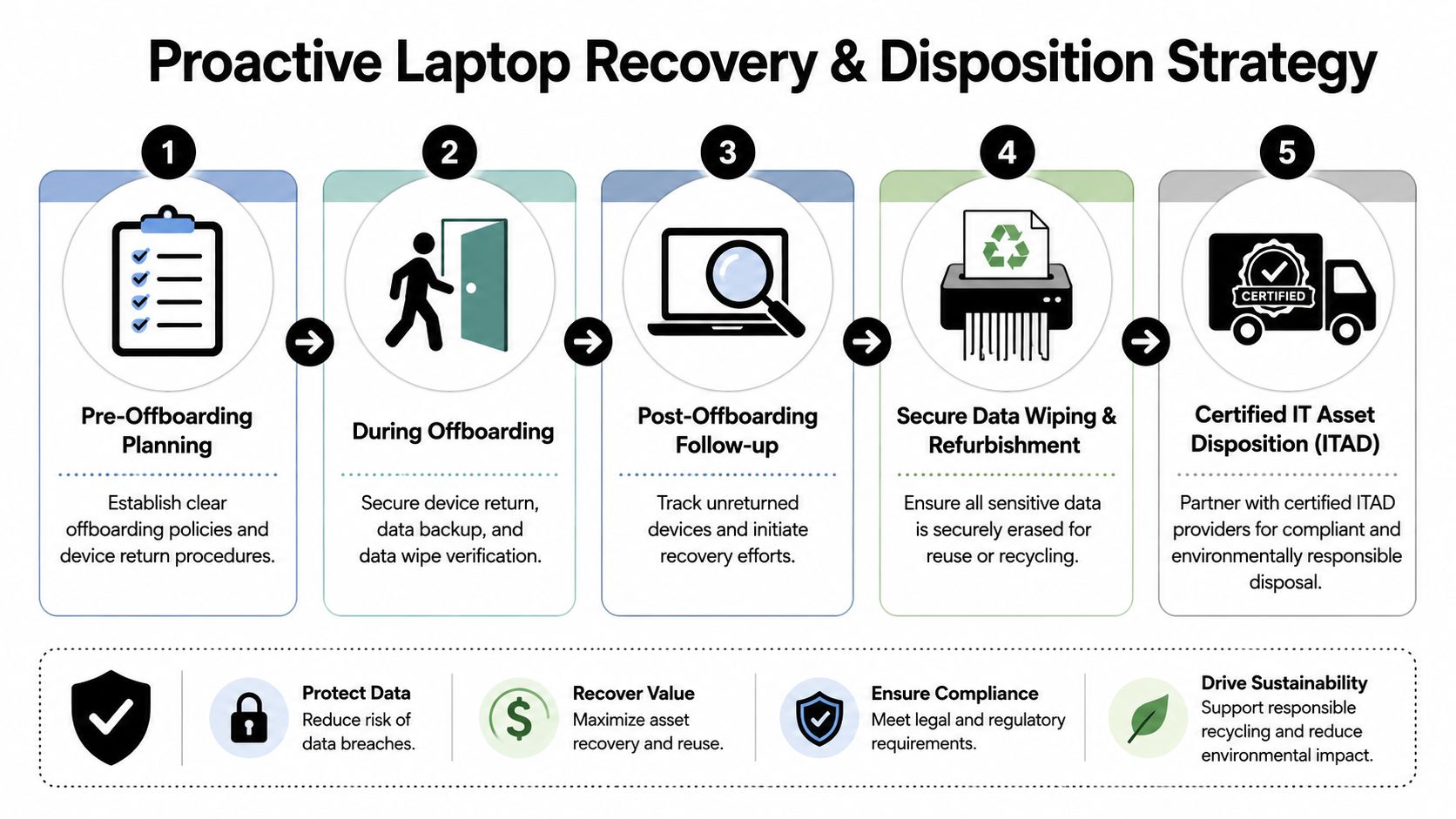
Recovery success begins at onboarding and equipment issuance. If the company doesn't document what was issued, who accepted it, and what the return expectations are, offboarding becomes an argument about memory instead of a process grounded in records.
A practical recovery strategy usually includes:
- Signed equipment acknowledgment that identifies the device and return obligation
- Defined trigger events such as resignation, termination, role change, or refresh cycle
- Clear return windows so the deadline is unambiguous
- Preplanned logistics including return kits, labels, or office handoff procedures
Tighten the handoff and shutdown sequence
A lot of recoveries fail at the handoff stage. The company knows the employee is leaving, but no one owns the exact return moment.
Use a standard sequence:
- revoke or limit access according to policy
- confirm the assigned hardware list
- issue return instructions immediately
- track return status in the asset record
- escalate if the deadline passes
If the device doesn't come back promptly, move from reminders to formal recovery steps fast. The longer a laptop remains outside control, the harder recovery becomes and the weaker your records get.
Define what happens after return
Recovery is only half the job. Once the laptop comes back, IT still has to inspect, sanitize, redeploy, remarket, or recycle it through a documented chain of custody. If that downstream process is loose, you solve the return problem but keep the compliance problem.
For devices that can't be reused, disposal choices matter. Reconext's IT asset disposition cost guide notes that physical destruction by shredding hard drives into 2mm fragments costs about $40 per unit, compared with $4 to $15 per unit for software-based data erasure. That difference shows why companies need a clear disposition path. The right method depends on reuse goals, data sensitivity, and chain-of-custody requirements.
The Financial ROI of a Professional ITAD Program
The ROI case gets clearer once you price the asset at the end of its life, not just at purchase.
According to Hummingbird International on monetizing retired IT assets, business-grade laptops aged 3 to 4 years typically retain a resale value between $120 and $450. An unreturned device wipes out that recoverable value, adds replacement pressure, and leaves the business with no documented disposition outcome.
A formal ITAD program changes those economics in two practical ways. First, it helps recover value through resale, refurbishment, or remarketing. Second, it closes the loop on sanitization, chain of custody, and downstream disposition records. That combination matters because finance, IT, security, and compliance all absorb part of the loss when a laptop disappears outside process.
This is also why professional laptop recovery services improve business outcomes across the asset lifecycle. The benefit is not limited to loss prevention. Companies also reduce write-offs, improve audit support, and cut the internal time spent chasing devices that should have been recovered through a defined workflow.
Ultimately, the cost of an unreturned laptop is a controllable expense. It is usually higher than the hardware book value and usually lower than a breach, but it is large enough to measure and manage with a TCNR model. For teams using the framework in this article, that is the key shift. Stop treating non-recovery as a minor offboarding exception and start treating it as an operational cost center with a clear ROI case for fixing the process.
Beyond Surplus helps organizations reduce laptop loss, protect sensitive data, and recover value through secure IT asset disposition, certified data destruction, electronics recycling, and nationwide business pickup. If your team needs a tighter offboarding process or a compliant path for retired devices, contact Beyond Surplus for certified electronics recycling and secure IT asset disposal.


