

A clinician returns a laptop after a workstation refresh. IT staff place it beside retired monitors, a copier, and several untagged devices waiting for pickup. Weeks later, the laptop appears in a resale channel, still carrying cached credentials, diagnostic exports, and patient records. The hospital's production encryption worked exactly as intended, but nobody controlled the device after retirement.
That failure is preventable. Secure healthcare IT equipment disposal requires a device-by-device sanitization decision, a documented chain of custody, and proof that each asset reached its approved final disposition. The same discipline must cover laptops, servers, imaging workstations, copiers, tablets, backup media, and IT-integrated medical equipment.
Table of Contents
- The Real Risk Behind Retired Healthcare Devices
- HIPAA and NIST SP 800-88 Standards You Must Follow
- Matching the Sanitization Method to Each Device
- Building a Chain-of-Custody Workflow That Holds Up
- Choosing a Disposal Vendor That Transfers Liability
- Verifying Destruction With Serialized Tracking and Certificates
- Internal Policy, Checklist, and Next Steps
The Real Risk Behind Retired Healthcare Devices
The laptop in that scenario isn't unusual. A clinician may return equipment to a department supervisor, who sends it to a mixed surplus area without confirming the asset tag or storage media. A contractor may collect the pile with a manifest listing only a total quantity. A reseller may later receive a working device with patient information still recoverable from its drive.
The exposure can begin with more than a laptop. Copier hard drives, imaging workstations, mobile tablets, diagnostic systems, servers, and unsecured donor equipment can retain ePHI after their visible files appear to be gone. A factory reset or emptied recycle folder doesn't establish that stored information has become unreadable, indecipherable, and unreconstructable.
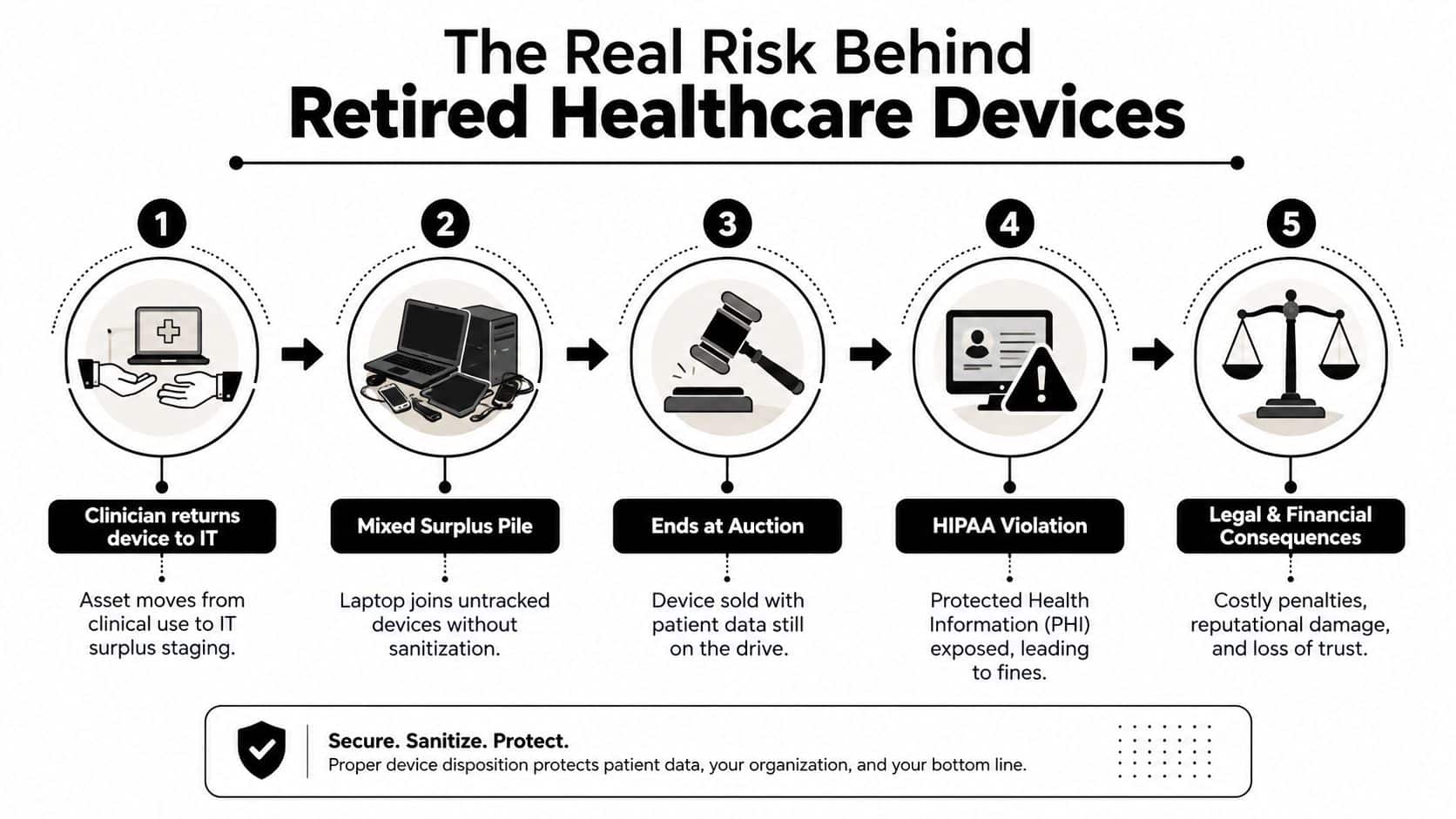
Disposal remains a breach control
The U.S. Department of Health and Human Services recorded 4 improper-disposal breach reports in its 2023 report, representing 1% of breach reports and affecting 2,675 individuals. The largest incident involved about 1,005 patient-log records discarded in a dumpster, as summarized in the HHS breach statistics reporting.
The issue continued in the 2024 report. Improper disposal accounted for 3 breach reports and 9,809 affected individuals, still less than 1% of total reports and affected individuals, but with a substantially larger aggregate impact than the prior year. Those figures concern improper disposal broadly, but the operational lesson applies directly to electronic media. A device that leaves the building without verified sanitization remains a potential breach vector.
Practical rule: Treat retirement as a security event, not a warehouse movement.
Encryption protects data while systems are managed correctly. It doesn't replace retirement controls, vendor oversight, or evidence of destruction. Regulators and litigators can examine what happened after clinical use, including who handled the asset, which method was applied, and whether the hospital can reconcile the final certificate to its original inventory.
HIPAA and NIST SP 800-88 Standards You Must Follow
HIPAA's Security Rule requires covered entities and business associates to maintain policies and procedures for the final disposition of ePHI and the hardware or electronic media that stores it. HHS states that computers and other electronic media may be reused or disposed of only after ePHI is properly removed or the media is destroyed. Its HIPAA disposal guidance identifies clearing, purging, and destruction as acceptable paths when they make the information unrecoverable.
NIST SP 800-88 provides the technical vocabulary. Clear applies logical techniques that protect against ordinary access through the device interface. Purge uses stronger sanitization, such as a verified cryptographic erase or an appropriate device-specific process. Destroy makes the media unusable through methods such as shredding, disintegration, pulverization, melting, or incineration.
NIST SP 800-88 is guidance, not a statute. In practice, it gives security teams and auditors a defensible framework for selecting and documenting the method. HHS identifies the standard as a basis for media sanitization, and the NIST SP 800-88 Rev. 2 publication emphasizes inventory, media type, sanitization method, and validation.
Method selection in operational terms
Clear may suit a device that remains inside a tightly controlled environment and will be reused under an approved process. Purge is the stronger choice when persistent storage is involved and the organization can verify the device-specific sanitization result. Destroy is appropriate when media will leave organizational control, the storage architecture is unknown, or sanitization cannot be validated.
| Sanitization Method | NIST SP 800-88 Definition | HIPAA Control Reference | Typical Healthcare Assets |
|---|---|---|---|
| Clear | Logical sanitization intended to prevent ordinary access to stored data | ePHI must be removed before reuse | Controlled internal reuse of selected computers or removable media |
| Purge | Stronger sanitization that makes recovery substantially more difficult, including verified cryptographic erasure where appropriate | ePHI must be rendered unreadable and unreconstructable | Self-encrypting laptops, enterprise drives, tablets, selected servers |
| Destroy | Physical destruction of the storage media | Media is destroyed before disposal | Failed drives, unknown media, some imaging systems, shredded backup media |
Healthcare teams shouldn't choose a method because a vendor's form offers only one checkbox. The method must match the media, the data, the intended disposition, and the organization's ability to verify the result. The NIST 800-88 data destruction standards guide provides a useful reference for translating those requirements into an ITAD process.
Matching the Sanitization Method to Each Device
A hospital's disposal policy should never say “wipe everything” or “shred everything.” Those instructions ignore flash storage, proprietary medical systems, RAID configurations, and reuse opportunities. Build a sanitization matrix that assigns a method to each device class before pickup.
A practical device matrix
| Device Class | Recommended Method | Rationale | Reuse Eligible |
|---|---|---|---|
| Laptops and desktops | Purge, often through verified cryptographic erase or certified overwrite | These systems commonly contain persistent ePHI and user profiles | Yes, when the result is verified |
| SSD and NVMe media | Purge through verified cryptographic erase, or Destroy | Flash translation layers, wear leveling, and remapped areas can defeat ordinary overwriting | Yes, if encryption and erase evidence are reliable |
| Servers with RAID | Vendor-specific Purge or controller-level cryptographic erase | RAID controllers and distributed storage can retain data beyond an individual drive wipe | Yes, after architecture-specific validation |
| Mobile tablets | MDM de-provisioning, factory reset, then appropriate Purge | Clinical applications, tokens, and local caches may survive a superficial reset | Yes, if the device is fully removed from management |
| Imaging equipment | Vendor-managed Purge or Destroy | CT, ultrasound, and other modalities may use proprietary storage and service tools | Sometimes, subject to vendor validation |
| Copiers and multifunction printers | Purge or Destroy | Internal drives can retain scanned documents, print jobs, and address books | Sometimes, if the manufacturer process is documented |
Servers deserve special attention. A technician who removes one drive and runs a generic wipe may miss controller caches, hot spares, mirrored volumes, or other addressable storage. The same problem appears in copiers and imaging systems, where the storage mechanism may not be visible to ordinary IT tools.
Reuse is a control, not a compromise
Reuse can reduce unnecessary destruction and preserve residual value, but only after the organization proves that sanitization matches the device's architecture. Destroy assets when the data status is unknown, the drive has failed, the vendor can't validate the method, or the device contains storage that can't be isolated.
For SSD-specific decisions, the secure SSD destruction methods comparison helps explain why a traditional overwrite isn't automatically defensible. The correct question is not whether a device still powers on. It's whether the hospital can prove that every relevant storage area was addressed.
Building a Chain-of-Custody Workflow That Holds Up
A sanitization method has little value if nobody can prove which device received it. Start the record in the clinical department, not at the recycler's dock. The source team should identify the asset, remove it from active assignment, and record its storage type before the device enters surplus staging.
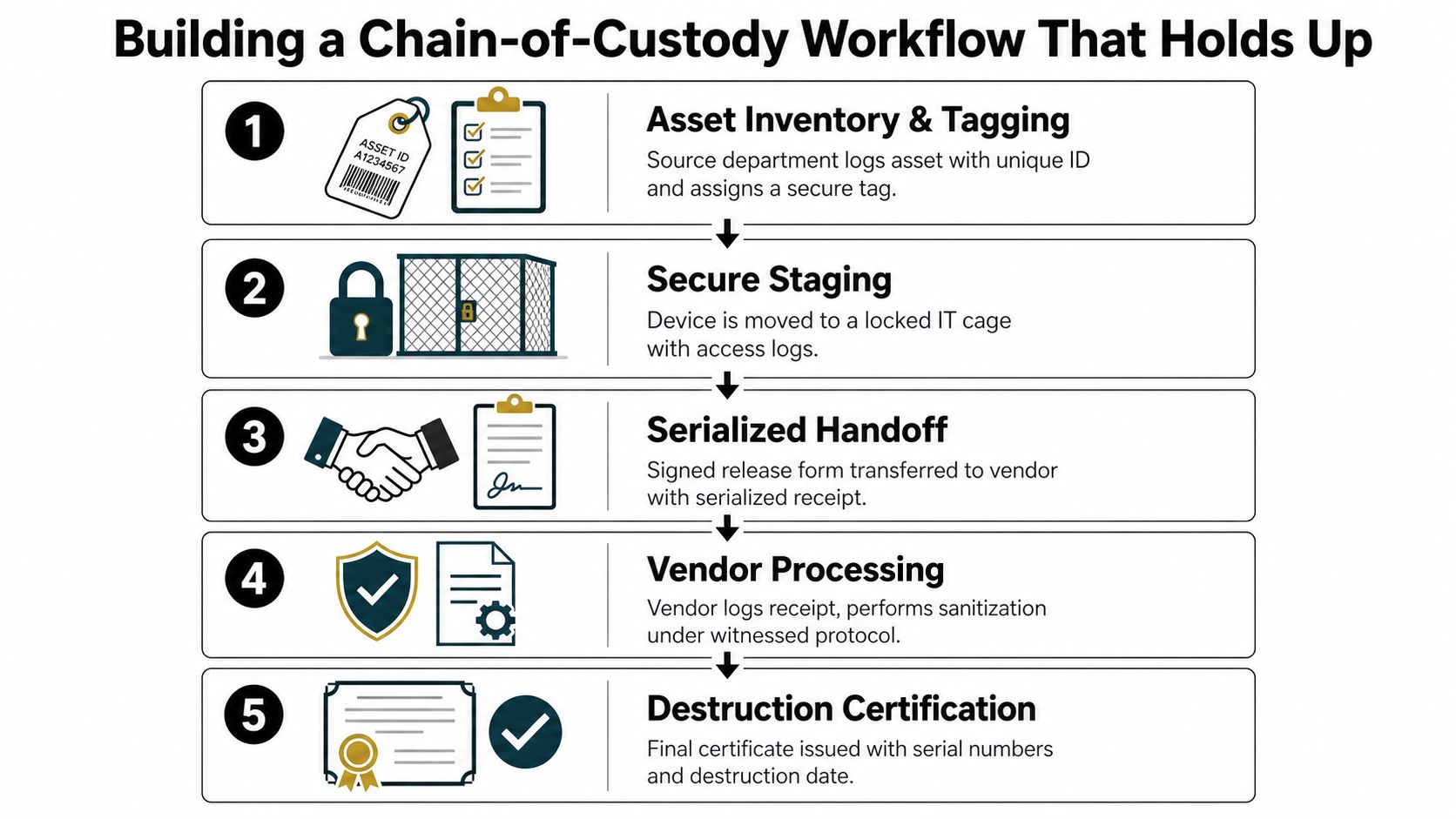
Five checkpoints prevent custody gaps
- Inventory and tagging: Record make, model, serial number, asset tag, department, media type, and retirement reason. Apply a disposal ID that stays with the device.
- Secure staging: Move equipment to a locked IT cage or controlled room. Restrict access and retain entry records.
- Serialized handoff: The releasing employee and vendor representative sign a manifest that lists each serial number, not merely the number of pallets.
- Transport control: Use shipment tracking, tamper-evident seals, and a named carrier or driver. Record pickup time, destination, and seal condition.
- Final reconciliation: Match the original inventory to the vendor receipt, processing record, certificate, and final disposition.
The manifest should capture the make, model, serial, media type, selected method, custody signatures, and timestamps. Shared logins on degaussers, unlabeled pallets, and generic “all assets destroyed” paperwork create avoidable ambiguity. Give each technician an individual credential, photograph unusual loads, and stop processing when a serial number doesn't match.
What an auditor should find
A usable form includes:
- Disposal ID and barcode
- Original asset tag
- Manufacturer, model, and serial number
- Storage media and capacity
- ePHI classification
- Approved Clear, Purge, or Destroy method
- Reuse or destruction decision
- Releasing employee and receiving technician
- Pickup date, vehicle or shipment reference, and seal number
- Processing date, location, technician ID, and witness
- Certificate reference and exception notes
For highly sensitive devices, onsite mobile shredding or witnessed destruction can reduce the period during which intact media travels outside the hospital. The strongest option is the one the organization can supervise, document, and reconcile. A detailed chain-of-custody process for IT asset disposal should be part of the vendor operating procedure, not an afterthought.
Choosing a Disposal Vendor That Transfers Liability
Vendor selection should begin with evidence, not a polished sustainability page. A disposal partner must show how it protects assets between pickup and final processing, how it controls downstream providers, and what responsibility it accepts when something goes missing.
Compare the operating models
| Criterion | Certified National ITAD | Local Recycler | Resale Broker |
|---|---|---|---|
| Certification scope | Typically documented across defined facilities and services | Must be verified for each operation | May rely on downstream providers |
| Serialized tracking | Expected throughout intake and processing | Varies widely | Often depends on the processor |
| Data destruction | Can support documented NIST-aligned workflows and dedicated destruction | May outsource or limit media services | May prioritize resale before control evidence |
| Downstream oversight | Should include written controls and audit rights | Review subcontractors directly | Highest need for contract scrutiny |
| Liability position | Negotiable through formal agreement, insurance, and procedures | Depends on contract maturity | Risk can concentrate between broker and buyer |
| Best fit | Enterprise, regulated, and multi-site programs | Controlled local loads with verified capabilities | Only where custody and destruction controls are explicit |
Ask for current R2v3 or e-Stewards certification scope, NAID AAA status for data destruction, insurance documentation, and evidence of downstream subcontractor oversight. Certification matters only within its stated scope. A vendor certified for recycling at one facility may not provide the same control when a subcontractor handles data-bearing media elsewhere.
Read the certificate before signing
The certificate template should list individual serial numbers, the NIST method applied to each asset, processing date, location, technician ID, and a verifiable reference number. Reject a document that says only “all equipment destroyed.” That phrase doesn't prove which drives were processed or when.
The contract should address indemnification, breach notification timing, audit rights, insurance limits, subcontractor approval, and responsibility for assets lost after pickup. Review the vendor due diligence checklist with legal, privacy, procurement, and security stakeholders before awarding the work.
A broker may offer attractive resale terms, but resale must follow verified sanitization, not precede it. The vendor's ability to recover value never outranks the hospital's duty to control ePHI.
Verifying Destruction With Serialized Tracking and Certificates
A certificate is evidence only when it connects to the original asset. Assign a unique disposal ID at intake, link it to the hospital's inventory record, and require the vendor to scan that identifier at every custody and processing point. This creates a traceable record from clinical retirement through reuse, recycling, or destruction.
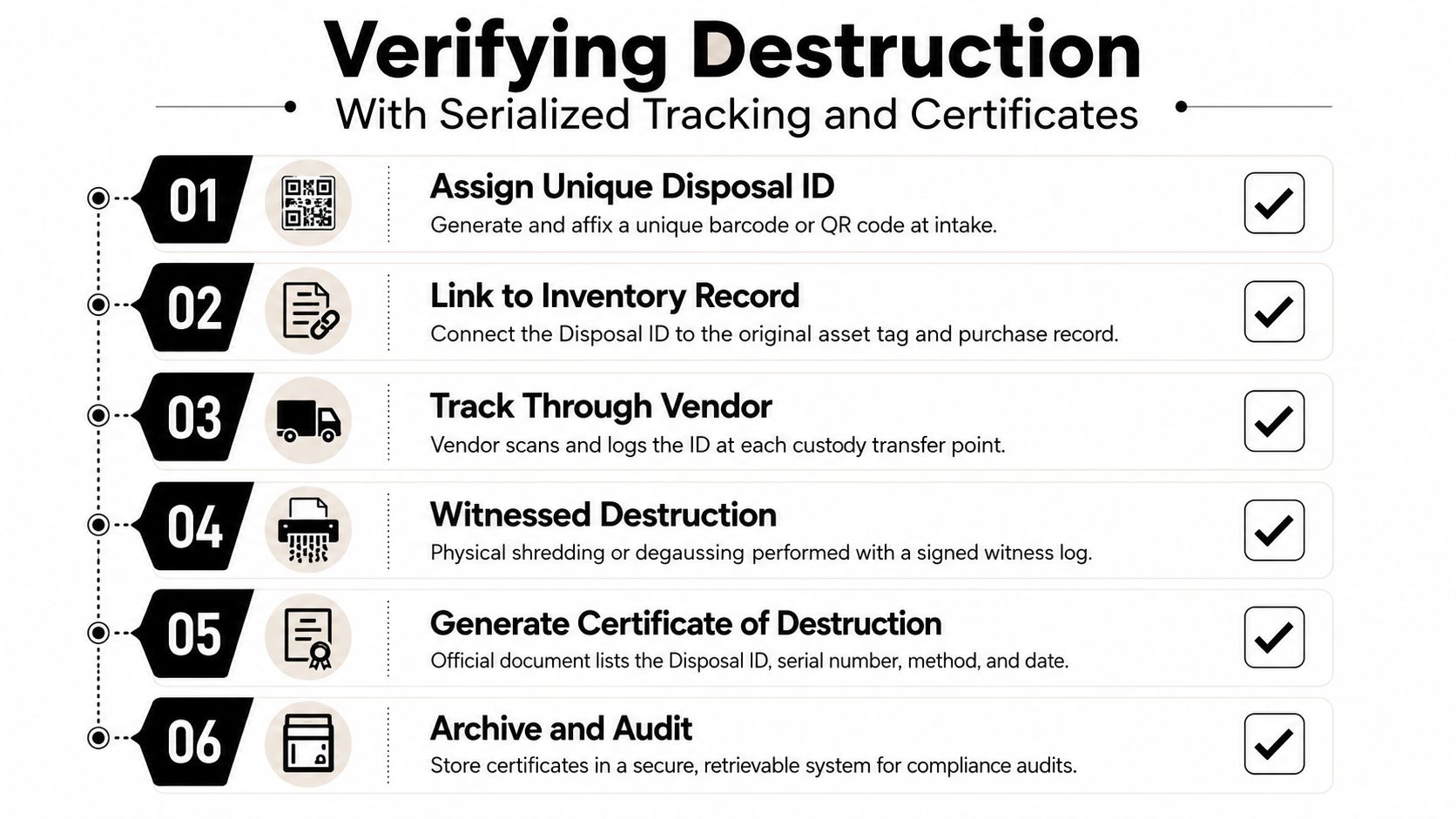
Proof must follow the asset
Audit-grade evidence should contain the asset serial number, disposal ID, media type, selected NIST method, processing date, facility or destruction location, technician identity, and certificate reference. For a cryptographic erase, retain the tool-generated report and the device or encryption details that support the result. For physical destruction, retain the witness record and processing documentation.
High-risk loads can justify additional verification:
- Independent witnessing: A privacy or security representative observes the process and signs the record.
- Tool evidence: Export cryptographic erasure or sanitization logs from the equipment used.
- Video records: Capture onsite destruction when the risk warrants visual proof.
- Sampling controls: Review output from shredded media under an approved quality process.
Most documentation failures are mundane. Certificates omit serials, method descriptions remain vague, or paperwork arrives long after pickup with no clear relationship to the manifest. Store the certificate, manifest, exception log, and processing report together. For transport-intensive programs, review data security for haulage platforms when assessing how carriers protect shipment information and movement records.
The certificate of data destruction guide offers a practical benchmark. If a reviewer can't trace one serial number from the hospital inventory to the final certificate without asking the vendor to reconstruct the history, the process isn't audit-ready.
Internal Policy, Checklist, and Next Steps
A workable policy assigns ownership before equipment retires. The CIO approves the control framework. The IT Asset Manager owns inventory and disposition decisions. The Security Officer defines data sensitivity and exception handling. The Vendor Coordinator confirms certifications, schedules custody transfers, and collects final evidence.

Model policy language
Reuse approval: No device may be released for reuse until the IT Asset Manager confirms the media type, approves Clear or Purge as appropriate, reviews the sanitization evidence, and records the receiving environment.
Failed-drive exception: A failed drive, unknown storage device, or asset with unverifiable sanitization status must be isolated and routed to Destroy. The Security Officer approves any exception.
Reconciliation escalation: If a serial number is missing, duplicated, or absent from the certificate, the Vendor Coordinator stops final closure, notifies the Security Officer, and opens an incident review.
Use this operational checklist for every load:
- Inventory: Tag the asset and record serial, model, department, and media type.
- Classify: Mark whether the equipment stored ePHI or connected to clinical systems.
- Select: Approve Clear, Purge, or Destroy based on architecture and final disposition.
- Stage: Secure the device and limit access until pickup.
- Transfer: Obtain signed, serialized custody records.
- Verify: Reconcile every asset to processing evidence and its certificate.
- Archive: Store the complete record in a controlled, retrievable system.
Retain disposal documentation according to your organization's HIPAA documentation policy and applicable legal requirements. The policy should define the retention period, access controls, annual review owner, and response process for a suspected loss. Schedule recurring pickups with a partner that can demonstrate NAID AAA or R2v3 controls, require a certificate for every serialized asset, and audit the program annually.
Beyond Surplus provides business IT asset disposal, secure data wiping, hard-drive shredding, electronics recycling, product destruction, and data center decommissioning with documented chain-of-custody support. Visit Beyond Surplus to discuss a healthcare equipment disposition program that matches sanitization methods to device types and produces the records your security and compliance teams need.


