

An office refresh has just ended. New laptops are deployed, old desktops are stacked in a storage room, and a facilities manager is asking when the equipment will leave the building. The easy answer is to call a general hauler. The responsible answer is to separate two decisions: how to recover the computer's materials and how to protect the information stored on it.
That distinction matters for every business, from a small professional office to a hospital, school, financial institution, or data center. A recycler may accept computers without providing data sanitization, asset-level tracking, or proof of downstream processing. A secure IT asset disposition program addresses those gaps with controlled logistics, documented custody, appropriate data destruction, reuse assessment, and final reporting.
This guide explains the full computer recycling process in practical terms. You'll learn what happens to retired equipment, why batteries and downstream vendors need attention, which records to request, how costs are shaped by volume and disposition method, and how to compare providers before a pickup. By the end, you'll be able to decide whether an asset should be reused, sanitized, destroyed, or recycled, and what evidence your organization should retain.
Table of Contents
- Introduction Why Computer Recycling Needs a Plan
- What Computer Recycling Really Means
- Why Businesses Prioritize Computer Recycling Now
- How the End to End IT Asset Disposition Process Works
- Compliance and Security Requirements You Must Meet
- How to Choose a Recycler and Understand Costs and Value Recovery
- Where to Recycle Computers With Beyond Surplus Options
Introduction Why Computer Recycling Needs a Plan
A closet full of retired computers can look like a housekeeping problem. In reality, it's an unmanaged inventory of physical assets, storage media, recoverable materials, and potential business liability. Without a plan, devices may sit for months, lose resale value, or leave the company without a reliable record of what happened to them.
The risk often starts during a rushed refresh. An employee returns a laptop, a technician removes it from the network, and someone places it on a pallet with monitors and printers. Nobody confirms whether the drive was sanitized, whether the serial number was recorded, or whether the eventual recycler accepts lithium-ion batteries. The equipment has moved, but the organization still can't prove its disposition.
Computer recycling is not the same as putting electronics in a waste stream. Recyclers may dismantle or shred devices to separate metals, plastics, and hazardous fractions. That material work is important, but it doesn't automatically erase data. A drive can be sent to a downstream processor, refurbished for resale, or separated from a computer while still containing recoverable information.
Practical rule: Treat every data-bearing device as a security asset until its sanitization or destruction is documented.
Business leaders also need to consider environmental recovery. The case for recycling retired business computers includes more than landfill diversion. It includes recovering useful materials, extending the life of functional equipment, reducing storage burdens, and giving procurement and compliance teams a defensible record.
The right plan connects the work from pickup through final disposition. It defines who inventories assets, who approves destruction, how batteries are handled, which vendors may receive material, and which certificates return to the client. That approach is especially valuable during office closures, mergers, hardware refreshes, and data center decommissioning projects.
What Computer Recycling Really Means
Computer recycling is primarily a materials-separation process. Think of an old computer as a building scheduled for deconstruction. A careful crew doesn't treat the entire structure as one pile. It identifies reusable fixtures, separates steel and copper, isolates wiring, and sends hazardous components to controlled handling.
Electronics recyclers use a comparable approach. Devices may be manually disassembled or mechanically shredded so processors can separate high-value materials such as gold, silver, platinum, and rare earths from plastics and lower-value fractions. Hazardous constituents, including lead and brominated materials, require controlled management rather than ordinary disposal. The materials recovery process for recycled electronics helps explain why the method and facility matter.
Reuse comes before destruction
Recycling isn't always the first disposition route. A working laptop, monitor, server, or network device may retain useful life after it no longer fits the company's technical standard. Testing, repair, refurbishment, and resale can preserve more of the device's original value than shredding it immediately.
That route still requires data security first. The device must be sanitized or its storage media must be physically destroyed before it enters reuse, resale, or material recovery. A recycler's acceptance of the hardware doesn't prove that data has been removed.
Recycling and data security are separate decisions
Shredding can increase processing throughput and may destroy personally identifiable information at the same time. Manual disassembly can improve sorting precision, but it takes more labor and can slow the workflow. Neither method replaces an agreed disposition policy.
For a business fleet, classify equipment before pickup:
- Reusable equipment: Test, sanitize, document, and direct to an approved reuse or resale channel.
- Failed or sensitive media: Use a destruction method appropriate to the device and information risk.
- Non-reusable electronics: Process through controlled materials recovery after data-bearing components are secured.
- Batteries: Remove and route through a process that accepts them. Lithium-ion batteries shouldn't enter household garbage or recycling bins.
The central principle is simple. Recycling answers what happens to the hardware. Data destruction answers whether the information is still recoverable. A complete ITAD program must answer both.
Why Businesses Prioritize Computer Recycling Now
Organizations face three connected pressures: a growing waste stream, uneven collection infrastructure, and persistent data exposure. These pressures turn retired equipment into an operational issue rather than a final cleanup task.
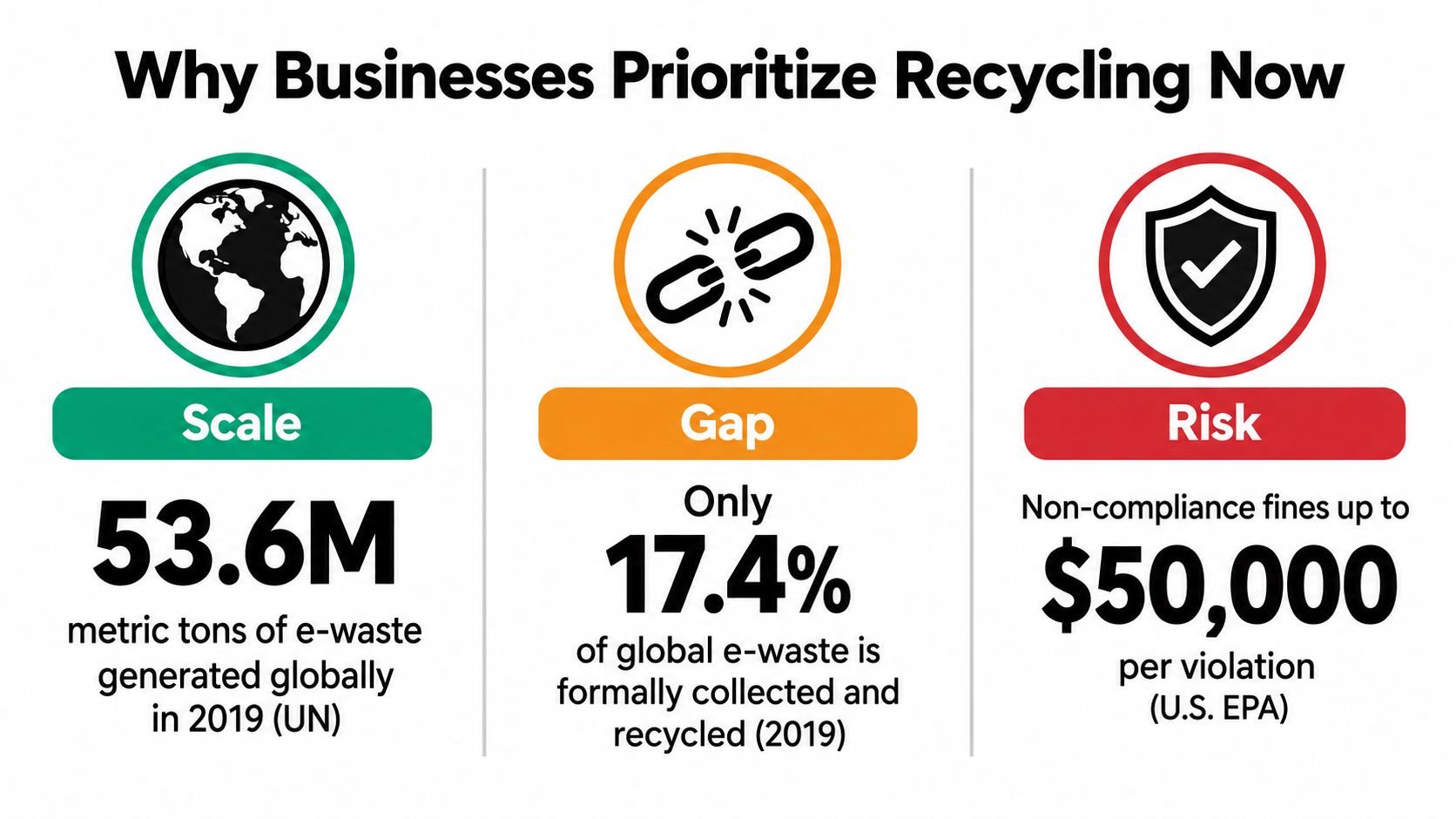
The global scale is substantial. In 2022, the world generated 62 billion kilograms of e-waste, or about 7.8 kilograms per person, while only 22.3% was documented as formally collected and recycled in an environmentally sound manner, according to the Global E-waste Monitor 2024. Formal systems captured roughly 13.8 billion kilograms, leaving about 48.2 billion kilograms outside documented formal recycling.
The direction is also important. In 2019, global e-waste generation was about 53.6 million metric tons, and the documented formal recycling share was 17.4%. By 2022, generation had reached 62 million tons and the documented share had risen to 22.3%, an increase in absolute waste of roughly 8.4 million tons in three years, as described in the earlier Global E-waste Monitor reporting.
Environmental responsibility needs evidence
A sustainability policy can't stop at “we sent it to recycling.” Procurement and facilities teams need to know whether the provider accepts the equipment category, controls downstream handlers, and reports final disposition. That matters because collection access and processing capacity aren't uniform.
A business can also miss recovery value by storing equipment indefinitely. Devices that could be refurbished may degrade in storage, while mixed pallets become harder to identify and reconcile. Scheduled disposition creates a cleaner path from refresh planning to reuse, resale, or material recovery.
The legal landscape is not one-size-fits-all
The United States has not relied on one national electronics recycling program in the source discussed by the EPA. Businesses therefore operate within a patchwork of state requirements, certified providers, customer contracts, and internal procurement standards.
That patchwork increases the value of a standardized national policy. A company with multiple offices should use one vendor qualification process, one chain-of-custody expectation, and one reporting package wherever practical. The precise legal obligations depend on the organization, data, equipment, and jurisdictions involved, so compliance teams should confirm applicable requirements.
Security risk follows the device
A retired computer may contain customer records, employee information, financial documents, research files, credentials, or cached access tokens. The risk doesn't disappear because the device is no longer connected to the company network.
Many recyclers don't erase data automatically. Drives may be resold, exported, or transferred to downstream processors. That makes secure collection, asset tracking, sanitization, and certificates essential parts of commercial electronics recycling, not optional extras.
How the End to End IT Asset Disposition Process Works
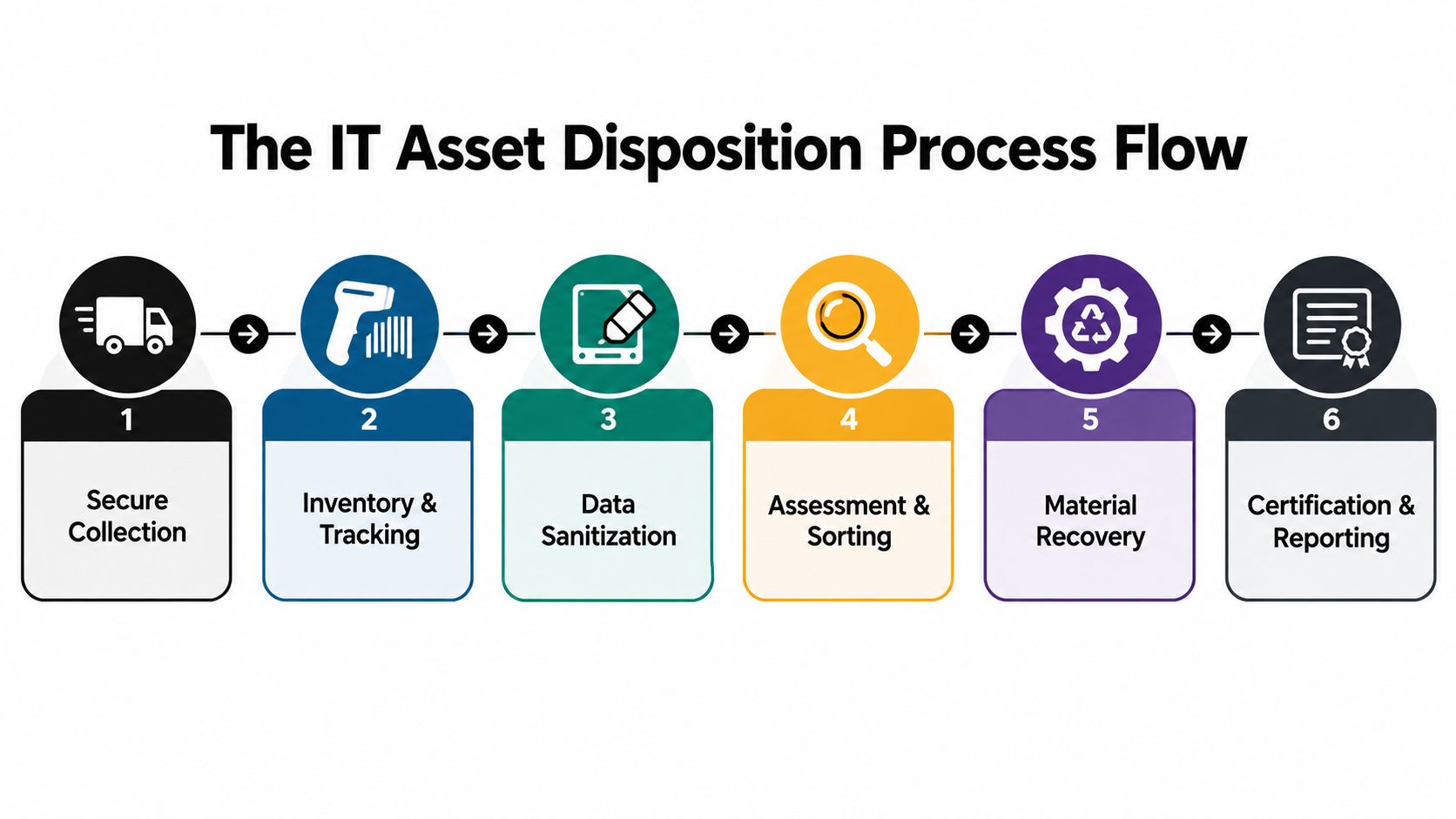
A reliable ITAD workflow works like a chain. Each handoff supports the next one, and a gap at the beginning can undermine the final certificate. The process should be defined before equipment leaves the client's control.
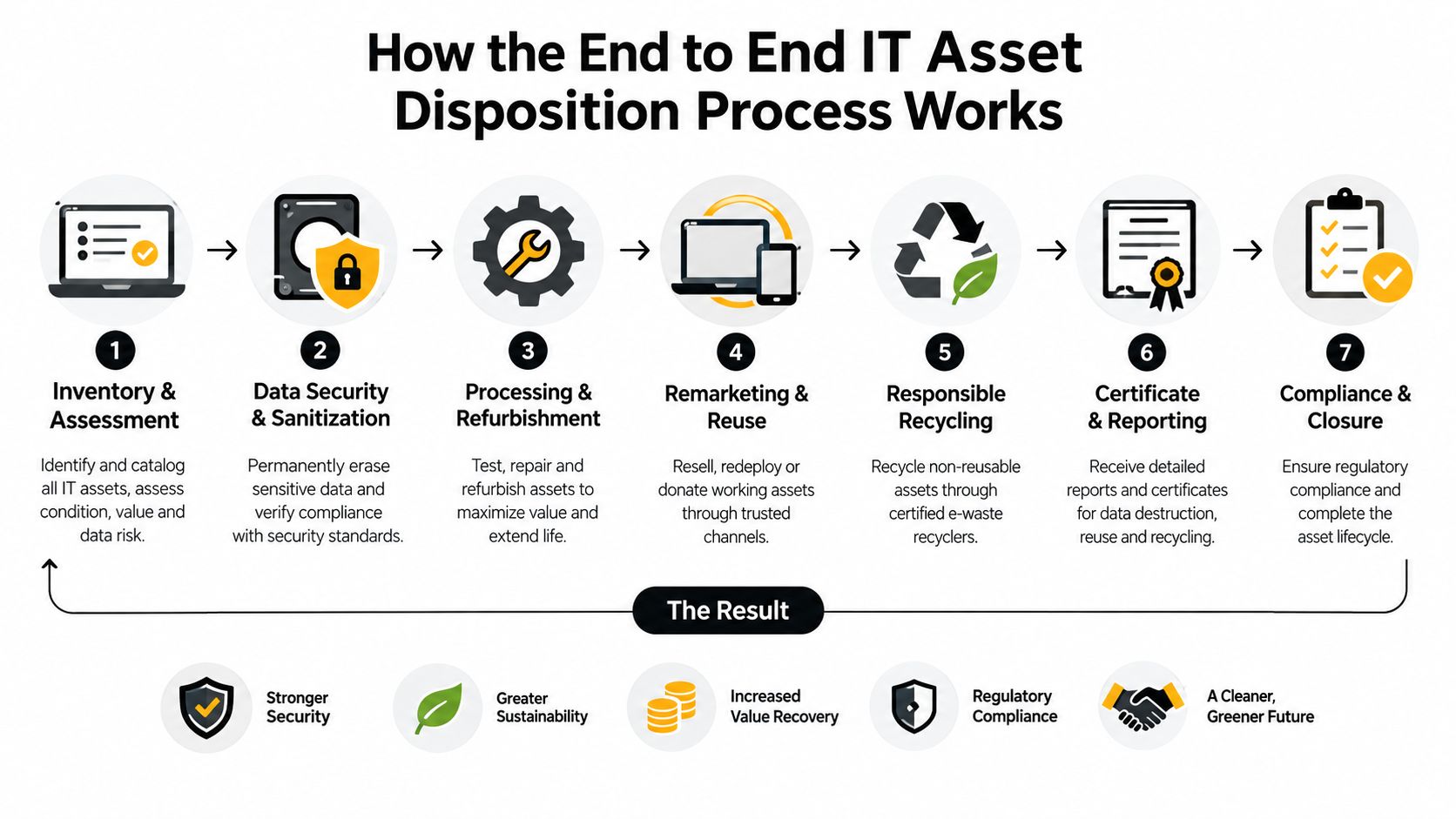
1. Scope the collection
Start with the location, equipment categories, approximate volume, access requirements, and timing. A data center decommissioning needs a different plan from a small office refresh. Servers, storage arrays, networking hardware, copiers with internal memory, monitors, batteries, and laboratory or medical equipment may require separate handling instructions.
The provider should confirm whether it can collect bulk loads, remove equipment from racks, palletize assets, and accept batteries. Clarify responsibilities for disconnecting, packing, loading, and site access.
2. Record custody and inventory
At pickup, the team should create or reconcile an asset inventory using serial numbers, asset tags, make, model, or another agreed identifier. A signed pickup receipt alone may not be enough for a complex fleet.
Chain-of-custody records should show when the equipment left the site, who accepted it, where it went, and which processing steps followed. This record is the audit trail connecting a physical laptop to its final certificate.
3. Secure the data
Data destruction depends on the media and the approved disposition route. Traditional hard drives and SSDs don't behave identically, so simple overwrite advice can be incomplete for mixed fleets.
Sanitization may be appropriate when a device will be reused, while physical destruction may be preferable for failed drives, high-risk media, or assets subject to stricter internal policy. Shredding can destroy the drive as a material and data-bearing component, but it eliminates the possibility of reuse for that media.
4. Test for reuse and value recovery
After data security controls are complete, technicians can assess condition, functionality, repair needs, and marketability. Reusable equipment may be refurbished, remarketed, donated, or returned through an approved value-recovery channel.
This stage keeps the process from treating every retired computer as waste. A device can be obsolete for one department and still useful elsewhere, provided the data and ownership controls are complete.
5. Separate materials and manage batteries
Non-reusable equipment is dismantled or shredded. Processors separate metals, plastics, circuit boards, cables, and hazardous fractions for appropriate downstream handling. Batteries should be removed and routed through a channel equipped to manage them safely.
The downstream question matters as much as the first pickup. Ask which vendors receive material, whether those handlers are qualified, and how the primary provider verifies their work.
6. Receive final documentation
The closeout package should match the original inventory. Depending on the project, it may include a certificate of data destruction, certificate of recycling, asset recovery report, and downstream or environmental reporting.
A useful certificate identifies the relevant assets and disposition method. Generic language such as “all equipment recycled” gives managers little help during an audit or internal review. For a fuller workflow reference, see this business IT asset disposition guide.
Compliance and Security Requirements You Must Meet
Compliance requirements differ by industry, but the proof standard is consistent. Your organization should be able to show what was retired, who handled it, how data was secured, and where the physical equipment went.
The FTC Disposal Rule applies to organizations that possess consumer report information and expect proper disposal of that information. That doesn't mean a certificate automatically eliminates every legal responsibility. It does provide evidence that the organization established and followed a defined process, while also documenting the provider's work.
Compare the risk by organization
A healthcare provider may need particularly strong controls for computers, servers, imaging systems, and other devices that can retain protected health information. A financial organization must consider customer records and vendor oversight. A government agency may impose procurement, security, or destruction requirements that exceed ordinary commercial practice.
Schools, laboratories, manufacturers, and professional services firms may also hold sensitive information even when a specific sector rule doesn't apply. Internal policies, contracts, cyber insurance conditions, and customer audits can create their own documentation expectations.
Mixed fleets require device-specific thinking
A “wipe every drive” policy can fail when the fleet contains SSDs, removable media, copiers, smartphones, and network appliances. The approved method should reflect the storage technology, the sensitivity of the data, and whether the asset will be reused or destroyed.
The NIST 800-88 data destruction guidance can help teams discuss sanitization choices with a provider. It shouldn't replace a risk assessment or legal advice, but it gives IT managers a practical vocabulary for comparing clear, purge, and destroy approaches.
Require an audit-ready file
At minimum, ask for:
- Serialized inventory: Tie each device or storage medium to a record.
- Custody documentation: Record every material transfer from pickup through final processing.
- Destruction or sanitization evidence: Identify the method and affected assets.
- Recycling confirmation: Show the final route for equipment that wasn't reused.
- Downstream controls: Explain how secondary processors are approved and monitored.
A collection point may be convenient, but convenience isn't proof of data security. Keep certificates, inventories, approvals, and vendor records together with the asset-retirement documentation.
How to Choose a Recycler and Understand Costs and Value Recovery
Price should be evaluated after scope and risk are clear. A low quote may exclude secure transport, asset-level reporting, battery handling, data destruction, or downstream accountability. A higher quote may include services that prevent internal labor, storage, and audit problems.
Use the provider's answers to build a procurement decision rather than relying on a certification logo alone.
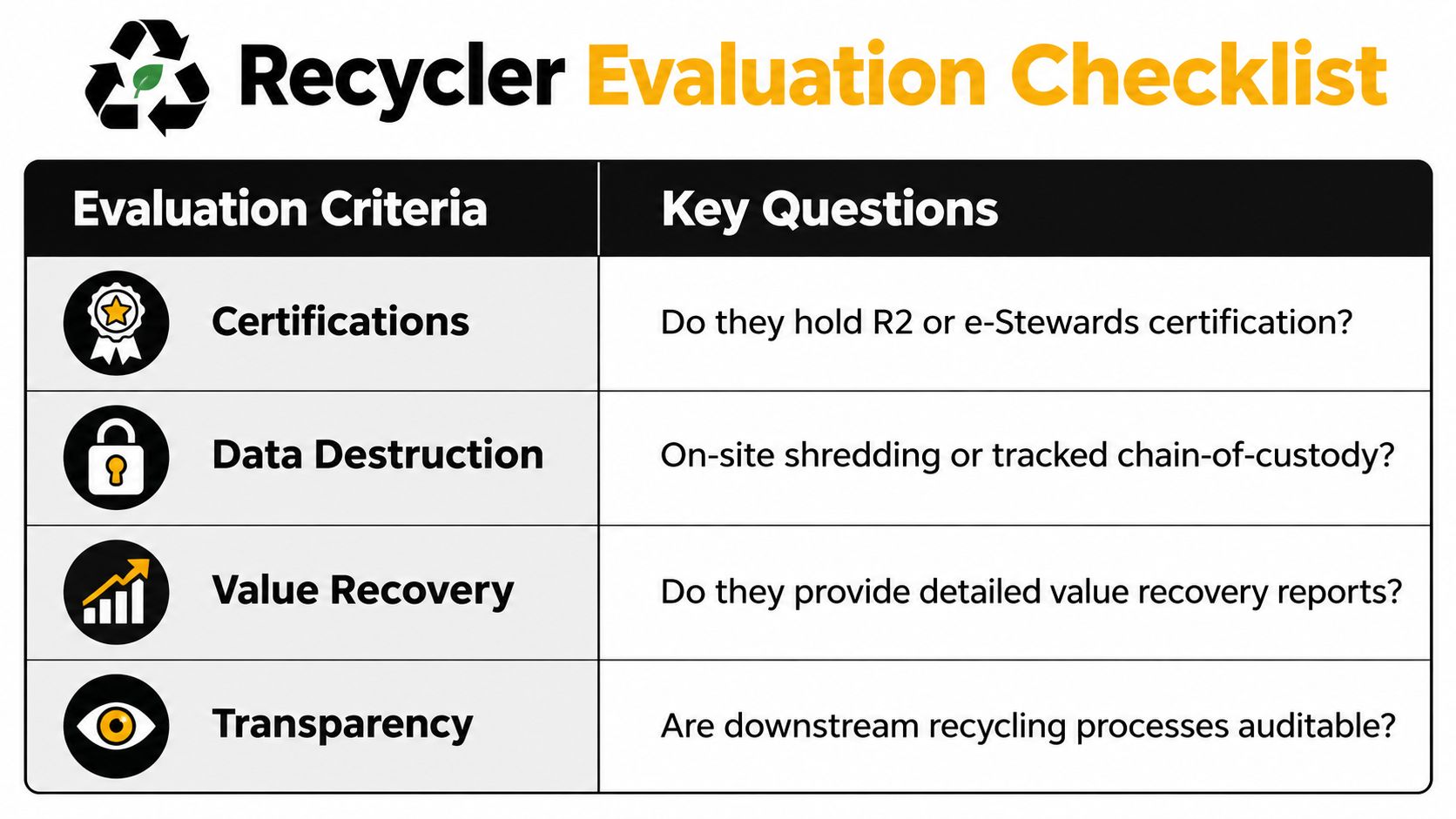
Recycler Evaluation Matrix
| Evaluation Criteria | What to Verify | Why It Matters |
|---|---|---|
| Certifications | Relevant certification status and scope | Indicates that processes are independently assessed |
| Data destruction | On-site or off-site method, device coverage, and records | Connects security requirements to specific assets |
| Logistics | Pickup geography, scheduling, loading, and transport controls | Reduces gaps during collection |
| Acceptance scope | Computers, servers, batteries, peripherals, and bulk loads | Prevents rejected items and split shipments |
| Value recovery | Testing, resale, buyback terms, and reporting | Shows whether reusable assets can offset program costs |
| Transparency | Downstream handlers and final disposition evidence | Supports environmental and compliance review |
Cost drivers usually include pickup complexity, equipment volume, labor, transportation, battery or hazardous-material handling, data sanitization, physical destruction, and reporting requirements. On-site shredding may cost more than off-site processing because it requires specialized equipment and deployment. Conversely, reusable equipment may generate recovery value through resale or IT buyback.
Ask how the provider calculates any credit. A clear report should distinguish reusable assets, recycled materials, destroyed media, service charges, and logistics costs. That gives finance and procurement teams a net-cost view instead of a vague promise of “free recycling.”
Questions to ask before approval
- Can you provide a sample certificate? Check whether it identifies assets, dates, methods, and final disposition.
- Who controls downstream processing? Request the names or qualification process for relevant downstream vendors.
- What happens to batteries? Confirm acceptance, removal, packaging, and routing.
- How do you handle SSDs? The answer should reflect the storage technology, not just repeat generic hard-drive wiping language.
- What is included in the quote? Identify pickup, sorting, destruction, reporting, and value recovery separately.
For organizations comparing providers, document quality is part of service value. A company that receives complete records with minimal internal reconciliation work may cost less overall than a cheaper provider whose paperwork requires manual investigation.
Where to Recycle Computers With Beyond Surplus Options
Business customers need a provider that can manage equipment where it sits, not point them toward a public drop-off. A commercial program may include scheduled pickup, multi-site coordination, office clearouts, data center de-installation, laptop disposal, product destruction, and secure e-waste management.
Beyond Surplus serves organizations across the contiguous United States through nationwide computer recycling services. Its service scope includes electronics recycling, IT equipment disposal, secure data destruction, IT buyback, product destruction, data center de-installations, and logistics coordination. Business programs can be designed for enterprises, schools, healthcare providers, financial institutions, manufacturers, and government agencies.
For organizations in Atlanta and Smyrna, the company also provides local drop-off options, while select items may be eligible for mail-in recycling. Commercial teams should confirm acceptance scope before shipping or scheduling, especially for batteries, bulk loads, medical equipment, laboratory equipment, servers, and devices with embedded storage.
The important question isn't “Where is the nearest recycler?” It's whether the provider can document the complete route from collection to final disposition. Request the chain-of-custody records, data destruction evidence, recycling certificates, and downstream controls that match your organization's risk profile.
Beyond Surplus provides commercial computer recycling, secure IT asset disposition, data destruction, equipment pickup, value recovery, and data center de-installation support across the contiguous United States. For a planned refresh, office closure, or mixed hardware backlog, Beyond Surplus can help you define the disposition route and documentation your team needs.


