

In Atlanta, the hardest part of getting rid of old electronics isn't finding a bin, it's proving you handled the assets correctly. The global waste stream is already too large to treat casually, with 62 million tons of e-waste generated in 2022 and only 22.3% formally collected and recycled, according to the Global E-waste Monitor cited in Atlanta-focused guidance (Atlanta e-waste overview). For businesses, that's a key context for How to Responsibly Dispose of Old Electronics in Atlanta, because laptops, servers, phones, and storage media carry environmental liability and data-security exposure at the same time.
If your facility still treats old IT gear like ordinary trash, you're taking an avoidable risk. Atlanta businesses operate in a market where e-waste is one of the fastest-growing waste streams, local recycling systems are improving, and documented disposal has become the standard for organizations that need audit-ready proof (Atlanta electronics disposal guidance). The job is not just removal, it's classification, secure handling, and documentation.
Table of Contents
- Why Responsible Electronics Disposal Matters for Atlanta Businesses
- Building Your Asset Inventory Before Disposal
- Choosing Between Data Wiping and Physical Destruction
- Scheduling Secure Pickup and Transport in Atlanta
- Securing Certificates and Compliance Documentation
- Your Complete Electronics Disposal Action Plan
Why Responsible Electronics Disposal Matters for Atlanta Businesses
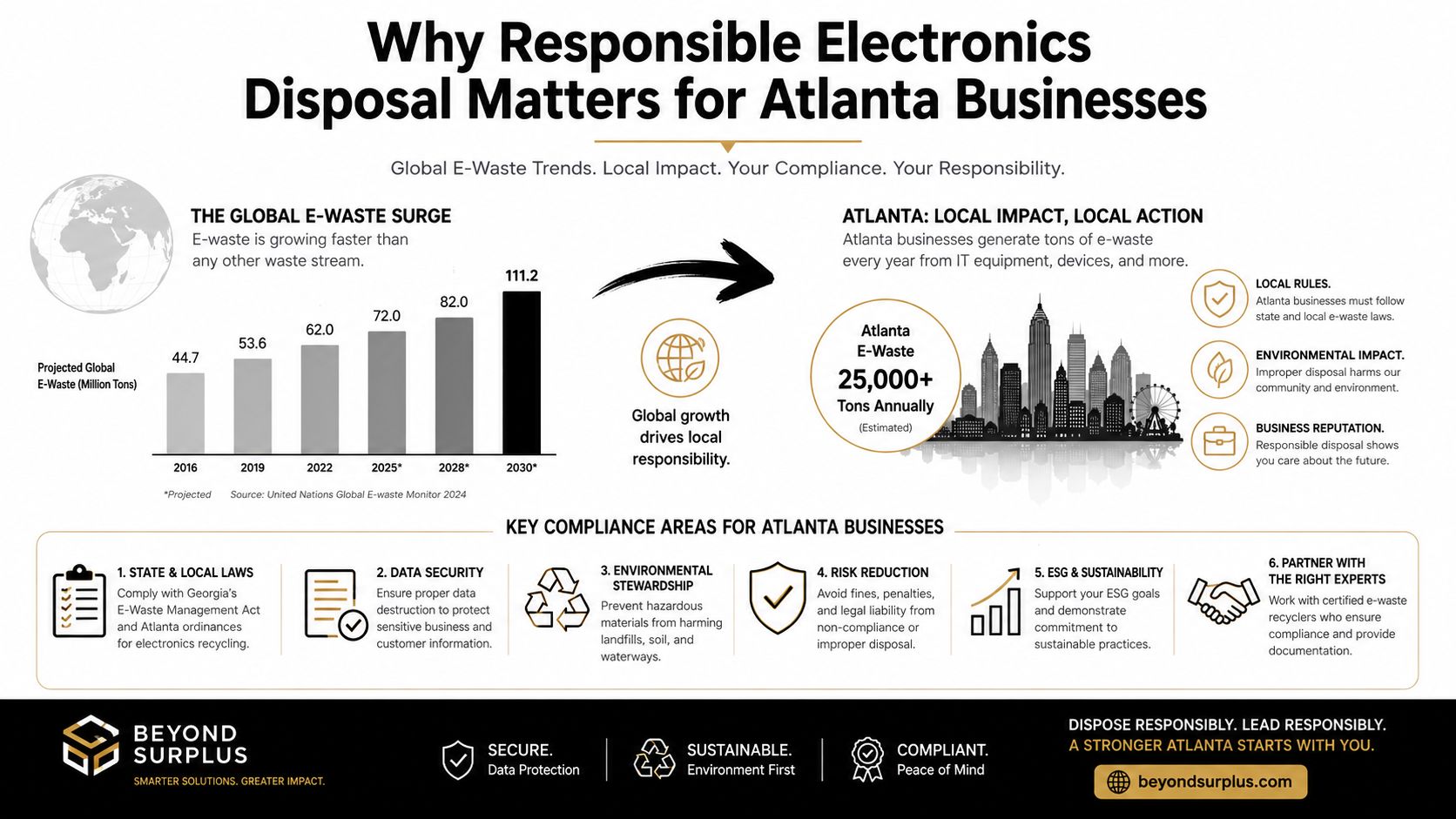
Atlanta companies need more than a recycler. They need a process that can stand up to audit review, vendor questions, and internal security checks. Local diversion efforts have improved, but enterprise electronics still carry data, metals, and regulated components that should not enter general waste streams (Atlanta disposal guidance). For facility managers and IT directors, the issue is whether each handoff creates a clean transfer of responsibility and clear proof of where the asset went.
Compliance as the Primary Driver
Responsible disposal should be built around certified recycling, secure data destruction, and chain-of-custody documentation rather than simple removal. That approach matches how enterprise, healthcare, finance, and public-sector teams should handle end-of-life assets, especially when regulators, insurers, or auditors may later ask who touched the equipment and what happened to the data.
A generic receipt only shows that something was dropped off. It does not show who accepted the device, whether the drive was sanitized, whether memory-bearing parts were separated correctly, or whether the downstream recycler was verified. That gap is where compliance problems start.
Practical rule: if the asset can store data, the disposal process needs a paper trail.
Atlanta business teams also need to separate environmental responsibility from security responsibility. The environmental side focuses on certified downstream processing and proper material handling, while the security side focuses on whether drives, SSDs, and other memory-bearing components were wiped or destroyed before the asset left your control. For a closer look at why discarded electronics create both environmental and operational risk, see electronic waste and sustainability.
What the business implication really is
Old equipment should be treated as a regulated asset, not leftover clutter. A retired server or a stack of laptops can create exposure if it is folded into a general junk pickup and later the serial numbers, certificates, and disposition records do not match. Better recycling access in the city helps, but it does not replace internal controls.
The practical standard is documented transfer, not convenience. Devices should leave only after they are classified, tracked, and assigned to a documented end point. That is what separates a clean disposal event from a future audit problem.
Building Your Asset Inventory Before Disposal
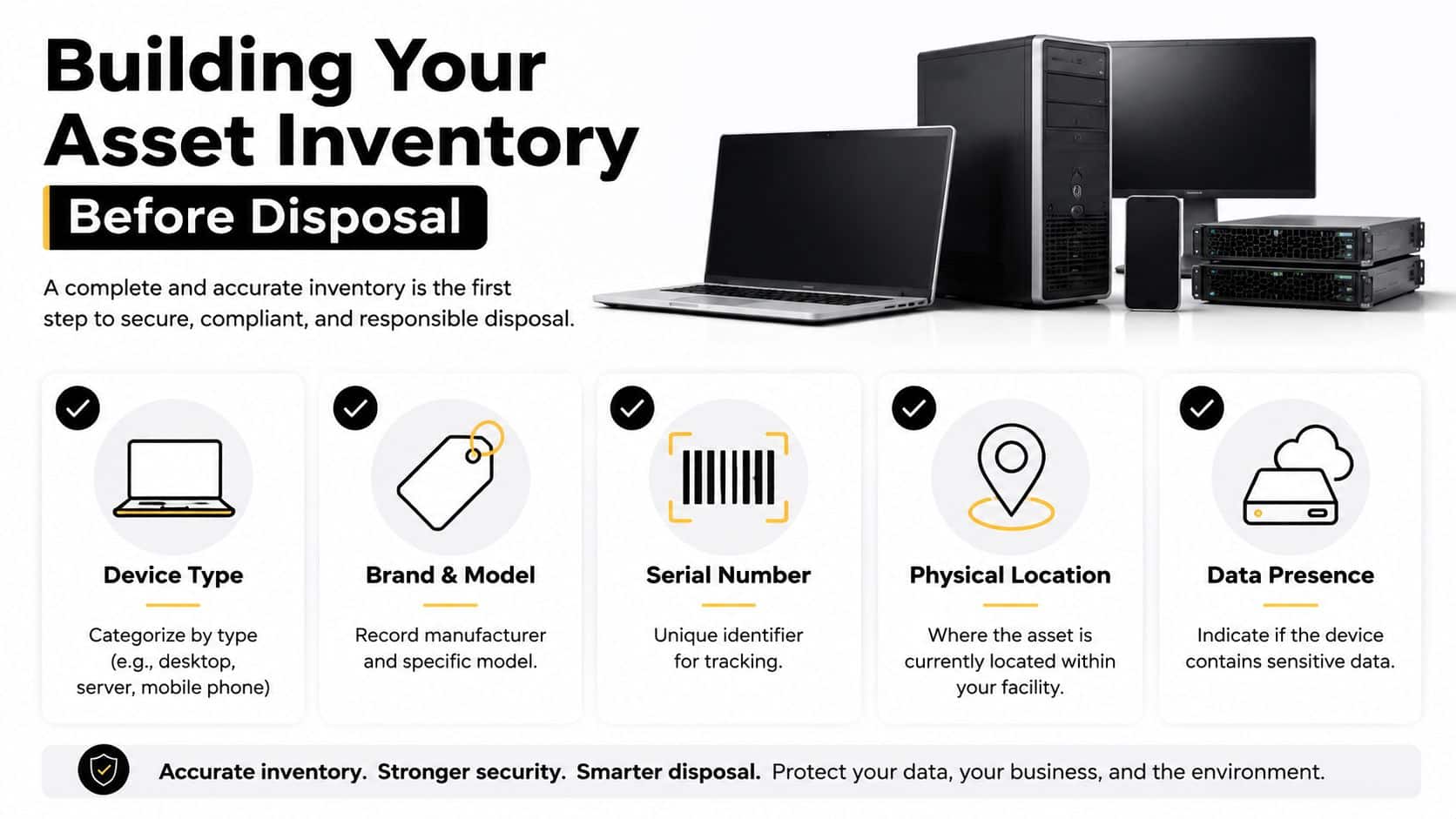
Before a single device leaves the building, build a clean inventory. An industry guide recommends recording device type, brand and model, serial number, physical location, and whether the item contains data-bearing media such as a hard drive, SSD, or memory module (Georgia e-waste inventory guidance). That inventory becomes the baseline for pickup, tracking, and final documentation.
What to record before anything leaves the site
Start with the asset record you already have, then reconcile it against what's on the floor. If a laptop is missing from the spreadsheet, fix that before the truck arrives. If a device has no visible serial number, flag it and decide whether it needs special handling.
A defensible record usually includes:
- Device type: desktop, server, laptop, monitor, phone, storage device, or peripheral
- Brand and model: enough detail to identify the exact equipment
- Serial number: the unique tracking reference for the asset
- Physical location: room, rack, closet, or department
- Data presence: whether the device contains storage media or other sensitive components
Keep one owner for the list. When nobody owns final paperwork, chain-of-custody gaps show up fast.
How to separate the risky items from the easy ones
The most useful classification splits equipment into data-bearing, sanitizable, destroy-only, and non-data-bearing groups. That distinction determines whether the unit is a candidate for wiping, whether the drive must be shredded, or whether the item can move through plain recycling once the data risk has been removed.
Do not mix loose drives, laptops, and non-data-bearing scrap in the same pile. That habit complicates serial tracking and makes later certificate matching harder. If you've ever had to explain why a certificate of destruction doesn't match the original asset list, this is usually where the problem started.
A strong inventory also lets you separate valuable devices from end-of-life gear. That matters because some equipment can be routed to reuse or recovery, while other gear should go straight to secure destruction. The point isn't to create paperwork for its own sake, it's to make sure every item has a documented destination before it crosses the dock.
Need tighter internal controls? Beyond Surplus's inventory optimization resource is relevant if your team is cleaning out mixed IT stock alongside retirement equipment.
Choosing Between Data Wiping and Physical Destruction
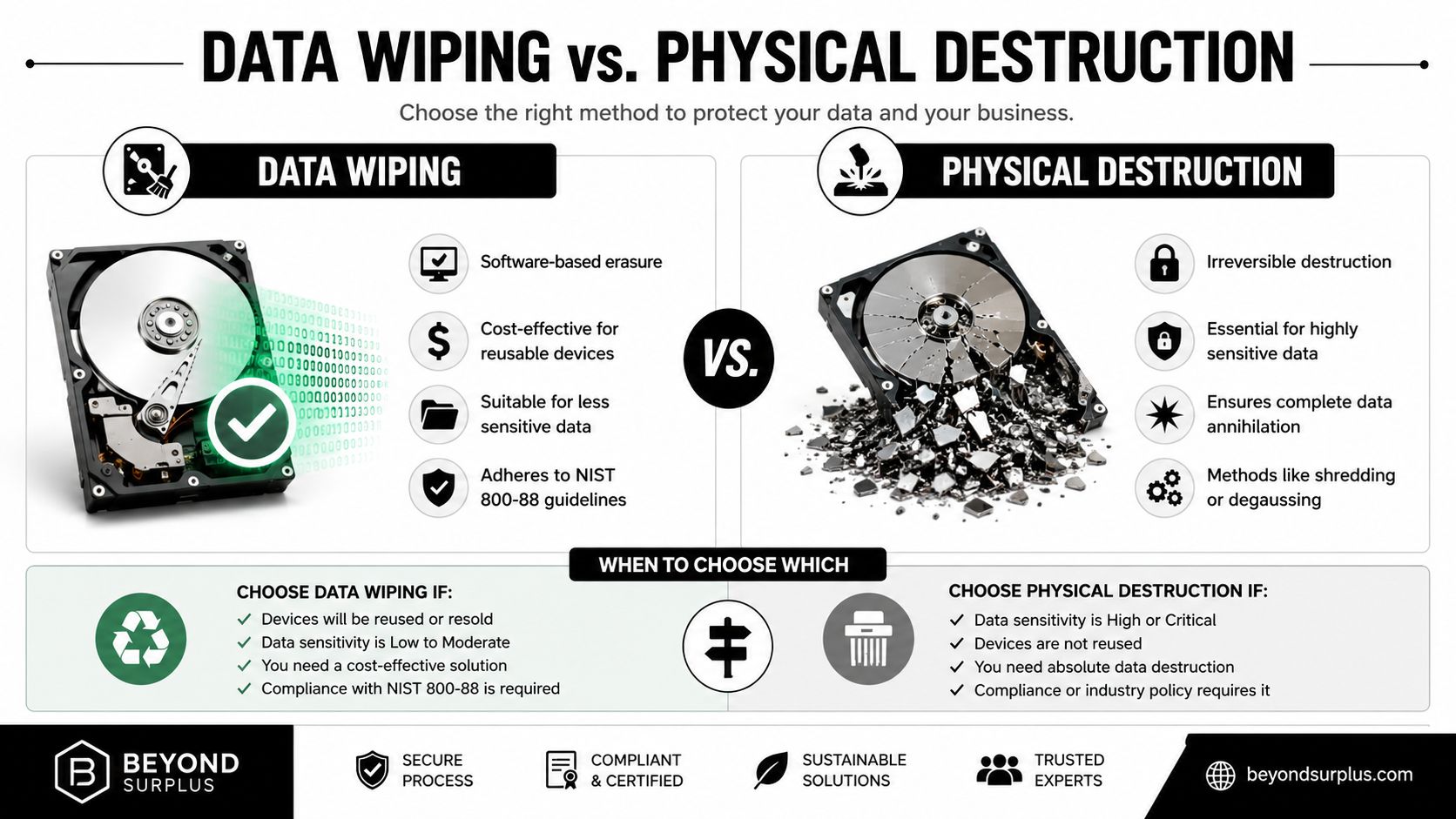
There's no single data-sanitization method that fits every asset. Industry guides for Atlanta businesses reference NIST 800-88-style wiping and physical hard-drive shredding as the secure choices for regulated devices (secure disposal guide). A factory reset is only a starting point, not a complete control, unless it's part of a documented erasure process that matches internal policy.
Use wiping when the device still has a second life
Wiping makes sense when the hardware is still reusable and the data sensitivity is manageable. It's the better fit for laptops, desktops, and some enterprise devices that may be redeployed, resold, or donated after sanitization. The output should be a data-destruction certificate or equivalent proof showing the device was processed under an approved method.
The practical benefit is that sanitized assets can sometimes retain value. That's why many ITAD workflows treat wiping as the first option for reusable gear and destruction as the fallback for devices that can't be confidently cleared.
Use physical destruction when the risk is too high
If the media contains highly sensitive information, or if the device can't be verified as safely sanitized, physical destruction is the safer endpoint. Shredding turns the media into unrecoverable material and removes debate about whether an erase command fully completed. That's why drives, SSDs, and other storage components often get separated early in the workflow.
A factory reset alone is not enough for regulated business equipment unless it's backed by a documented erasure procedure.
For teams deciding between the two, the decision tree is straightforward. If the hardware will be reused and the data can be sanitized under policy, wipe it. If the media is sensitive, damaged, or non-qualifying for reuse, destroy it and keep the destruction certificate with the asset record.
The operational difference matters too. Wiping can support remarketing or redeployment, while shredding closes the risk quickly and cleanly. In both cases, the key deliverable is documentation, not the machine action by itself.
For detailed device-level steps, see how to wipe a computer hard drive.
Scheduling Secure Pickup and Transport in Atlanta
Once the inventory is clean, the next decision is how the assets leave the site. Atlanta providers offer both scheduled pickups and drop-off options, and local recycling facilities can operate on business hours rather than only event days, such as the Atlanta drop-off facility at 640 Cordell Drive, Suite B, Atlanta, GA 30349, with hours from 8:00 a.m. to 4:30 p.m. Monday through Friday (Atlanta drop-off location). For a small office load, drop-off can be practical. For a multi-site enterprise, pickup is usually easier to control.
Pickup works best when the load is controlled
A secure pickup should feel like a logistics event, not a curbside collection. The assets should already be grouped, counted, and labeled so the carrier can verify serials against the inventory. Scheduled pickup is also where chain of custody really starts, because the handoff is documented at the point the equipment leaves your premises.
That matters for organizations with multiple locations. If each site handles its own retirement gear differently, the paperwork gets messy fast. One team should own scheduling, one team should own the inventory, and one person should sign off on final transfer documents.
Drop-off makes sense for smaller, simpler loads
Drop-off can be efficient when you have a few assets, a limited number of data-bearing devices, and a recycler that accepts your equipment on posted business hours. It works especially well for standard hardware that does not need complex transport coordination. It's less useful when you need serialized proof across racks, carts, and mixed device classes.
Secure transport is part of compliance, not just a convenience add-on.
A professional vendor should be able to explain how items are loaded, whether transport is insured, and how the chain of custody is logged during transit. If the process sounds informal, it usually is. That's the wrong setup for enterprise, healthcare, finance, or government equipment.
For Atlanta organizations arranging collection, the relevant service page is Atlanta e-waste pickup. Use that kind of service only after the inventory and sanitization path are already decided.
Securing Certificates and Compliance Documentation
For business electronics, the paperwork is the actual risk transfer. Atlanta guidance focused on B2B disposal emphasizes a recycling certificate, a data-destruction certificate, and a serialized chain-of-custody record tied to each asset (Atlanta e-waste laws and best practices). A generic recycling receipt does not satisfy an auditor when the pertinent question is who handled which serial number and what happened to the storage media.
Match the documents back to the inventory
The certificate set only works if it matches your original asset list. Serial numbers, counts, and device categories need to line up with the pickup manifest and the final disposition paperwork. If the recycler processed 40 assets and your inventory shows 41, that gap has to be resolved before the file closes.
That level of matching matters because enterprise, healthcare, finance, and government buyers need proof that liability moved through a controlled process, not a vague promise that everything was handled responsibly. The three documents together create that proof, and each one should point back to the same asset record.
What good documentation does for auditors
Good documentation shows who received the equipment, when the handoff happened, what was done to the data-bearing media, and where the recycled assets went next. It also supports internal review when procurement, security, or compliance teams ask what happened to retired devices. Many organizations keep the certificates with the asset retirement record, not in a separate inbox, so the trail stays complete when someone needs to pull it later.
The strongest workflow is to file the pickup manifest, the destruction or wipe certificate, and the recycling certificate together, along with the notes in chain-of-custody documentation. If your vendor cannot produce all three when needed, the chain is weaker than it should be.
Audit-ready proof beats a recycling receipt every time.
For teams working with a disposal partner, Beyond Surplus issues the kind of documentation that supports serialized accountability and downstream reporting. That is the difference between a cleanup job and a compliance program.
Your Complete Electronics Disposal Action Plan
The cleanest Atlanta disposal process is simple to describe and hard to fake. Start with a full asset audit, classify the devices by data risk, choose the right sanitization method, schedule a secure pickup or controlled drop-off, and file the final certificates with the retirement record. If the assets have resale value, route them through a legitimate value-recovery path before they become waste.
Use this sequence:
- Assess the inventory. Confirm each device's type, serial number, location, and data-bearing status.
- Sanitize or destroy the media. Use wipe or shredding based on the device's role and sensitivity.
- Select a qualified vendor. Pick a recycler or ITAD provider that can issue the right certificates.
- Control the logistics. Arrange pickup or drop-off only after the records are reconciled.
- Archive the documentation. Save the recycling certificate, destruction certificate, and chain-of-custody record together.
Special equipment needs special handling. Data center gear, medical devices, and mixed office refresh projects often need tighter coordination than a standard laptop cleanup. If you're managing recurring retirements, schedule a standing process instead of treating every cleanup as a one-off event.
Beyond Surplus handles certified electronics recycling, secure IT asset disposal, and documentation-driven pickups for business clients that need audit-ready results. If your team is retiring laptops, servers, storage media, or mixed office equipment in Atlanta or anywhere in the U.S., visit Beyond Surplus to request a pickup and get the right paperwork in place before anything leaves your site.


