

Remote offboarding usually breaks in the same place. HR closes the exit checklist, IT disables accounts, and the laptop is still sitting on a former employee's kitchen table with no box, no tracking number, and no verified path back into your asset inventory. At a small scale, teams can patch that with reminders and spreadsheets. Growth destroys that approach.
For IT managers, the main challenge isn't shipping one laptop back. It's building remote employee laptop return solutions for growing organizations that hold up across hiring spikes, layoffs, seasonal churn, and multi-state teams. The companies that get this right don't rely on a string of ad-hoc tasks. They build a system where policy, logistics, tracking, and final disposition work as one chain of custody.
Why Ad-Hoc Laptop Returns Fail at Scale
A remote workforce spreads devices everywhere. In 2025, approximately 28% of U.S. workers are fully remote and 72% are hybrid, which means companies are managing retrieval across a wide geographic footprint. At the same time, only about 30% of devices are returned on time by default, according to industry reporting summarized here. That's why informal return processes collapse as headcount grows.

The first failure is ownership. HR thinks IT is chasing the device. IT assumes the manager already handled it. Nobody owns the shipment, so nobody notices the delay until the return window has gone cold.
The second failure is friction. If the employee has to find a box, buy padding, print a label, and make a carrier run, compliance drops. Small inconveniences become permanent losses when exits stack up.
What breaks first
- Manual tracking fails: spreadsheets age fast, and return status changes get buried in inboxes.
- Asset visibility disappears: once a laptop leaves the employee's hands, teams often lose real-time status.
- Security risk expands: an unreturned endpoint isn't just missing hardware. It's an unmanaged device outside controlled disposal.
- Finance gets hit twice: first from replacement cost, then from delayed redeployment or missed resale value.
Practical rule: If your return process depends on memory, goodwill, or one person's inbox, it isn't a process.
Nearly 50% of companies lose at least 5% of their IT devices during offboarding events, and organizations without structured return processes see return rates between 70% and 85%, leaving 15% to 30% of devices permanently missing, according to this breakdown of remote laptop return practices.
A scalable playbook fixes that by making every exit follow the same path. Trigger the return at offboarding. Send packaging automatically. Track the shipment. Log receipt. Move the device directly into data destruction or recovery workflow. That's the standard.
Building Your Bulletproof Laptop Return Policy
Most laptop return problems start long before offboarding. They start when the company never defined the rules clearly enough to enforce them.
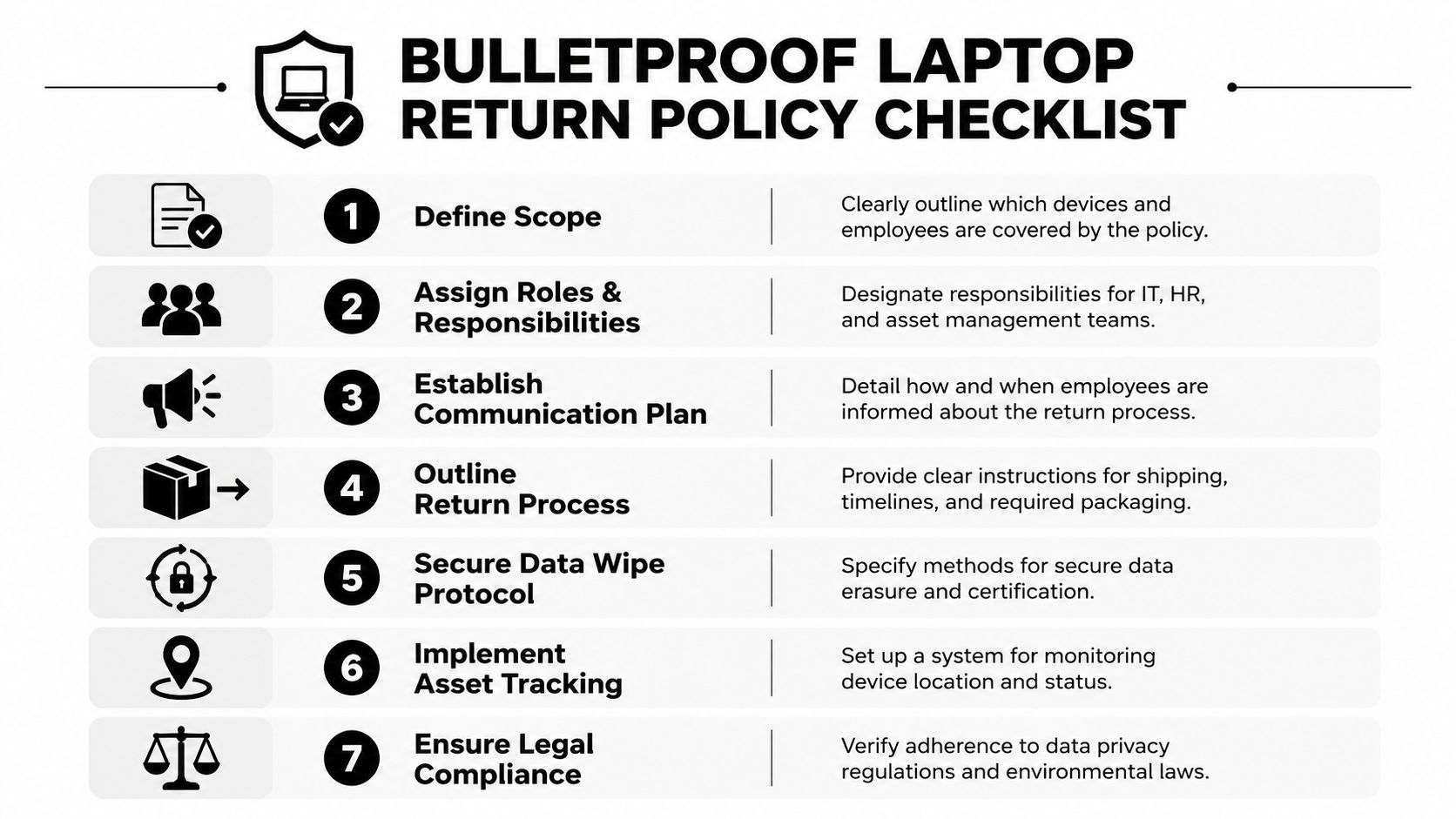
A policy isn't admin paperwork. It's the operating document that tells employees what must be returned, when the process starts, how the device must be packaged, and what happens if they ignore the request.
The clauses that matter
Your policy should define:
- Covered assets: laptops, docks, monitors, phones, tokens, and accessories.
- Trigger events: resignation, termination, role change, leave, or hardware refresh.
- Return deadline: state the window clearly and tie it to offboarding communications.
- Condition expectations: normal wear is one thing. Missing drives, broken screens, or stripped accessories should be documented separately.
- Approved return method: don't leave this open-ended. Name the exact shipment or pickup process.
- Escalation path: who follows up first, who approves legal review, and when the case moves beyond reminders.
That last point matters more than many teams expect. Over 34% of remote offboarding failures involve unreturned devices, yet 68% of HR and IT teams delay legal action due to uncertainty about whether laptop costs can be deducted from final paychecks, a question that varies by state and requires a clear pre-existing policy, according to this analysis of remote laptop return issues.
Policy language has to match jurisdiction
Don't write one aggressive clause and assume it applies everywhere. Wage deduction rules vary by state. California is not Georgia. A policy that sounds forceful but doesn't match local law creates more liability, not less.
Use legal counsel to confirm:
| Policy area | What IT should confirm |
|---|---|
| Final paycheck deductions | Whether deductions are allowed and under what written authorization |
| Return obligations | Whether employment agreements and device acknowledgments are enforceable as written |
| Notice timing | What must be communicated before separation and at separation |
| Disposal requirements | How chain-of-custody and documentation support compliance |
Put the return obligation in the employment agreement and the acceptable use policy. Then repeat it in onboarding and offboarding communications.
What works in practice
The strongest policies remove ambiguity. They assign responsibilities across HR, IT, legal, and the employee. They also define evidence standards. Serial number, assigned user, shipment tracking, receipt confirmation, and disposition record should all live in one file trail.
A policy also needs operational realism. If you tell employees they must return equipment within days but provide no packaging and no prepaid label, the policy is weak even if the wording is strong.
Streamlining Logistics for Packaging and Shipping
Policy sets the rules. Logistics determines whether the rule gets followed.
Most organizations choose one of three retrieval models. The wrong one creates friction and delay. The right one standardizes returns without turning every exit into a custom project.
Three common models
| Model | How it works | Main weakness | Best fit |
|---|---|---|---|
| Employee-managed shipping | Employee buys packaging and ships the laptop back | High friction and inconsistent packing | Very small teams with low risk tolerance on cost only |
| Prepaid return kit | Company sends box, padding, label, and instructions | Requires coordination and inventory of kits | Most growing organizations |
| Vendor-managed pickup | Third party handles kit, scheduling, tracking, and intake | Higher service cost | Distributed teams with volume or compliance pressure |
The gap between these models is significant. When companies provide fully equipped prepaid shipping kits, employee compliance exceeds 90%. Requiring employees to buy their own supplies can reduce compliance by nearly 40%, based on this guidance on shipping laptops back from remote employees.
That's why the prepaid kit is usually the operational sweet spot.
What a real return kit should include
- Fitted box: not a random oversized carton that lets the laptop shift during transit
- Protective material: enough to prevent impact damage
- Tracked prepaid label: so the company controls carrier data and status updates
- Clear instructions: short, plain-language steps, not a long policy PDF
- Return identifier: employee name, asset tag, or case ID that matches internal records
DIY shipping sounds cheaper on paper, but it creates hidden costs. Devices arrive damaged. Labels are lost. Employees delay the return because the task is inconvenient. IT staff then spend more time chasing a return than the company saved on packaging.
When full vendor management makes sense
Some teams outgrow kits alone. If you're handling high volumes, cross-country exits, sensitive roles, or frequent terminations, a vendor-managed program can remove a lot of manual coordination. The provider sends the kit, tracks the movement, receives the device, and pushes it into disposition workflow.
The retrieval method should match your failure point. If your issue is employee follow-through, reduce friction. If your issue is internal coordination, outsource the logistics.
For growing organizations, the practical answer is usually a hybrid model. Standard exits get kits. High-risk or time-sensitive exits get managed retrieval.
Ensuring Security from Pickup to Disposition
A laptop isn't secure because it arrived at your facility. It's secure when the chain of custody is documented and the data is destroyed or sanitized with proof.
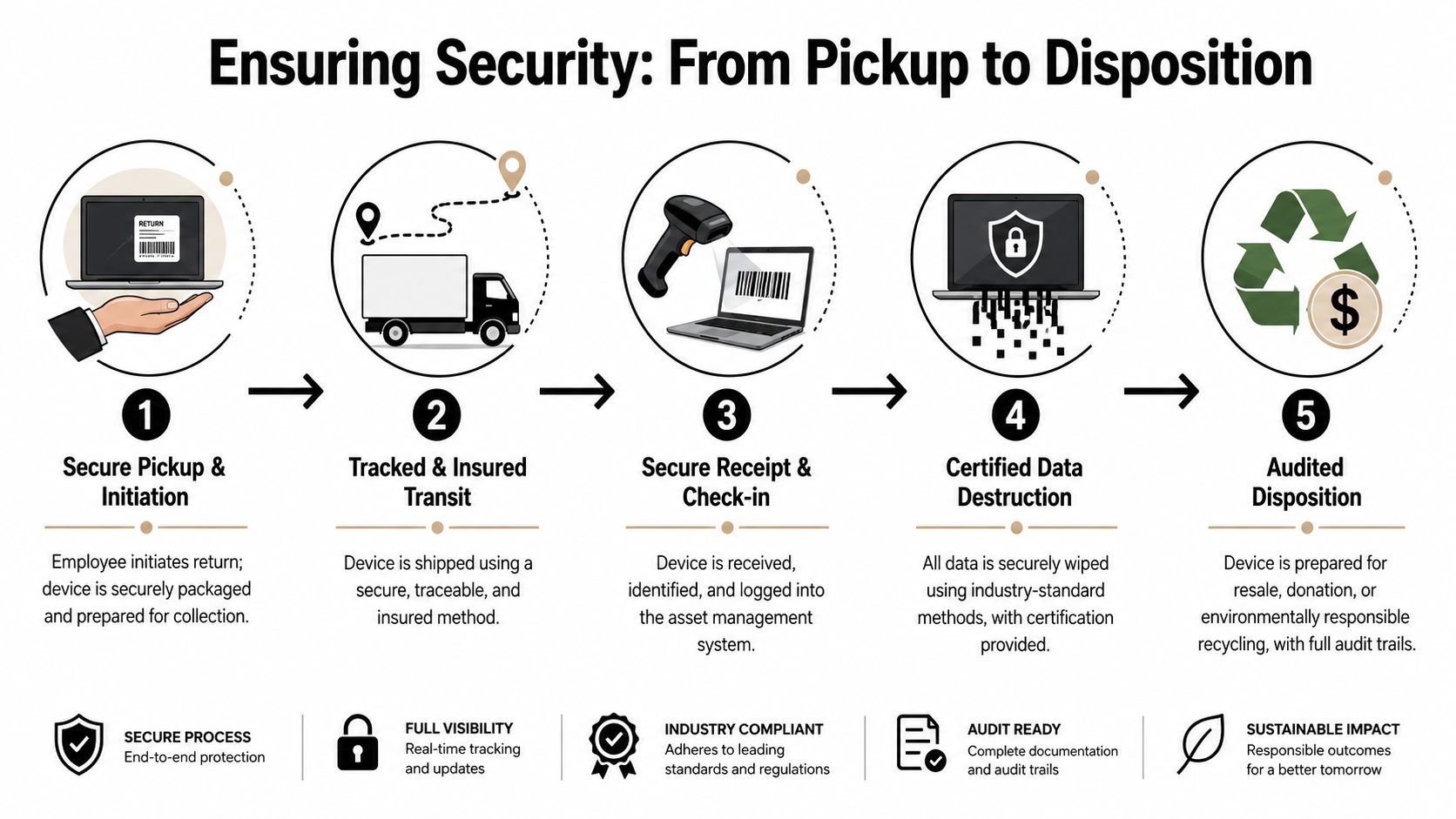
Too many teams stop at “delivered.” That creates the most overlooked risk in the whole process: the gap between receipt and verified destruction.
The disposition stall
Data shows that 42% of returned laptops from remote offboardings experience a 14+ day gap between physical receipt and certified data destruction, creating what many teams experience as a disposition stall. A unified platform that links tracking IDs to destruction certificates is the key control for reducing that exposure, according to this discussion of remote return compliance gaps.
That gap matters because devices often sit in cages, shelves, or intake rooms waiting for review. During that time, they still contain data, they may not yet be removed from asset books, and audit documentation is incomplete.
What a secure chain of custody looks like
A sound process includes these checkpoints:
Shipment initiation
The return label, tracking ID, employee, and asset record are linked before the device moves.Tracked transit
The company can see in-transit status and exceptions, not just final delivery.Serialized receipt
Intake staff scan and verify the exact device received against the asset record.Data destruction or sanitization
The device is wiped or physically destroyed under documented controls.Final disposition record
Resale, redeployment, recycling, or shredding is logged with supporting documentation.
A missing certificate creates the same audit problem as a missing laptop. You can't prove what happened.
Compliance is a documentation exercise
The FTC Disposal Rule (16 CFR Part 682) requires businesses that maintain consumer information in records to take reasonable measures to protect that information during disposal. In practice, that means choosing a process and provider that can deliver certified data destruction and documentation, as noted in Beyond Surplus guidance on protecting sensitive data during remote laptop returns.
For IT managers, that translates into vendor questions:
- Can they produce serialized certificates?
- Can they tie the certificate to the shipment and asset ID?
- Can they show who handled the device and when?
- Can they separate devices for resale from devices marked for destruction without breaking chain of custody?
If the answer to any of those is unclear, the workflow isn't mature enough.
Maximizing Value and Choosing the Right Partner
Once the return system is stable, the next question is financial. Are you just getting devices back, or are you recovering usable value from them?
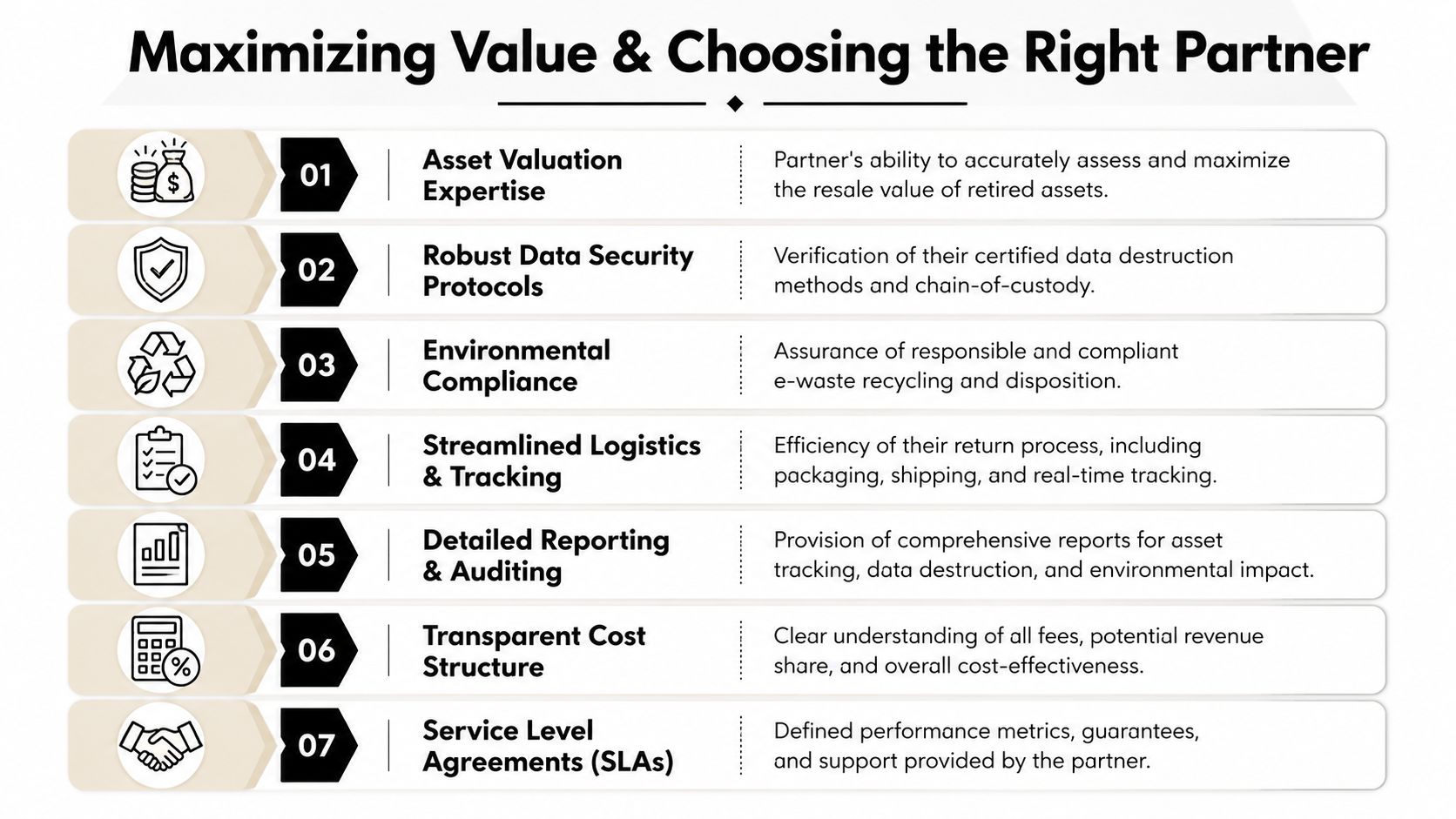
Not every returned laptop belongs in the shred stream. Some can be redeployed internally. Others can go through refurbishment and resale. Older or damaged assets may need compliant recycling. The right ITAD partner helps you sort those paths without breaking documentation.
Value recovery starts with triage
A practical intake model separates devices into three tracks:
| Track | Typical outcome | What matters most |
|---|---|---|
| Reuse | Clean, test, and redeploy | Speed back into inventory |
| Recovery | Refurbish and resell | Accurate grading and transparent settlement |
| End of life | Recycle or destroy | Secure destruction and environmental documentation |
That's why partner selection matters. A recycler can remove assets. A real ITAD partner should also preserve resale opportunity where appropriate, while still maintaining secure handling.
What to look for in a partner
- Documented data destruction: The provider must support certified wiping or physical destruction with auditable records.
- Nationwide logistics capability: Remote fleets don't live near one office. Your provider needs broad pickup and shipping coverage.
- Chain-of-custody reporting: Shipment, intake, processing, and final disposition should connect in one reporting flow.
- Clear commercial terms: Understand service fees, value recovery structure, and what happens with low-value assets.
- Environmental handling: You need evidence that downstream recycling is managed responsibly.
- Operational fit: Some vendors are strong in warehouse processing but weak in remote return execution. Others are the opposite.
The compliance baseline is not optional. The FTC Disposal Rule (16 CFR Part 682) requires businesses to take reasonable measures to protect consumer information during disposal, so selecting a vendor that provides certified data destruction and documentation is part of risk transfer, not just procurement, as outlined by this explanation of IT asset recovery support for remote employee laptop returns.
One option in this market is Beyond Surplus, which offers logistics coordination, certified data destruction, and documentation support as part of its IT asset disposition services. The key point isn't brand preference. It's that your provider must be able to manage retrieval, security, and disposition as one connected service.
Choose the partner that can prove custody, not just promise pickup.
Measuring Success and Scaling Your Program
A laptop return program is mature when you can measure it without hunting through five systems.
The basic KPIs are straightforward, but they need consistent definitions. Track return rate, time to return, cost per retrieval, percentage moved to resale or redeployment, and exceptions that required escalation. If those numbers aren't easy to produce, the workflow still has blind spots.
The KPIs worth watching
- Return completion rate: Are assets returning?
- Cycle time: How long from separation to physical receipt?
- Security completion time: How long from receipt to certified destruction or approved reuse path?
- Exception volume: Which cases stall and why?
- Recovered value: Which assets generate budget return instead of disposal cost?
Use those measures to tighten the system. If cycle time is long, fix the shipping model. If exceptions cluster by business unit, tighten manager accountability. If security completion lags after receipt, your disposition workflow needs attention.
For leadership reporting, keep the dashboard simple. Show asset recovery, unresolved cases, and documented closure. For program improvement, go deeper and compare results by location, role type, exit type, and retrieval method. That's how remote employee laptop return solutions for growing organizations stay scalable instead of becoming another manual process.
A documented feedback loop matters too. IT, HR, procurement, and security should review failures together. If you want a model for that, Beyond Surplus publishes useful ideas around customer satisfaction measurement that can be adapted to asset return workflows.
If your offboarding process still depends on reminders, spreadsheets, and disconnected handoffs, it's time to replace it with a system. Beyond Surplus helps organizations coordinate secure laptop returns, certified data destruction, IT asset recovery, and compliant end-of-life disposition so remote devices don't turn into permanent losses. Contact Beyond Surplus for certified electronics recycling and secure IT asset disposal.


