

A lot of IT teams are dealing with the same mess right now. A laptop is somewhere in a former employee's home office, a monitor was handed to a contractor without a clean record update, and nobody can say with confidence whether the device was returned, wiped, redeployed, or lost. In a distributed workforce, asset recovery breaks down unnoticed. Then it becomes a finance problem, a security problem, and eventually a compliance problem.
That's why The Complete IT Asset Recovery Guide for Distributed Workforces has to start with operations, not recycling. If your process only begins after HR marks someone inactive, you're already behind. The companies that recover equipment consistently treat offboarding as a controlled workflow with ownership, deadlines, tracking, and proof.
Building the Foundation of Your Remote IT Asset Recovery Program
Remote asset recovery fails when companies rely on informal habits. One manager sends a label. Another asks the employee to expense shipping. A third assumes the laptop is old enough to ignore. That inconsistency is expensive and risky.
A formal IT asset recovery policy fixes that. It gives HR, IT, legal, procurement, and managers one operating document for every separation event, whether the employee resigns, is terminated, or finishes a contract.
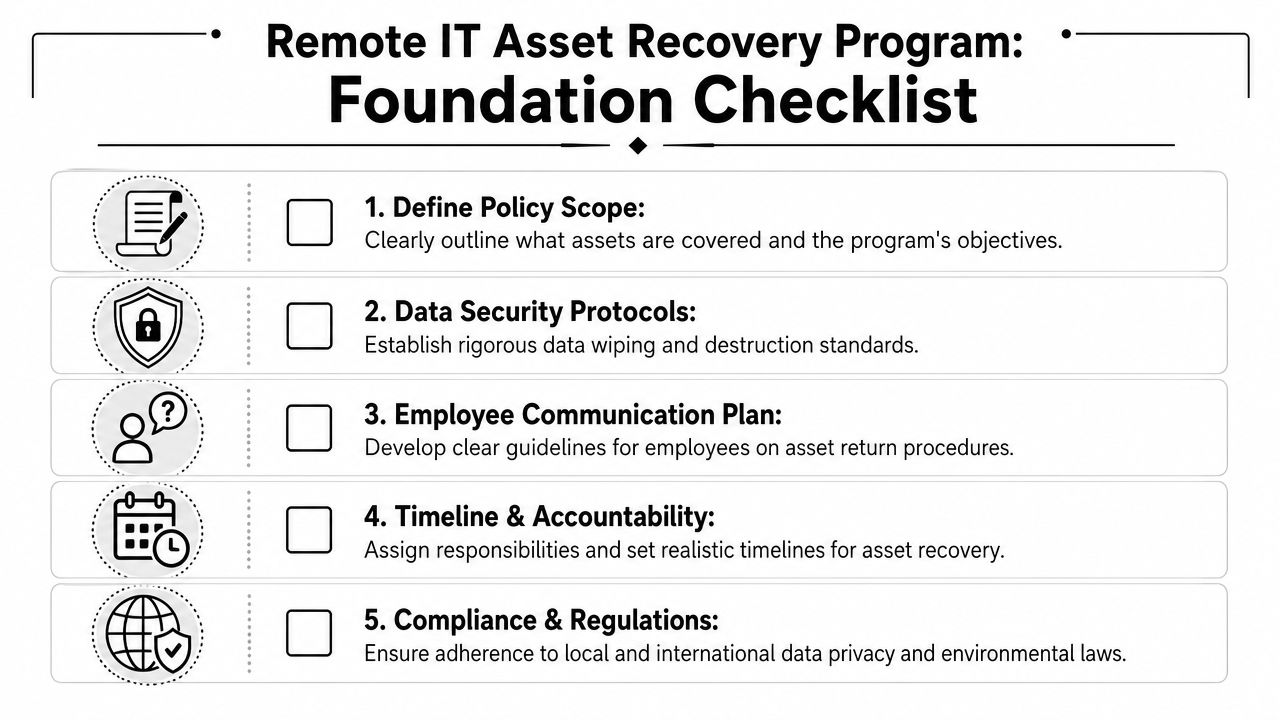
Put ownership in writing
Start with the basics that people usually skip:
- Covered assets include laptops, desktops, monitors, docking stations, phones, tablets, drives, accessories, and any specialized equipment issued by the company.
- Ownership terms should state that company-issued equipment remains company property through the full lifecycle.
- Return obligations should apply at separation, role change, or hardware refresh.
- Decision authority should identify who can approve exceptions, such as low-value items or secure remote wipe as an alternative to retrieval.
A documented policy matters because performance is measurable. A highly optimized remote recovery program achieves an 80 to 90% recovery rate, while rates below 70% signal failures in policy, logistics, or communication, according to Beyond Surplus on improving remote employee asset recovery rates.
Define the employee experience
The employee shouldn't have to guess what happens next. The policy should answer:
- What must be returned.
- When it must be returned.
- How return materials will be provided.
- Who to contact for pickup or packing issues.
- What happens after receipt and inspection.
Practical rule: If your policy leaves room for interpretation, your recovery rate will depend on whoever happens to run that offboarding ticket.
A strong policy also includes reminder cadence, escalation rules, and final disposition language. If you want a practical template for workflow design, this remote employee equipment return program guide is a useful operational reference.
Build for legal defensibility
Good policies do more than improve returns. They create records. That matters when an employee disputes ownership, when a regulator asks for disposal evidence, or when finance wants to reconcile fixed assets against devices still in the field.
At minimum, your system of record should capture serial number, assigned user, return status, communication history, shipment status, inspection outcome, and closeout confirmation. If that data lives across email threads and spreadsheets, the policy isn't fully implemented. It's just written down.
Mastering Logistics for Pickup Mail-in and De-installation
Once the policy exists, logistics becomes the make-or-break layer. Most return failures aren't caused by bad intent. They happen because the process creates friction. The employee doesn't have a box. The label arrives late. The monitor is too bulky to ship easily. Nobody knows whether a home-office teardown needs a technician.
The fix is simple in principle. Remove effort from the employee and standardize the return path.
Start the process when notice is given
The timing rule is critical. Organizations should trigger retrieval immediately when an employee gives notice of resignation or termination, not on the final day, because that allows inventory confirmation and logistics initiation to happen at the same time, as explained in Signifi's ITAM best practices for enterprises.
That early trigger lets IT freeze the asset record, confirm what was issued, and send one set of instructions with one deadline and one return method.
Choose the right return model
Different assets need different recovery methods.
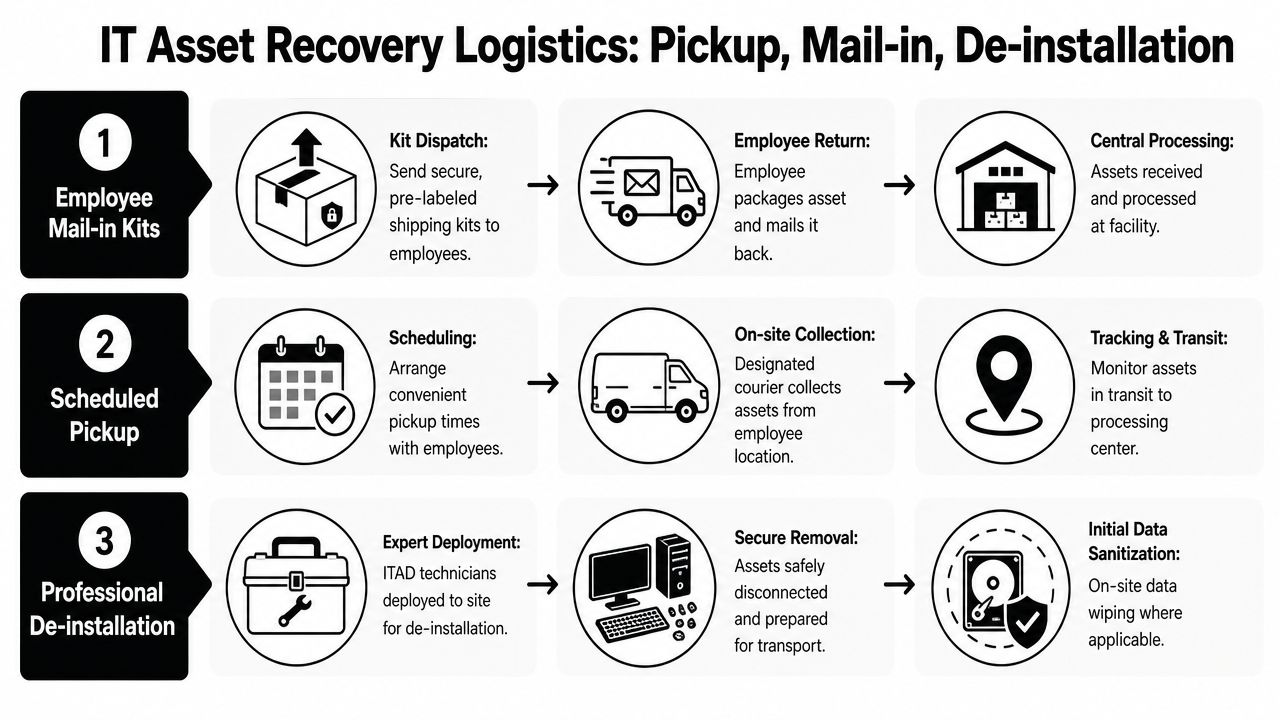
Mail-in kits
This is the default for standard laptops, phones, and accessories.
- Best for lightweight assets and routine offboarding
- Requires prepaid label, packaging, packing instructions, and status tracking
- Fails when the employee has to source boxes or pay upfront
Mail-in works because it scales. It doesn't work when the company asks the employee to improvise.
Scheduled pickup
Use pickup when devices are bulky, the employee has multiple items, or the account has higher compliance sensitivity.
A pickup model gives you tighter control over handoff timing and can reduce damage from poor packaging. It's also easier for employees who are leaving under strained circumstances and won't put extra effort into a return.
Professional de-installation
Some remote setups are more like mini branch offices. Think trading desks, engineering workstations, healthcare imaging peripherals, or executive offices with multiple connected devices.
In those cases, de-installation is the safer choice because technicians can disconnect equipment, verify serials, package everything correctly, and document the handoff.
The wrong logistics model creates “returned” assets that never arrive, arrive damaged, or arrive without a clean custody trail.
Automate the handoffs
The workflow should run through a single queue tied to HR offboarding and IT asset management. That queue should generate the shipment request, track reminder history, record transit milestones, and alert teams when an asset stalls.
A useful reference for building that automation is this guide to automated logistics for remote employee laptop returns.
The practical goal isn't elegance. It's fewer exceptions. Every manual handoff creates another chance for a ghost asset.
Ensuring Secure Data Destruction and Regulatory Compliance
A remote asset recovery program fails its audit the moment a returned device cannot be tied to a defensible data disposition record. The laptop may be back in your possession, but the risk remains until the organization can show how data was sanitized or why the media was destroyed. In a distributed workforce, that bar is higher because devices sit in homes, travel through parcel networks, and often contain cached files, browser tokens, local sync folders, and regulated records outside the office perimeter.
The standard should be set before the first box ships. For most enterprise programs, that means documented sanitization procedures aligned to NIST SP 800-88 media sanitization guidance, mapped to your legal, security, and finance requirements. That is the operational framework many teams miss. Data destruction is not only a security task. It affects resale eligibility, audit readiness, insurance exposure, and whether finance can recognize any recovery value from the asset.
Decide disposition by risk class, not habit
Wiping and destruction serve different purposes, and the wrong default gets expensive fast.
| Method | Best use | Result |
|---|---|---|
| Certified wiping | Devices approved for redeployment or resale | Data removed while preserving asset value |
| Physical destruction | Failed drives, encrypted media you cannot verify, or storage from high-sensitivity roles | Media rendered unusable |
I see two common failures in first-time remote recovery programs. One is destroying every drive regardless of condition, which eliminates downstream recovery value on perfectly remarketable equipment. The other is approving reuse based on assumption instead of proof, which creates breach exposure that can be far more expensive than the device itself.
A workable policy should define who gets wiped, who gets destroyed, and who must be escalated for review. Security should own the criteria. IT operations should execute it. Finance should know which path preserves value and which path writes the asset off completely.
Use a four-part decision screen before disposition
Distributed programs need a triage model, not one blanket rule for every return. Before final disposition, screen each asset against four questions:
- What data lived on the device? Executive, finance, healthcare, legal, and engineering endpoints usually need tighter review than a standard kiosk or shared display.
- Can sanitization be verified? If the drive is damaged, inaccessible, or fails the wipe process, destruction is the safer path.
- Does the asset still have resale or redeployment value? A successful wipe only matters financially if the device is still worth putting back into service or remarketing.
- Do contractual or regulatory requirements dictate the outcome? Some data sets, customer agreements, or internal retention rules narrow your options.
It is essential that policy, logistics, security, and finance work from the same playbook. A remote monitor, a broken SSD, and a recently issued executive laptop should not move through the same approval path.
Require evidence that stands up in an audit
Vendor assurances are useless in a dispute. The file needs records.
At minimum, require:
- Serialized asset matching between the device shipped, the device received, and the device processed
- Sanitization or destruction method records tied to the asset record
- Exception logs for failed wipes, damaged media, missing drives, or substituted serial numbers
- Certificates of data destruction that support legal, compliance, and customer audit requests
Beyond Surplus notes in its NIST 800-88 guidance that sanitization has to be documented, not assumed. That point matters in remote recovery because exceptions are common. Devices arrive with dead batteries, broken screens, removed storage, or encrypted drives that no longer boot. Your program needs a documented exception path for those cases before they show up.
Audit test: Could your team produce, for one specific serial number today, the device owner, data disposition decision, sanitization or destruction record, exception notes if any, and certificate without pulling details from email threads?
That is the threshold for a defensible remote ITAD program. If the answer is no, the gap is not paperwork. It is control.
Establishing an Unbroken Chain of Custody
Chain of custody is where a defensible program separates itself from a loose collection of tasks. It records who had the asset, when possession changed, how it moved, where it was received, and what happened next. Without that sequence, a company can't prove that a missing device was merely delayed, that a returned drive was destroyed, or that liability properly shifted after handoff.
Track the asset as an event stream
Think in events, not statuses. “Returned” is too vague. A useful custody record logs distinct moments:
- Employee handoff
- Carrier acceptance
- Transit milestone
- Facility intake
- Inspection
- Data handling
- Final disposition
- Certificate issuance
That level of detail matters when a shipment goes missing or a regulator asks what happened to a specific serial number. It also reduces internal disputes between HR, IT, procurement, and finance because everyone is looking at the same timeline.
Treat certificates as legal documents
Certificates of data destruction and recycling aren't courtesy paperwork. They are part of your risk transfer file. If the vendor can tie those certificates to serialized intake and processing records, your organization has stronger evidence that the asset was handled under controlled conditions.
A practical due diligence view of this issue appears in this explanation of ITAD chain of custody and why it matters.
If a vendor can't show how an asset moved through custody, they also can't prove what happened to the data on it.
Build controls around exceptions
The most important custody cases are the messy ones. Damaged box. Missing accessory. Label created but never scanned. Device received with a mismatched serial. Those exceptions should trigger notes, escalation, and documented disposition decisions.
That's what turns custody into a management control instead of an after-the-fact report. The point isn't perfect transit. The point is being able to explain every irregularity with records that stand up to audit, legal review, and procurement scrutiny.
Maximizing Value Recovery Through IT Buyback Programs
A remote recovery program earns its budget when it does more than collect equipment and close risk. It should also separate assets that still have resale value from assets that belong in recycling, parts harvest, or internal redeployment. That decision affects finance, logistics, and security at the same time, which is why buyback cannot sit outside the operating model.
The market supports that focus. Analysts at Future Market Insights project the global IT asset disposition market will reach USD 39.3 billion by 2035, and they identify computers and laptops as the largest product category in the period they forecast, according to Future Market Insights on the IT asset disposition market.
Set disposition rules before devices come back
The biggest value loss usually happens before the asset reaches the vendor. An offboarding manager waits two weeks to trigger retrieval. A laptop ships without padding and arrives cracked. A three-year-old engineering workstation gets routed to bulk recycling because nobody set a remarketing threshold by model and spec.
These are program design failures, not resale problems.
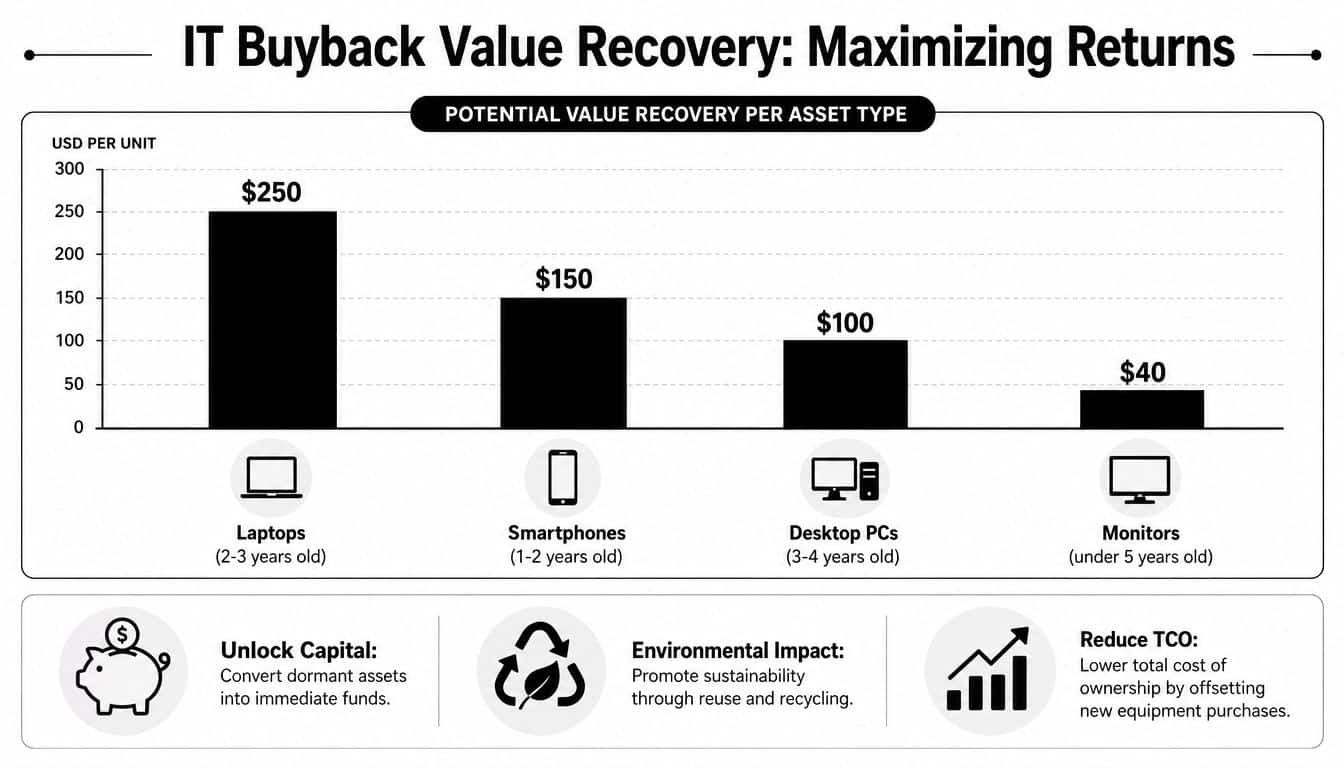
Start with a simple hierarchy. Redeploy internally if the device still matches current standards and the cost to reissue is lower than buying new. Send it to buyback if the model has current secondary-market demand and the expected resale value exceeds refurb and handling cost. Recycle it if condition, age, or missing components erase the margin.
Use practical screens such as:
- Model age and market demand. Older devices can still sell, but only if buyers actively want that configuration.
- Physical condition and completeness. Missing chargers, cracked housings, dead batteries, and locked BIOS settings all reduce price.
- Specification profile. Business-class systems with usable CPU, memory, and storage configurations hold value longer.
- Repair economics. A device with cosmetic wear may still be profitable. A device needing screen, keyboard, and battery replacement often is not.
- Expected processing cost. Secure wiping, testing, grading, and resale labor should not exceed the likely return.
Build finance into the workflow
Finance should approve the grading logic, credit structure, and reporting format before the first return kit goes out. Otherwise, IT ends up arguing about whether a low-grade return was mishandled in transit, underquoted by the vendor, or written off incorrectly in the ledger.
I advise clients to define four things up front. What counts as redeployable. What qualifies for buyback. How credits are issued and reconciled. How damaged, incomplete, or non-returned assets are recorded against the employee, department, or cost center.
That discipline turns value recovery into a measurable process instead of a quarterly surprise. It also gives procurement and finance a common basis for comparing vendors. A vendor due diligence checklist for ITAD programs is useful here because pricing alone tells you very little about actual recovery performance.
Protect the margin
Three problems show up in almost every first-generation remote recovery program:
- Retrieval delays reduce resale value because depreciation does not wait for HR and IT to align.
- Weak packaging controls turn working equipment into damaged inventory during transit.
- No intake triage sends potentially saleable assets into low-value commodity streams.
There is a trade-off. Faster retrieval and stricter packaging standards cost more operationally. In practice, they usually protect more value than they consume, especially for laptops, tablets, and newer smartphones. The only way to prove that is to track recovery by device class, age band, condition grade, and net return after processing cost.
The strongest programs treat buyback as one part of a single framework. Policy sets the return rules. Logistics protects condition in transit. Security clears the device for resale. Finance measures net recovery against expectations. That is how a distributed workforce program creates value instead of just containing loss.
How to Select the Right ITAD Vendor for Your Distributed Team
Choosing an ITAD vendor for a distributed workforce isn't the same as hiring a local recycler to empty a storage room. You need a partner that can handle remote logistics, data destruction, reporting, and value recovery without breaking the custody trail. That's why vendor evaluation should look more like risk assessment than price shopping.
The market itself points to the enterprise stakes. The IT and telecom segment accounts for over 30.0% of global IT asset disposition revenue share in 2024, which reflects how much recoverable equipment and regulated risk sits inside IT-heavy operations, according to Grand View Research on the IT asset disposition market.
Compare a full-service ITAD partner against a basic recycler
| Capability | Full-service ITAD partner | Basic recycler |
|---|---|---|
| Remote employee retrieval | Structured mail-in, pickup, and de-install workflows | Often limited or ad hoc |
| Data destruction evidence | Serialized records and certificates | May offer general confirmation only |
| Chain of custody | Multi-step documentation from pickup to disposition | Often minimal |
| Value recovery | Testing, grading, remarketing, reporting | Usually not core |
| Compliance support | Audit-ready documentation | Variable |
A company such as Beyond Surplus can fit this full-service model because it offers IT equipment disposal, data destruction, logistics coordination, and documentation for business clients nationwide, but the same evaluation standard should be applied to any vendor under consideration.
Use a procurement-grade checklist
Ask direct questions. If the answers are vague, move on.
- Logistics coverage can they support distributed employees across your operating footprint?
- Security process do they provide certified wiping, destruction options, and asset-level reporting?
- Custody controls how do they document handoff, intake, and exception management?
- Financial recovery can they separate recyclable scrap from remarketable hardware?
- Documentation quality will audit, legal, and procurement accept the records?
For a structured review process, use a vendor due diligence checklist for ITAD programs.
Watch for the pricing trap
Low headline pricing often means the service excludes the controls you need. That can leave your team managing labels, chasing serial numbers, and reconciling missing assets manually. A cheaper recycler becomes expensive when your staff has to do the vendor's work, or when a missing data-bearing device turns into a legal issue.
Vendor selection should answer one question clearly. Can this provider operate as an extension of your offboarding, security, and finance process? If the answer is uncertain, keep looking.
Your Action Plan for End-to-End Asset Recovery
A workable remote asset recovery program is built in layers. First, write a policy that removes ambiguity around ownership, responsibilities, and timing. Then connect that policy to a retrieval workflow that starts as soon as notice is given, not after the employee disappears from your systems.
From there, insist on verified data handling. Devices should move through a controlled process that supports sanitization, destruction where required, and documented final disposition. If you can't produce the record, the control doesn't really exist.
Keep the program operational
Use this checklist to keep the program grounded:
- Policy first so every stakeholder follows the same rules
- Logistics second so returns are easy for the employee and visible to IT
- Security third so data doesn't outlive device ownership
- Custody throughout so liability transfer is documented
- Value recovery last so reusable hardware isn't wasted
Judge success the right way
Success isn't just whether boxes come back. It's whether the organization can answer five basic questions for any device: who had it, how it returned, whether data was handled correctly, what its final disposition was, and whether any residual value was recovered.
That's the unified framework most first-time programs miss. They treat policy, logistics, security, and finance as separate tasks. In practice, they are one operating system. When they're connected, offboarding gets cleaner, audits get easier, and hardware stops leaking out of the business.
Contact Beyond Surplus for certified electronics recycling and secure IT asset disposal for distributed workforces, including logistics coordination, data destruction, chain-of-custody documentation, and IT asset recovery support for business teams across the United States.


