

The rack has already been powered down, but it hasn't left your Atlanta facility. A few servers are out of warranty, several no longer have enough capacity, and nobody wants to sign off on a pickup without knowing what's on the drives. That's the point where used server disposal in Atlanta becomes an IT governance project, not a hauling task.
The right process assigns every retired server a documented outcome: reuse, resale, parts recovery, or recycling. It also records every storage device, applies a defensible sanitization method, controls transport, and preserves evidence for procurement, legal, security, and sustainability teams.
Table of Contents
- Why Atlanta IT Teams Need a Real Plan for Retired Servers
- Building an Asset-Level Inventory Before Anything Leaves the Building
- Choosing Between Clear, Purge, and Destroy for Each Drive
- On-Site Versus Off-Site Data Destruction in Atlanta
- When Resale, Parts Recovery, or Pure Recycling Wins
- Compliance, Certificates, and Chain of Custody Atlanta Organizations Need
- Picking the Right Atlanta Partner and Moving Forward
Why Atlanta IT Teams Need a Real Plan for Retired Servers
A server can look like obsolete metal while still containing databases, credentials, backups, user profiles, financial records, or regulated information. Removing it from production doesn't remove the risk. If the equipment goes directly from a rack to a recycler without an asset manifest and media-level decision, your team may lose control of both the data and the equipment's remaining value.
The environmental case is just as practical. The Global E-waste Monitor 2024 reported that the world generated 62 billion kilograms of electronic waste in 2022, averaging 7.8 kilograms per person. Only 22.3% was documented as formally collected and recycled in an environmentally sound manner. Retired servers contain steel, aluminum, copper, circuit-board materials, storage devices, and components that may still support refurbishment.
Practical rule: Treat decommissioning as a controlled disposition workflow. Never treat it as a single recycling pickup.
The four decisions every retirement project requires
Start with inventory. Identify each chassis and each internal storage device before anything is moved. A rack server isn't one data-bearing asset if it contains multiple hard drives, SSDs, cache modules, or removable backup media.
Next, decide how data will be handled. The correct method depends on the information, the medium, the confidentiality risk, and whether the drive will be reused. A functional enterprise SSD may deserve verified sanitization rather than destruction. A damaged drive with inaccessible sectors may require physical destruction.
Then assess value recovery. Some systems can be resold, redeployed, or harvested for processors, memory, controllers, and other parts. Others have no credible market and should move directly to responsible recycling after data handling.
Finally, preserve documentation. A serialized manifest, custody record, sanitization result, and final disposition report give your organization evidence instead of an informal promise. For larger projects, Atlanta data center decommissioning services can coordinate removal, logistics, data handling, and downstream disposition as one managed process.
Building an Asset-Level Inventory Before Anything Leaves the Building
The most common inventory mistake is listing “server” as the asset. That description is too broad to support secure data destruction or value recovery. Record the chassis separately from every internal and removable storage component.
NIST guidance says the sanitization decision must consider the information's confidentiality, the storage medium, the risk to confidentiality, and the media's future disposition. That decision is impossible if the inventory doesn't identify what each device is and where it came from. The NIST media sanitization bulletin supports a component-level approach.
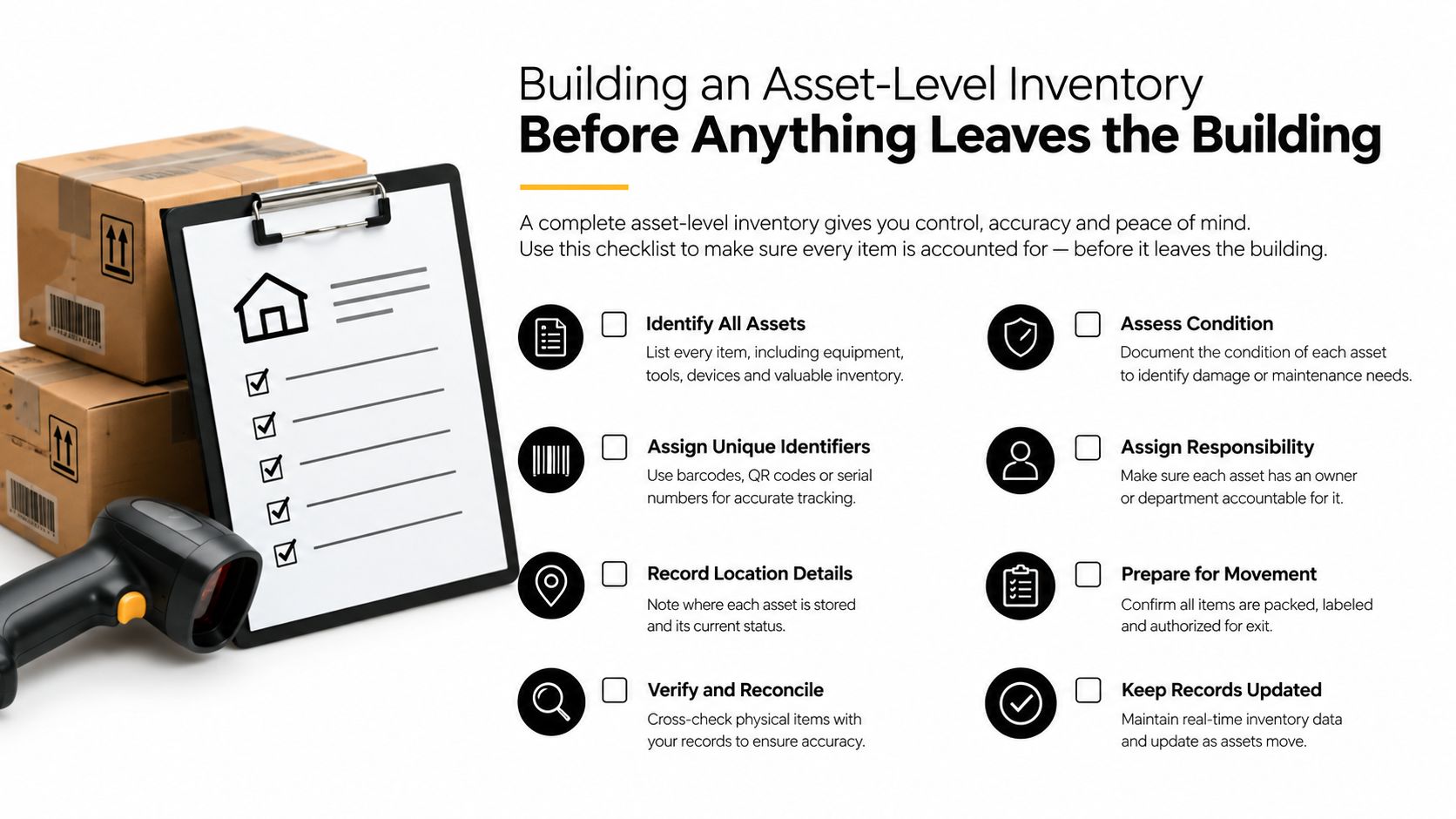
What the inventory should capture
For each server chassis, record:
- Identity: Manufacturer, model, serial number, asset tag, rack position, and owning department.
- Configuration: Processor family, memory, controller, network configuration, and operating status.
- Disposition status: Reuse candidate, resale candidate, parts source, or recycling candidate.
- Location history: Current facility, room, cage, and transfer destination.
For each storage device, record:
- Media details: Manufacturer, model, serial number, capacity, interface, and type, such as HDD, SSD, or NVMe.
- Placement: Chassis, bay, RAID group, hot-spare position, cache role, or removable-media location.
- Data classification: Public, internal, confidential, regulated, or another category used by your security policy.
- Decision record: Clear, Purge, or Destroy, along with the person approving the method.
The blind spots that create exposure
Technicians often find hot-spare HDDs, SSDs the operating system never mounted, NVMe modules behind a backplane, and RAID cache devices after the primary inventory is complete. Battery-backed cache cards and removable backup media also need separate tracking. Don't assume that an empty drive bay means no media is present, or that a RAID controller contains no retained information.
Reconcile the physical count against the CMDB, procurement records, and decommissioning ticket. A serial number that appears in the procurement record but not on the pickup manifest needs investigation before transport. For teams building a repeatable process, inventory optimization for IT assets can help align physical inspection with asset records and reporting.
Choosing Between Clear, Purge, and Destroy for Each Drive
NIST SP 800-88 gives you a decision menu, not a blanket instruction to shred everything. Clear applies a logical sanitization process within the normal storage environment. Purge uses stronger logical or physical techniques to make recovery infeasible for the relevant risk level. Destroy makes the media unusable through methods such as shredding, disintegration, pulverization, or licensed incineration.
The choice should follow two questions. How sensitive is the information, and what happens to the media next? A drive staying under your control for a controlled internal reuse may follow a different path from a drive leaving the organization for resale.
A practical decision matrix
| Method | Best for | Reuse potential | Verification required |
|---|---|---|---|
| Clear | Lower-risk media remaining in a controlled environment | Usually preserved | Verify the result and retain the record |
| Purge | Higher-risk media approved for reuse or transfer | Often preserved, depending on the technique | Verify the result independently |
| Destroy | Failed, damaged, inaccessible, or policy-restricted media | None | Confirm destruction and document final disposition |
For reusable enterprise drives, a qualified team may select software-based or cryptographic erasure when the medium and encryption controls support it. Firmware-based commands such as Secure Erase may be appropriate for certain ATA drives. Degaussing has a narrower fit and isn't a universal solution for modern SSDs or NVMe media.
Choose destruction when the drive is damaged, inaccessible, subject to a specific policy, or impossible to verify. Destroying a functional drive because it is leaving the building can eliminate recoverable value and increase material waste. A NIST 800-88 data destruction guide for Atlanta IT managers can help your team translate the method decision into a vendor specification.
Verification is part of the method
A deletion log isn't proof that sanitization succeeded. NIST recommends verification after sanitization, ideally by testing every item. If resources don't allow that, representative sampling should be performed by personnel independent of the original sanitization operation.
For physical destruction, ask what the output looks like, not just whether the vendor “shreds drives.” NIST specifies shredded residues with nominal edge dimensions of 5 mm and a surface area of 25 mm² or less, as described in NIST SP 800-88 Revision 1. Your certificate should connect the destruction result to each media serial number.
On-Site Versus Off-Site Data Destruction in Atlanta
On-site destruction keeps drives inside your controlled facility until the moment they're wiped or physically destroyed. It suits projects involving highly regulated records, executive offices, restricted data centers, or security teams that don't want media transported before destruction. It can also simplify witness procedures because your staff can observe the operation.
The trade-off is logistics. Mobile equipment needs access, staging space, power considerations, and a schedule that works at your facility. On-site wiping also requires the vendor to bring the right tools and maintain a reliable process in a live business environment.
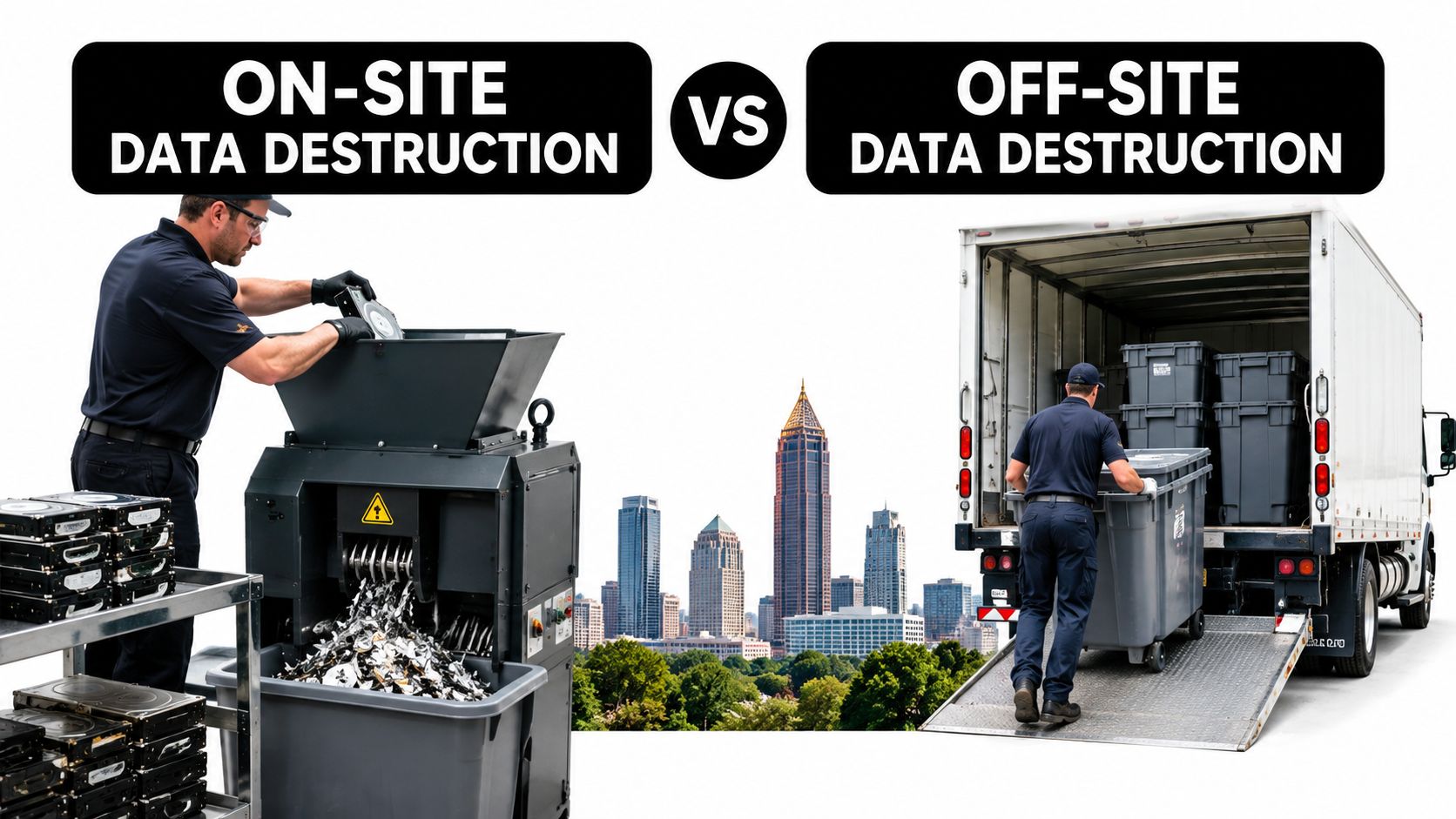
When off-site processing makes more sense
Off-site destruction at a secure processing facility fits routine refreshes, branch-office clearouts, mixed equipment lots, and large fleet decommissionings. A controlled facility can separate drives, process different media types, test reusable equipment, and route non-reusable material through appropriate recycling streams.
Off-site doesn't mean uncontrolled. Specify the custody controls before the pickup:
- Serialized manifest: Every chassis and storage device appears on the transfer document.
- Sealed containers: Media remain in locked or sealed containers during staging and transport.
- Transfer signatures: The releasing employee and receiving technician sign at each handoff.
- Transport visibility: Use documented vehicle and route controls appropriate to your security policy.
- Processing record: The destruction or sanitization report references the original asset identifiers.
The correct choice depends on risk, volume, facility access, and the required turnaround. On-site versus off-site ITAD services in Georgia provides a useful basis for writing those requirements into a statement of work.
When Resale, Parts Recovery, or Pure Recycling Wins
Server retirement is also a value decision. A system's remaining worth depends on its age, model, configuration, condition, completeness, and current demand. Don't ask whether “the server” has value until you separate the chassis, processors, memory, storage, controllers, network cards, rails, and other components.
Resale works when the system is functional, identifiable, complete enough to support a buyer, and free of unresolved security or regulatory restrictions. It requires stronger documentation because the equipment leaves your control and may be installed in another organization's environment.
Four possible outcomes
Wholesale resale fits complete systems with a credible secondary market. Preserve model and serial information, sanitize every drive, and document the final buyer or downstream channel.
Parts harvesting is better for incomplete systems, older platforms, or equipment with valuable processors, memory, controllers, or power components. It can recover useful spares even when the full chassis has no practical resale path.
Manufacturer or vendor trade-in may suit refresh programs with compatible replacement cycles. Evaluate the offer against the labor involved in packing, testing, data handling, and reporting.
Pure recycling is the honest answer for damaged equipment, failed media, obsolete configurations, or assets whose handling cost exceeds their likely recovery value. Recycling should still produce a disposition trail and route recoverable metals and components away from ordinary disposal.
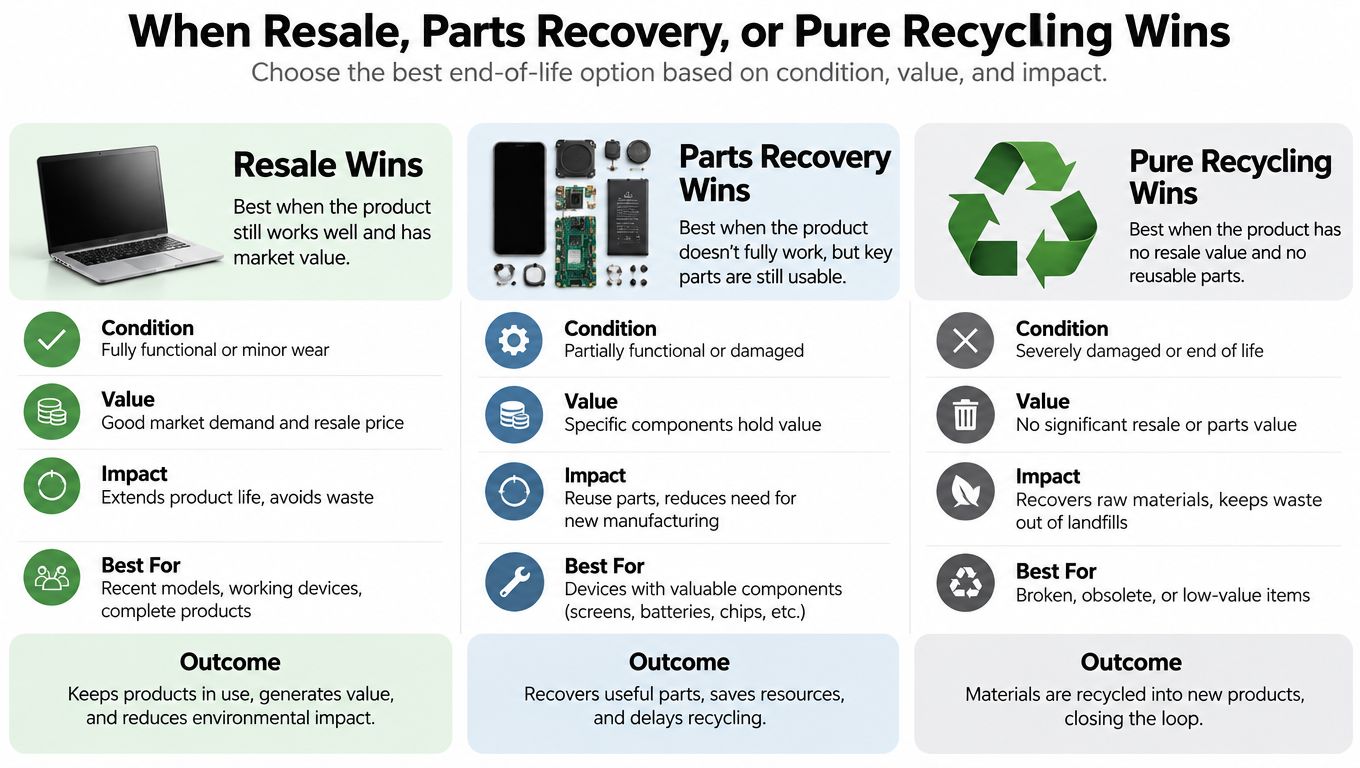
Don't force a resale outcome
Resale is a poor choice when drives fail self-tests, the chassis has no viable buyer channel, the configuration is incomplete, or the equipment sits under a legal or regulatory hold. Testing and remarketing also add labor. If the expected recovery doesn't justify that work, move the asset to parts recovery or recycling.
A 2025 data-sanitization review noted that data-center devices were frequently still functional when destroyed and reported that IEEE 2883 discourages shredding, pulverizing, and crushing when secure erasure can support reuse. The review is summarized through NIST's media sanitization publication. For a structured Atlanta value-recovery option, IT asset recovery services can evaluate resale, parts recovery, and recycling outcomes after the security decision is made.
Compliance, Certificates, and Chain of Custody Atlanta Organizations Need
A recycling receipt rarely answers the questions an auditor or attorney will ask. Who handled the drive? Which method was used? Was the result verified? Which asset number connects the certificate to the equipment that left the building?
The FTC Disposal Rule took effect on June 1, 2005, under the Fair and Accurate Credit Transactions Act of 2003. It covers businesses and individuals that maintain or possess consumer reports or information derived from them for business purposes. The FTC requires covered parties to use reasonable measures to prevent unauthorized access to or use of that information during disposal, including destroying or erasing electronic media so the information can't be read or reconstructed and performing due diligence on destruction contractors. The FTC Disposal Rule guidance sets out those expectations.
Healthcare, financial, education, government, and other regulated organizations should map server contents to their own obligations, including HIPAA, GLBA, FERPA, contractual controls, and internal retention policies. The rule isn't the same for every organization, but the operational requirement is consistent: prove that sensitive media remained controlled until an approved disposition occurred.
What a defensible certificate should show
Require certificates that include:
- Asset identity: Chassis, drive, or media serial number and internal asset ID.
- Method: Clear, Purge, Destroy, or the specific approved technique.
- Verification: Test result, sampling method, verifier, and any exception.
- Custody history: Pickup location, transfer dates, receiving personnel, and processing location.
- Authorization: Technician and witness names or signatures, where applicable.
- Final disposition: Reuse, resale, parts recovery, recycling, or destruction.
- Downstream detail: Processor or facility information for material routed onward.
Keep the certificate of data destruction separate from, but linked to, the certificate of recycling. Data sanitization proves what happened to the information. Recycling documentation proves what happened to the physical equipment and materials. You need both when a server contains sensitive records and valuable recoverable components.
Picking the Right Atlanta Partner and Moving Forward
Choose a partner by process, not by the lowest pickup quote. Before signing, ask for a sample serialized manifest, certificate templates, sanitization method list, verification procedure, insurance evidence, and an explanation of downstream processing. The provider should be able to handle mixed lots that include reusable servers, failed drives, SSDs, NVMe modules, battery-backed RAID cards, networking equipment, and scrap.
Score the service against your actual project
Look for:
- Chain-of-custody control: Clear handoffs from rack removal through final disposition.
- Flexible destruction: On-site and off-site options, with methods matched to media type and data risk.
- Value recovery: Testing, resale, parts harvesting, and transparent settlement records.
- Responsible recycling: Separation of reusable assets, data-bearing media, batteries, lamps, CRTs, and other special components.
- Operational capacity: Secure pickup, de-racking, packing, transportation, and facility processing.
- Reporting: Asset-level certificates that procurement, security, sustainability, and legal teams can use.
A Smyrna or Atlanta-area drop-off may work for a prepared, manageable load that your team can transport securely. Schedule a pickup when equipment remains in racks, the lot includes heavy systems, multiple facilities are involved, or your staff shouldn't handle the logistics. Beyond Surplus also coordinates nationwide logistics for larger enterprise projects, with services covering secure data destruction, IT equipment disposal, recycling, and value recovery.

Start by freezing the equipment list and separating chassis from every storage device. Then send vendors the inventory, data classifications, preferred destruction methods, pickup conditions, and reporting requirements before requesting a quote.
Beyond Surplus provides Atlanta businesses with secure server decommissioning, certified data destruction, electronics recycling, logistics coordination, and value recovery for equipment that still has a viable second life. Visit Beyond Surplus to plan a documented used-server disposal project that protects your data and gives every retired asset a clear final outcome.


