

A hardware refresh rarely ends when the replacement computers arrive. An IT manager still has to move retired laptops out of a healthcare network, protect the information stored on them, document every handoff, and prove that the equipment reached an appropriate end state. That's why the answer to what happens to recycled computers is more involved than “they get shredded.”
For a business, the pipeline usually branches. A working device may be sanitized and reused, a damaged unit may donate parts, and the remaining material may enter mechanical separation and downstream refining. The provider's job is to make each decision traceable, secure, and consistent with the client's compliance requirements.
Table of Contents
- From Pickup to First 24 Hours Inside the Facility
- Chain of Custody, Receiving, and Asset Inventory
- Secure Data Destruction and Compliance Documentation
- Testing, Refurbishment, and Resale Decision
- Parts Harvesting and Component Recovery
- Shredding, Separation, and Material Recovery
- Certificates, Reporting, and Questions to Ask Your ITAD Provider
- Why the Recycling Pipeline Matters for Your Business
From Pickup to First 24 Hours Inside the Facility
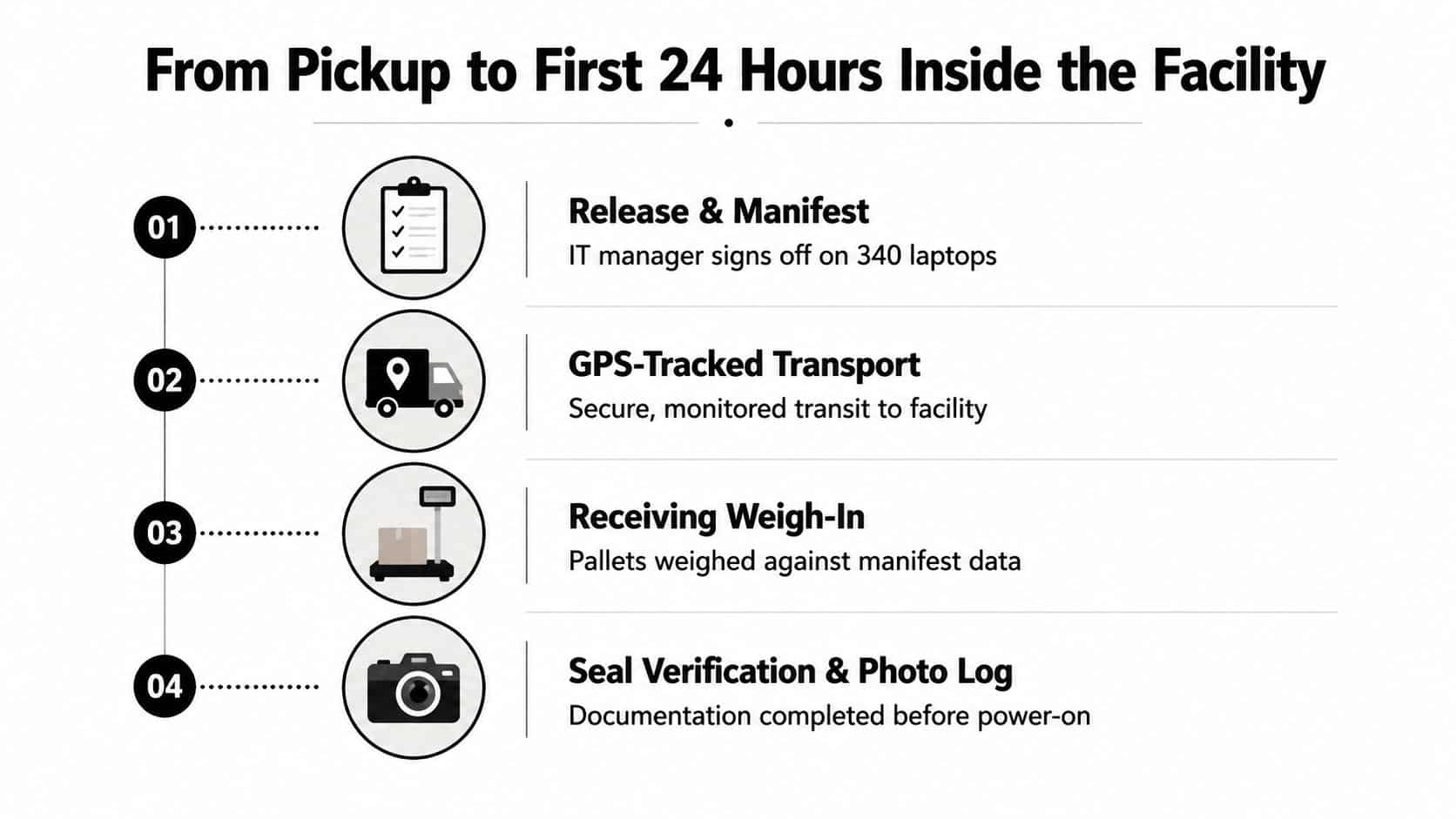
A regional healthcare network has completed a hardware refresh. Its retired laptops are sealed, labeled, and matched to release paperwork before a vetted logistics crew arrives. The driver verifies the load, scans each tamper-evident seal, and places the shipment in a GPS-tracked vehicle headed to a secure ITAD facility. Businesses arranging secure IT equipment pickup should confirm that these handoffs are documented from the start.
The shipment stays sealed during transport, reducing opportunities for unauthorized access before intake. At arrival, the receiving team checks the bill of lading, confirms the pallet count, and records visible damage or other condition issues. The driver does not leave the equipment at a loading dock.
Why the receiving bay matters
Inside the facility, pallets move into a segregated, caged receiving bay monitored by cameras. Staff do not open the shipment on the dock or mix it immediately with equipment already in process. Access badges record employees entering controlled areas, while photographs preserve evidence of the seals and pallet condition.
During the first 24 hours, the provider weighs the shipment, compares it with the outgoing manifest, and creates an inbound receiving record. That record anchors later inventory reports, certificates of data destruction, certificates of recycling, and resale statements. A well-organized ITAD pipeline works more like a decision tree than a single processing line, so this early record helps determine which path each asset can safely enter.
If intake is not verified, every later report rests on an uncertain foundation. A business should ask who checks the shipment, what evidence is retained, and how discrepancies are handled before processing begins.
Chain of Custody, Receiving, and Asset Inventory
A professional ITAD provider should produce receiving evidence before any computer is powered on. That sequence protects both the client and the facility. Technicians need to know what arrived, where it came from, and whether the shipment matches the release documentation before they begin testing or data sanitization.
The intake record
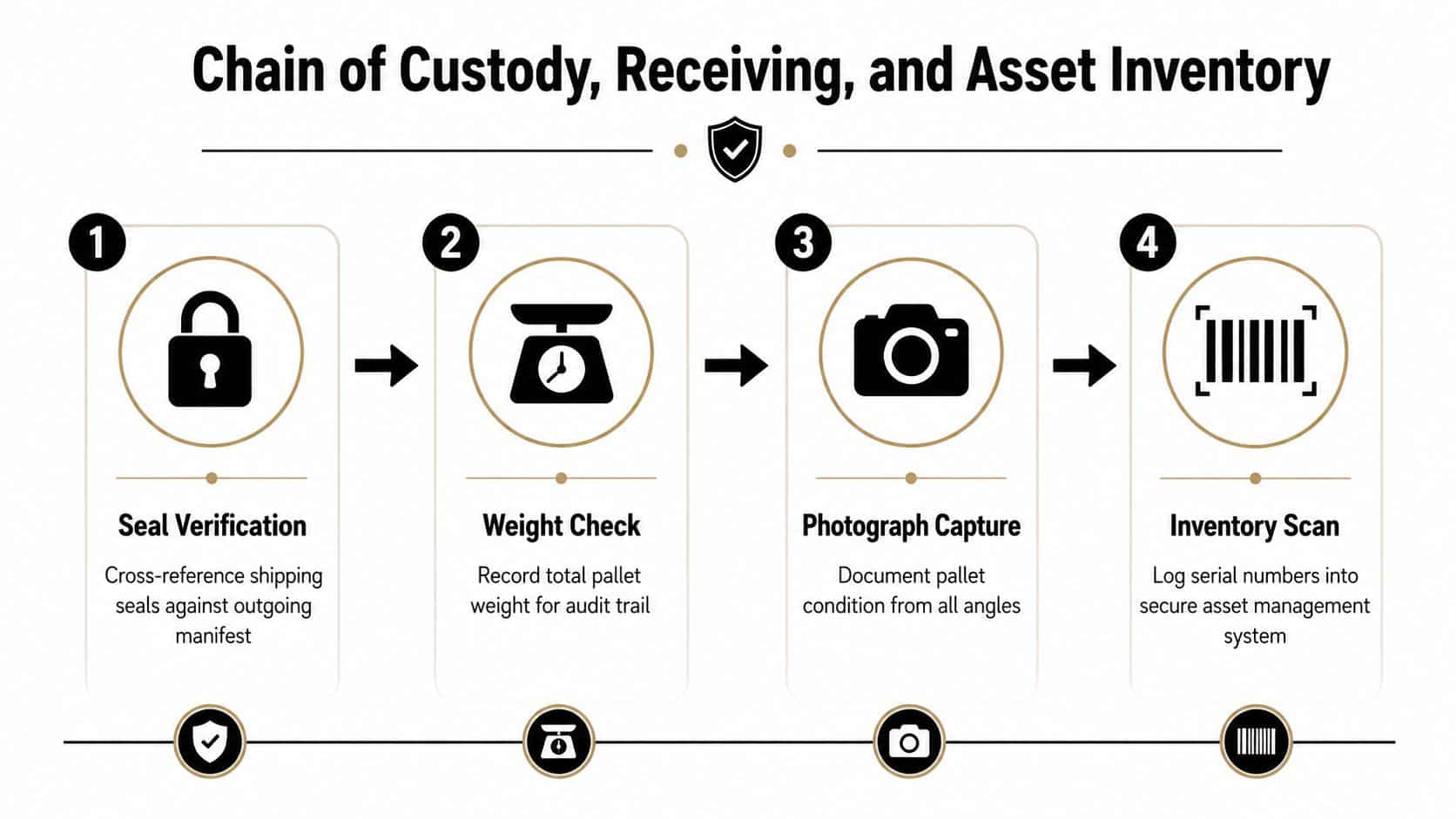
The receiving process typically follows a controlled sequence:
- Seal verification: Staff cross-reference each seal with the outgoing manifest and document signs of tampering.
- Weight and condition checks: The team records pallet weights and photographs all sides, including crushed corners, torn wrapping, or exposed equipment.
- Inbound report creation: The facility assigns a unique reference number that connects the shipment to the client's purchase order and service request.
- Individual scanning: Technicians record each device's serial number, asset tag, service tag, and motherboard UUID in an asset management platform.
The provider should use a dual-signature intake process. One employee performs the physical count and scan, while another verifies the records. If the system finds an unexpected laptop or flags a missing serial number, the discrepancy should be investigated before the inventory is released as final.
What the client should be able to see
A customer portal can show inventory counts as technicians scan equipment. The client may also receive exception reports, photographs, condition notes, and a reconciliation summary tied to the original purchase order.
Practical rule: If a provider can't connect a final certificate to a specific serial number and verified intake record, ask how it supports an audit.
This evidence trail supports more than operational visibility. It helps establish who controlled the equipment, when responsibility changed hands, and whether the provider processed the expected assets. A detailed chain-of-custody documentation process gives procurement and compliance teams a defensible record instead of a generic pickup receipt.
Secure Data Destruction and Compliance Documentation
Data destruction is the decision point that determines whether a computer can move toward reuse or must be physically destroyed. A provider may use software-based sanitization for a functioning drive, while a damaged, unsupported, or inaccessible medium may require physical destruction.
The FTC Disposal Rule says companies that possess consumer information must take reasonable measures to protect against unauthorized access during disposal. Its examples include destroying or erasing electronic media so information can't practicably be read or reconstructed, as described in this summary of the FTC Disposal Rule. HIPAA, GLBA, and PCI DSS may create additional obligations depending on the information and organization involved.
Matching the method to the media
A controlled sanitization run can include drive detection, device identification, hash capture, an approved overwrite or purge operation, verification, and pass/fail labeling. A failed wipe shouldn't proceed to resale. The provider should route that drive to an approved physical destruction process instead.
| Method | Best For | NIST 800-88 Method | Compliance Fit | Output Evidence |
|---|---|---|---|---|
| Certified software wiping | Accessible drives suitable for reuse | Clear or Purge, based on media and approved procedure | Supports reuse when verification succeeds | Drive-level certificate, method, date, technician ID, result |
| Degaussing | Appropriate magnetic media | Purge where technically applicable | Useful when the medium and device support the method | Equipment record, method record, verification documentation |
| Crushing | Drives that shouldn't return to service | Destroy | Strong option for failed or unsuitable media | Serial number, destruction result, operator record |
| Shredding | Media requiring irreversible physical destruction | Destroy | Appropriate when reconstruction must be impracticable | Certificate of destruction and device-level disposition |
| Manual destruction | Selected media or components needing controlled handling | Destroy | Depends on documented procedure and verification | Technician record, photographs, final certificate |
A provider should also retain media for client retrieval when the contract requires it, rather than automatically releasing every unit into the resale stream. The NIST 800-88 data destruction standards help teams evaluate whether the proposed method fits the actual storage technology.
The final package should identify each drive, the sanitization method code, date, technician, and pass or fail result. That level of detail turns data destruction from a verbal assurance into audit-ready evidence.
Testing, Refurbishment, and Resale Decision
Once data sanitization is complete, each computer reaches a triage bench. Technicians assess its age, processor generation, memory, storage, battery condition, display, ports, chassis, and likely market demand. The unit's condition determines whether it becomes a resale candidate, a source of components, or a material-recovery load.
The triage decision
Functional devices with suitable specifications may enter refurbishment. Technicians stress-test the hardware, replace failed parts, re-image the operating system, inspect the battery, clean the chassis, and assign a new service identifier. The resulting equipment may move through wholesale channels, organizational redeployment, charitable programs, or employee purchase arrangements.
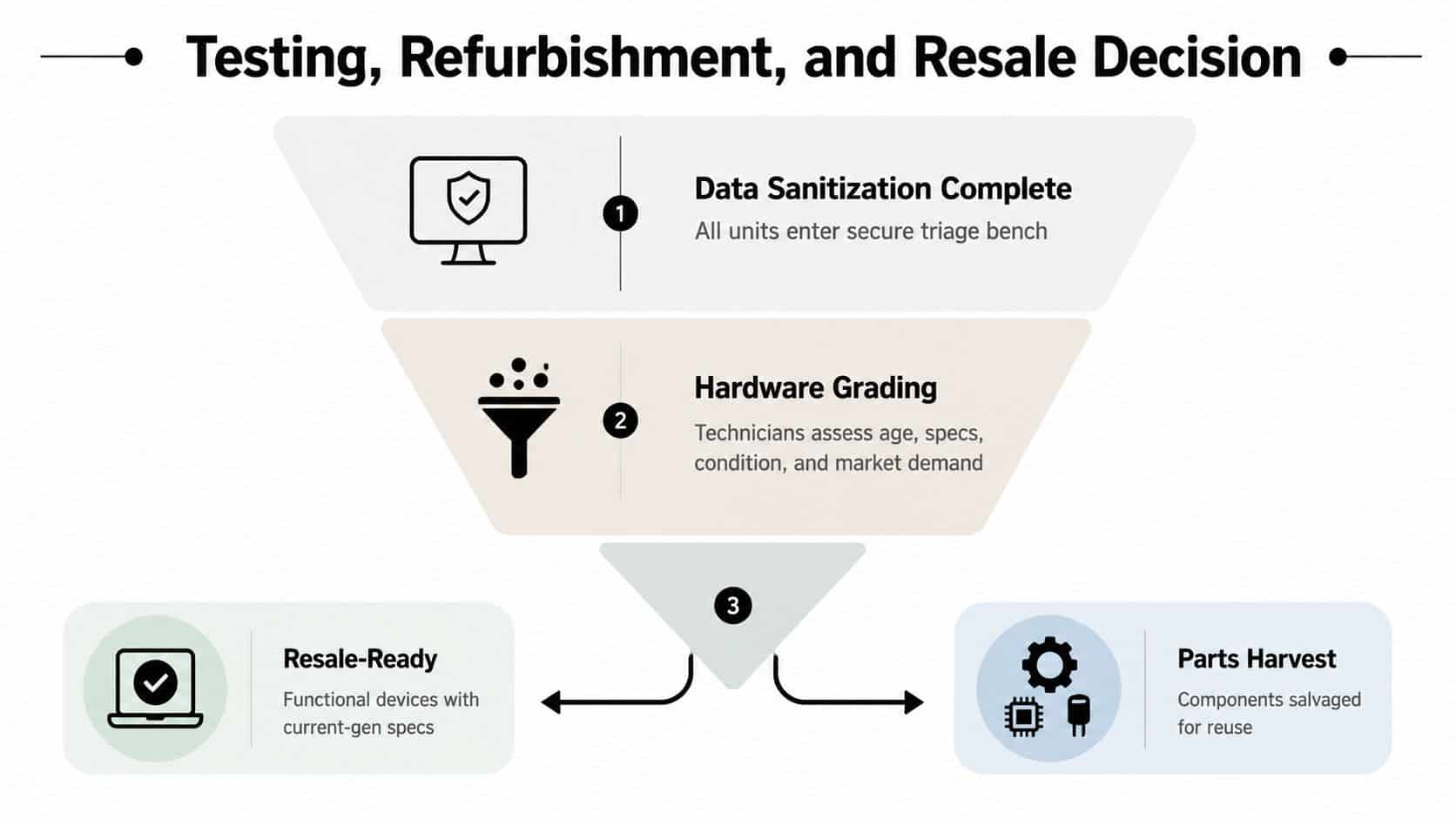
A device that fails testing, has severe physical damage, or lacks enough market value to justify repair may skip refurbishment. That isn't a failure of the recycling program. It's a controlled economic decision that prevents labor and replacement parts from exceeding the asset's recoverable value.
Reuse is usually the highest-value path, but only after data security, functional testing, and condition grading are complete.
Businesses should request a documented equipment condition assessment rather than accepting a broad label such as “recycled.” The report should show which assets were reused, which were sold for parts, and which entered material recovery. Microsoft reported a 90.9% reuse-and-recycling rate for servers and components in 2024 in its sustainability reporting, illustrating how reuse and recycling can operate as connected outcomes rather than competing programs. Microsoft's 2024 sustainability discussion provides that reported figure.
Parts Harvesting and Component Recovery
A computer that can't justify refurbishment may still contain valuable working hardware. At the dismantling bench, technicians follow a bill of materials and remove components before the chassis enters a shredder. This manual step protects reusable parts from destructive processing and creates a cleaner inventory for secondary buyers.
A technician may remove a compatible memory module, SSD, processor, power supply, fan, keyboard, LCD panel, or proprietary battery. Each part is labeled by SKU, tested separately, and graded for cosmetic and functional condition. A working component can serve a repair shop or refurbisher even when the original computer no longer has a viable resale path.
What happens to the remaining shell
After parts removal, the residual unit is sorted by material and device type. Broken plastics, cables, metal housings, and circuit boards move into different processing streams because they require different handling and have different recovery values.
| Component | Typical Yield per Unit | Grade Criteria | Secondary Buyer |
|---|---|---|---|
| RAM modules | Depends on model and condition | Capacity, compatibility, test result | Refurbishers and repair shops |
| SSDs and hard drives | Depends on model and condition | Secure sanitization, health, interface | Secondary IT equipment sellers |
| Processors | Depends on model and condition | Generation, pins, functional test | Repair and refurbishment channels |
| Power supplies | Depends on model and condition | Output stability, connectors, safety inspection | Service providers and repair shops |
| LCD panels | Depends on model and condition | No cracks, image quality, compatible part number | Screen repair businesses |
| Keyboards and fans | Depends on model and condition | Function, wear, model compatibility | Parts resellers |
The computer component recycling process should separate tested parts from commodity material. Without that separation, a business loses potential recovery value and sends reusable hardware into a lower-value stream.
Shredding, Separation, and Material Recovery
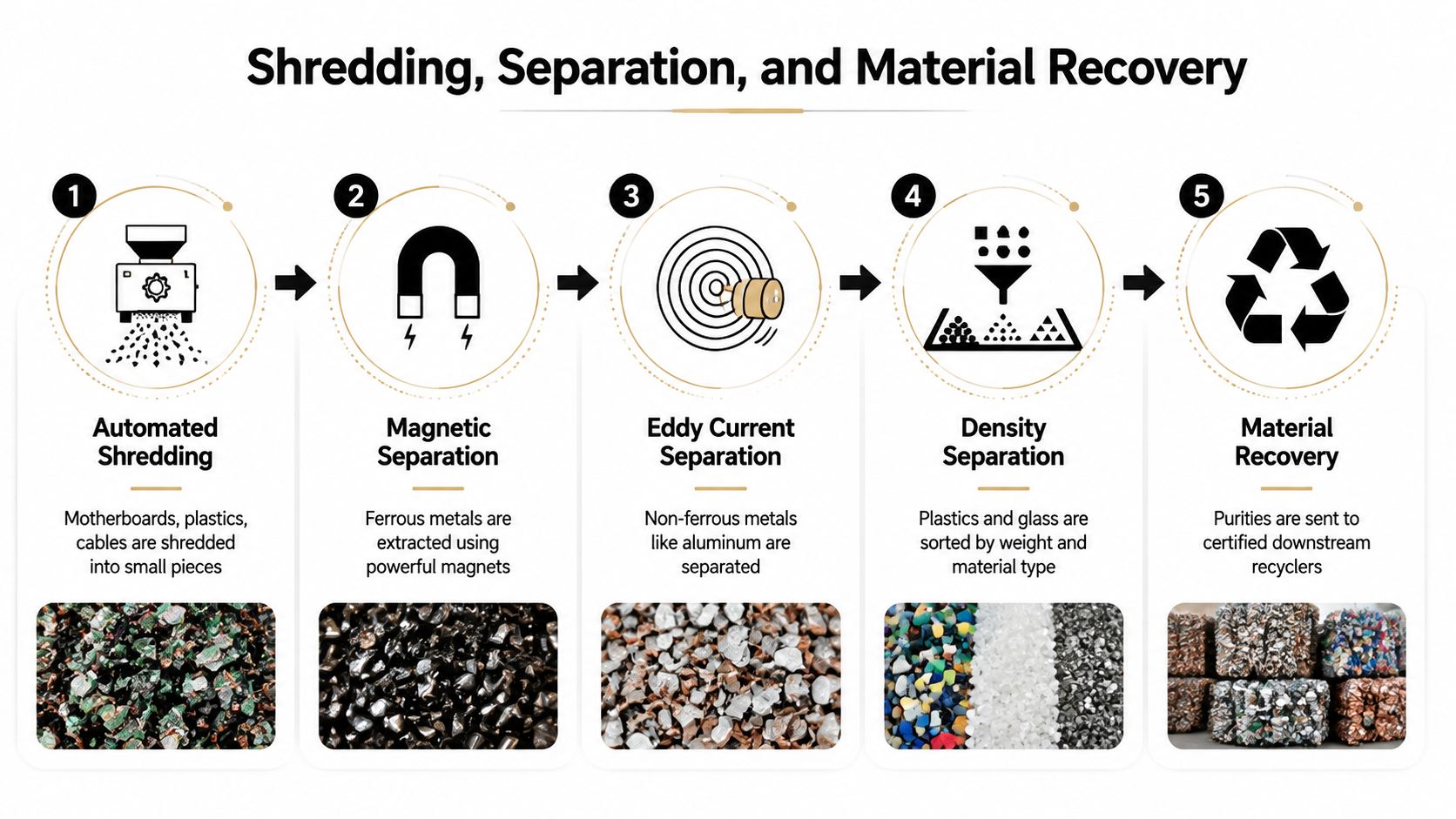
Shredding is the last major processing route for computers that aren't suitable for reuse or parts harvesting. Industrial equipment reduces circuit boards, plastics, cables, and residual housings into controlled fragments. The exact liberation size matters because metal must separate from the plastic or composite material holding it.
A characterization study found that fractions below 2 mm achieved approximately complete metal liberation, while coarser material retained copper in plastic-encapsulated wire segments and pins, reducing separation efficiency. The study is available in this mechanical separation analysis of scrap computers. Operators therefore balance controlled shredding with dust, contamination, and sorting complexity. Pre-dismantling can improve concentration, while excessive shredding can create additional handling challenges.
How the separation line works
- Shredding: The line breaks residual equipment into smaller pieces.
- Magnetic separation: Magnets extract ferrous steel from chassis fragments and other material.
- Eddy current separation: Eddy currents help eject non-ferrous metals such as aluminum and copper.
- Screening and density separation: Screens and density equipment separate fractions by size, weight, and composition.
- Downstream refining: Qualified processors recover usable metals and manage hazardous fractions under controlled conditions.
Circuit boards contain both valuable and hazardous substances. A review identifies copper, tin, lead, zinc, nickel, iron, bromine, manganese, and magnesium in waste PCBs, as documented in this review of waste printed circuit board composition. A separate 2022 study reported approximately 39 grams of gold per ton of waste PCBs, with recoverable precious metals estimated at $2,292.94 per ton, and gold contributing 98% of that value. The study's abstract explains why circuit boards remain economically important after other recovery options are exhausted.
Recycling benefits come through avoided virgin production rather than turning an old laptop directly into a new laptop. An Australian lifecycle analysis found that recycling 1 tonne of mixed television and computer waste saved 2,071 kg CO2e, 25,655 MJ of energy, and 451 m3 of water, according to this electronics recycling lifecycle assessment. Those benefits depend on controlled downstream processing, not informal dismantling or uncertain export routes.
Certificates, Reporting, and Questions to Ask Your ITAD Provider
Certificates and final reports prove whether the provider followed the promised route. A business should receive a Certificate of Data Destruction listing affected serial numbers, the sanitization method, the date, the technician or operator, and the result. A Certificate of Recycling should identify the disposition of material and, where applicable, downstream weights or processing categories.
The procurement checklist
Ask prospective providers to show:
- Certification evidence: Confirm current NAID AAA, R2v3, or e-Stewards credentials and ask which facilities and processes those credentials cover.
- Sample reports: Request redacted certificates before signing so you can inspect the level of device-level detail.
- Sanitization policy: Require a written policy that identifies applicable NIST 800-88 procedures and explains what happens after a failed wipe.
- Downstream controls: Ask who receives circuit boards, plastics, batteries, displays, and other fractions, and how the provider audits those relationships.
- Insurance documentation: Verify coverage appropriate to transportation, facility operations, data exposure, and environmental liability.
- Handoff records: Require signatures or electronic confirmations at pickup, facility receipt, processing, and downstream transfer.
- Reporting timing: Clarify how quickly the provider delivers inventory reconciliation, destruction certificates, recycling certificates, and resale reporting.
A legitimate ITAD partner should answer these questions without hiding behind a single logo or a generic “eco-friendly” statement. The more regulated the business, the more important it is to see the actual audit trail behind the service claim.
Why the Recycling Pipeline Matters for Your Business
The full pipeline transfers documented responsibility in stages. Chain-of-custody controls address custody risk, data sanitization addresses information exposure, testing protects residual value, and downstream reporting supports environmental and compliance reviews. A vague “recycled” label can't provide that same clarity.
Global volume shows why disciplined routing matters. The world generated 62 billion kg of e-waste in 2022, but only 22.3% was documented as formally collected and recycled in an environmentally sound manner, according to the Global E-waste Monitor 2024. The report also identified US$62 billion in recoverable natural resources left unaccounted for and projected that the documented rate could fall to 20% by 2030 if current trends continue.
For a business, the practical choice isn't whether to recycle. It's whether the provider can demonstrate the correct outcome for every asset, reuse when justified, parts recovery when practical, and controlled material processing when neither option works.
Request a sample audit pack before your next refresh, and ask to walk through the provider's receiving, sanitization, and downstream controls. Those documents and observations reveal far more than a disposal quote.
Beyond Surplus provides secure computer recycling, IT equipment disposal, data destruction, asset recovery, and documented chain-of-custody services for businesses. Visit Beyond Surplus to request service information, review pickup options, or schedule a conversation about your next equipment refresh.


