

A remote employee leaves, a replacement laptop arrives, and the old device remains in a spare room hundreds of miles from headquarters. The IT team has disabled the user account, but nobody can confirm whether the laptop was returned, who handled it in transit, whether its storage was sanitized, or whether the asset still has resale value. That gap is where laptop recycling for remote employees becomes an IT asset management issue, not merely a shipping task.
A reliable program connects offboarding and refresh events to inventory control, retrieval, chain of custody, data destruction, and final disposition. The process should protect company information, support the FTC Disposal Rule, and distinguish reusable equipment from devices that belong in a documented recycling or destruction stream.
Table of Contents
- Understanding Laptop Recycling Challenges for Remote Employees
- Developing a Secure Recycling Policy Framework
- Designing Collection Logistics for Remote Devices
- Implementing Secure Data Destruction and Chain of Custody
- Choosing and Managing Vendor Partnerships
- Communicating with Remote Teams and Stakeholders
- Monitoring Costs Recovery and KPI Tracking for Improvement
Understanding Laptop Recycling Challenges for Remote Employees
An IT director at a distributed company may start the week with several unresolved assets. One employee has shipped a laptop but omitted the serial number. Another says the carrier collected the package, yet the tracking record hasn't updated. A third employee still has a damaged device because nobody arranged a return method suitable for a home address. Meanwhile, the asset register shows each laptop as assigned, even though the company can't prove where the devices are.
Office-centered programs often assume that employees can hand equipment to a local IT desk. Remote work removes that assumption. Devices move through private residences, carrier networks, regional consolidation points, and third-party facilities. Each transfer creates a chance for missing documentation, shipping damage, delayed recovery, or unauthorized access to company data.
Why the old office process breaks
A recycling policy that says “return equipment to IT” doesn't define the practical details. Remote employees need a clear device list, packaging instructions, a prepaid shipping method or scheduled pickup, and a way to report the handover. IT needs serial-number validation, tracking visibility, escalation rules, and a disposition record that remains connected to the original asset.
Return programs are now operationally significant. Over 88% of organizations report supporting remote workers, while only about 26% report that most employees are primarily in-office, according to remote-work ITAD benchmarking data. Asking employees to recycle or donate company equipment independently creates more uncertainty than a managed retrieval workflow.
The environmental and financial stakes are substantial. The International Telecommunication Union's e-waste reporting records 62 million tonnes of global e-waste in 2022, with only 22.3% formally collected and recycled. More than three-quarters therefore wasn't documented in proper recycling streams. The same reporting estimated approximately USD 62 billion in recoverable natural resources went unaccounted for, which highlights the value embedded in retired laptops and related IT equipment.
Practical rule: Treat every unreturned laptop as both an asset-recovery exception and a data-security risk until the company resolves it.
A purpose-built program gives HR, IT, procurement, and finance one shared workflow. The business can recover equipment faster, preserve resale opportunities, and show what happened to each device. For a closer look at the security implications, review why remote employee laptop recovery matters for data security.
Developing a Secure Recycling Policy Framework
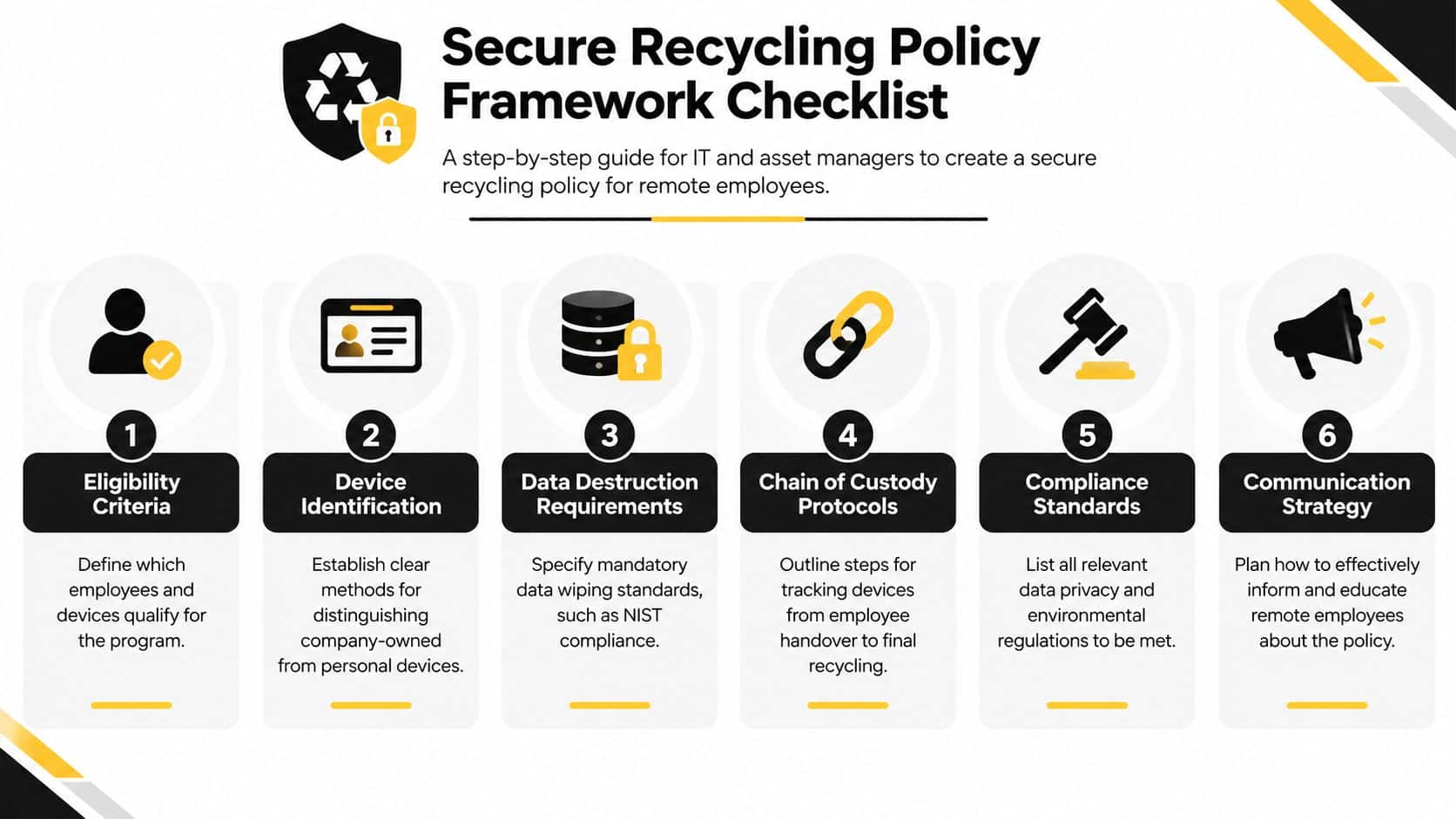
A remote employee leaves unexpectedly, and the laptop sits in a home office while HR, IT, and security each assume someone else is handling it. A workable policy prevents that gap. It must be clear enough for an employee to follow without a meeting and controlled enough for an auditor to reconstruct later. Start with the asset lifecycle, then assign an owner to every decision.
Define ownership and trigger events
Write the policy around company-owned laptops and associated storage media. State which equipment is covered, including assigned laptops, spares, loaners, docking equipment, and removable storage where applicable. Personal devices that accessed company systems need a separate control path because ownership, data removal, and physical recovery differ.
Tie retrieval to defined events:
- Offboarding: HR notifies IT and asset management as soon as separation begins.
- Refresh: Shipping a replacement creates a return task for the outgoing device.
- Repair or failure: A damaged laptop enters a controlled recovery or replacement workflow.
- Role change: Reassess equipment when an employee changes location, function, or security requirements.
Capture the inventory record before shipment. Record the asset tag, serial number, assigned user, condition, accessories, location, and retrieval status. If the device cannot be located, record an exception and obtain the required acknowledgment instead of closing the assignment.
Set the sanitization and compliance standard
A factory reset does not provide a defensible media-sanitization record. Require a method aligned with NIST SP 800-88, choosing Clear, Purge, or Destroy based on the storage media, data sensitivity, and intended disposition. Reusable equipment usually needs documented software sanitization. Faulty or high-risk media may require physical destruction.
Set approval and evidence requirements before the first shipment. Define who authorizes sanitization, what evidence the vendor supplies, how failed wipes are escalated, and how certificates are retained. The policy should also identify applicable legal and contractual obligations without treating one procedure as suitable for every jurisdiction.
Build the documentation checklist
Before launch, confirm that the policy covers:
- Eligibility rules: Covered employees, assets, jurisdictions, and exceptions.
- Retrieval controls: Approved kits, carriers, pickups, tracking, and escalation.
- Data controls: Approved Clear, Purge, or Destroy methods and failure handling.
- Custody records: Handoff timestamps, signatures, serial numbers, and locations.
- Disposition decisions: Reuse, redeployment, resale, recycling, or destruction.
- Evidence retention: Receipts, sanitization logs, certificates, and downstream records.
The chain of custody should remain visible from assignment through final disposition. Store the current policy in an accessible employee portal, then provide a short operational version during onboarding and offboarding. Keep detailed compliance documentation for IT asset disposal available to IT, legal, procurement, and audit stakeholders.
Designing Collection Logistics for Remote Devices
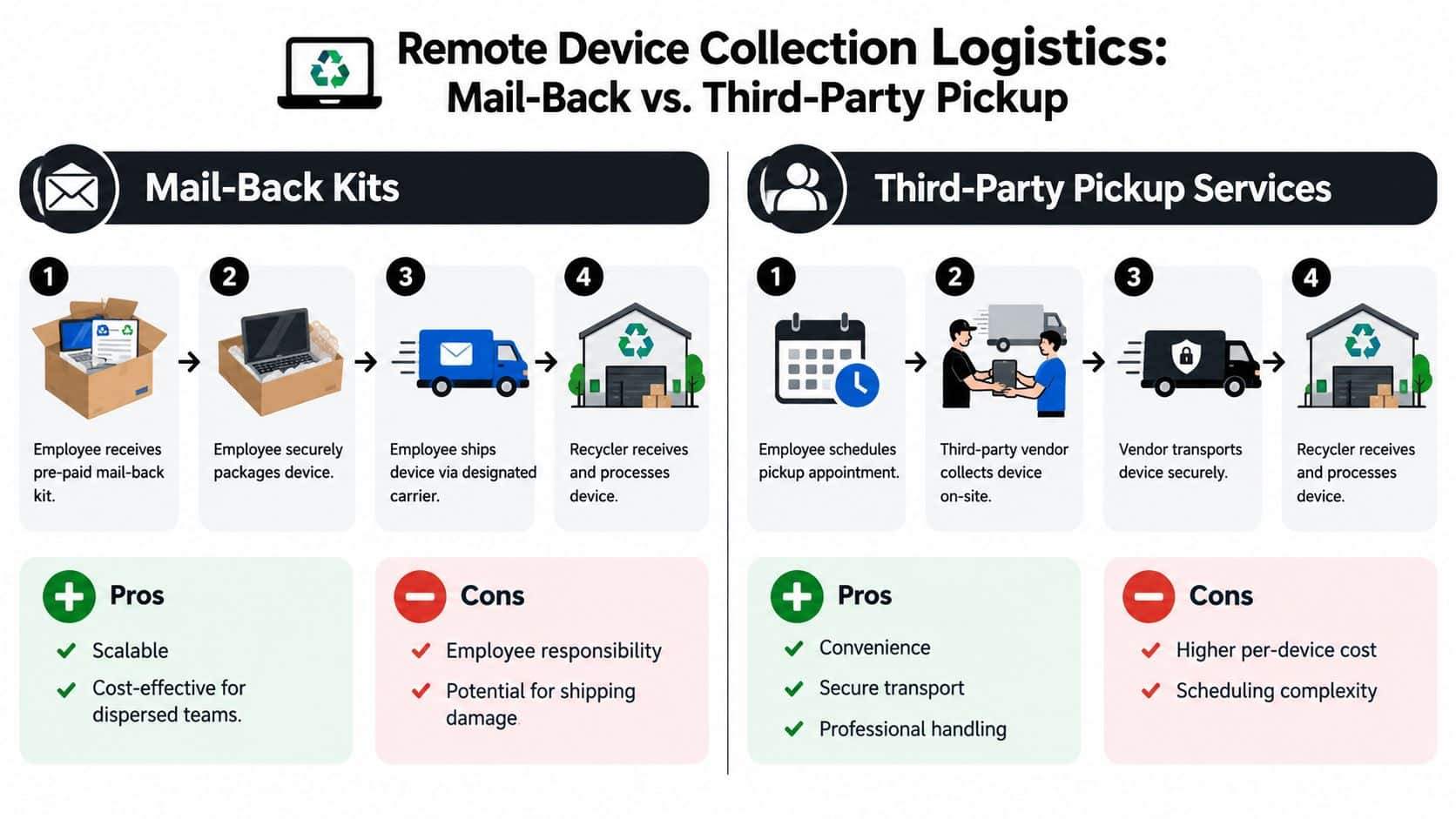
Retrieval succeeds when the process removes decisions from the employee. The company should provide the packaging, label, instructions, deadline, and confirmation method. The employee's job is to prepare the device and complete the handover, not design the logistics.
Two models work for most distributed teams.
Mail-back kits
A prepaid kit suits a geographically dispersed workforce and recurring refreshes. The provider sends a box, protective materials, return instructions, and a carrier label. The employee packages the laptop, records the serial number or photographs the asset tag, and hands the parcel to the designated carrier. The receiving facility scans the shipment, verifies the contents, and updates the asset record.
Build the kit around the device, not a generic box. Include protection for corners and screens, a checklist for power adapters and accessories, and clear instructions for lithium-ion battery handling. Use trackable shipping and send the tracking number to both the employee and the asset manager.
Managed pickup
Pickup is useful when the device is bulky, the employee can't safely package it, or the asset has heightened handling requirements. The employee selects an appointment, a courier verifies the handover, and the transport record follows the device to the processing site. The trade-off is greater coordination, because appointment windows and regional coverage must align.
Use a decision rule rather than offering both methods without guidance:
| Situation | Preferred method | Control to require |
|---|---|---|
| Dispersed refresh program | Mail-back kit | Prepaid label, tracking, serial verification |
| Damaged or bulky equipment | Managed pickup | Appointment record and signed handover |
| International return | Coordinated logistics | Customs documentation and jurisdiction review |
| High-risk or sensitive asset | Controlled pickup or specialist transport | Enhanced custody records and escalation |
Remote recovery can cross state or national borders. Guidance for distributed teams emphasizes packaging sent to the employee, serial verification on receipt, customs documentation for international moves, and a formal destruction certificate tied to each device. The remote ITAD guidance for distributed teams in Europe also highlights why a home address can be an auditability gap.
Send reminders automatically, but don't rely on reminders alone. Notify the employee when the task opens, when the kit ships, when tracking shows movement, and when the receiving team confirms the asset. If a device remains outstanding, keep it open as a risk until retrieval, remote lock, remote wipe, or an approved exception resolves the exposure. The remote employee equipment return process should connect directly to HR's offboarding ticket.
Implementing Secure Data Destruction and Chain of Custody
The custody record begins before the laptop leaves the employee's home. Inventory teams should create a disposition record, associate the asset tag and serial number, and document the device condition. The record then follows the laptop through packaging, carrier acceptance, receipt, inspection, sanitization, resale, redeployment, recycling, or destruction.
Apply the NIST decision path
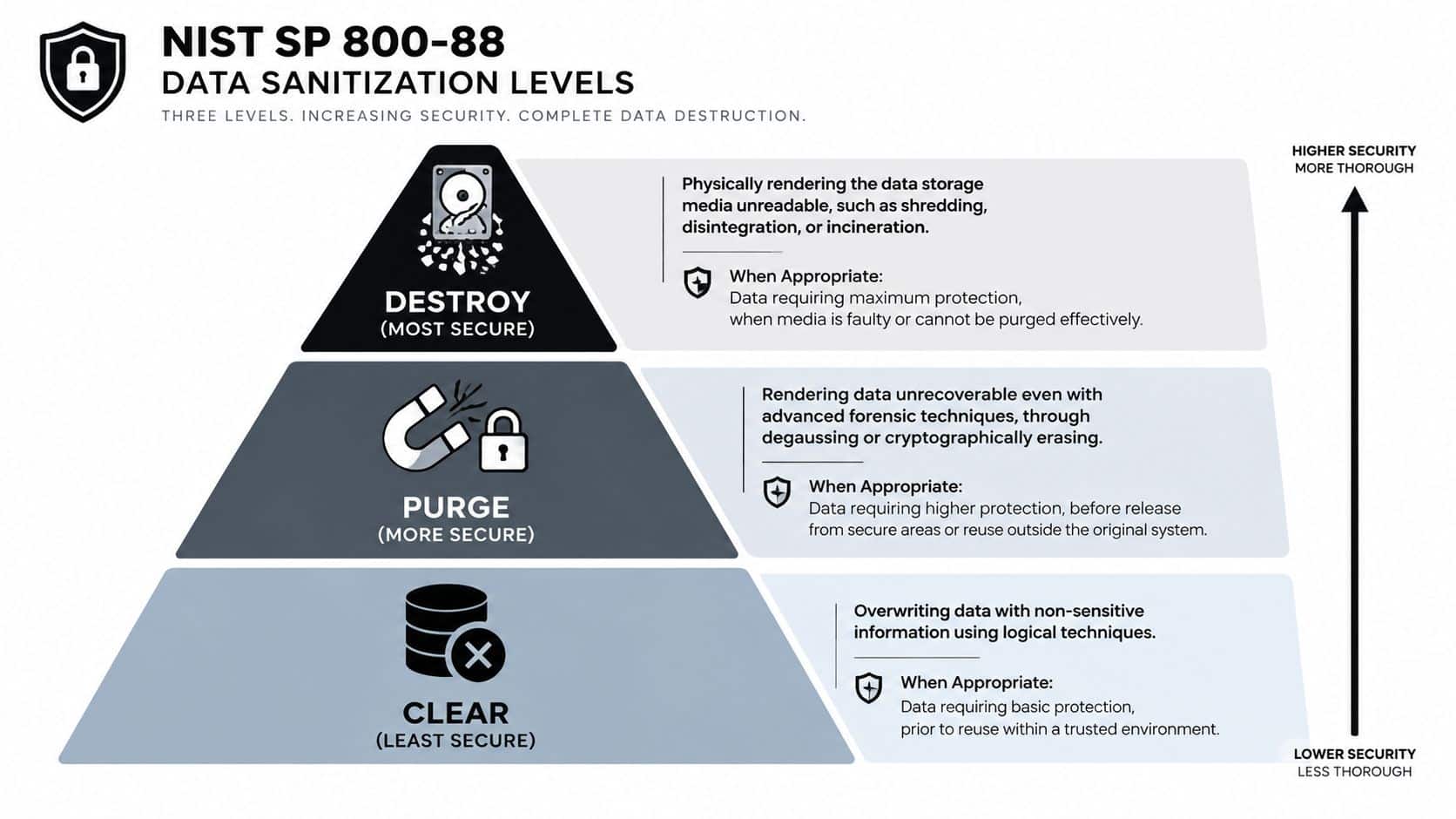
NIST SP 800-88 provides three sanitization levels. The right choice depends on the media and what happens next.
- Clear: Use logical techniques to remove data for a device that remains in a trusted environment and is suitable for controlled reuse.
- Purge: Use approved methods intended to make recovery infeasible before the device leaves the original secure environment or enters broader reuse.
- Destroy: Physically render the storage media unreadable when it is faulty, high-risk, or unsuitable for effective logical sanitization.
The NIST SP 800-88 media-sanitization guidance reinforces that formatting alone isn't enough. Modern laptops may contain solid-state storage, removable media, or components that require different handling. The technician should record the media type, selected method, tool or process, operator, result, and exception reason.
Record every handoff
A usable custody log answers four questions: which device, who handled it, when did the transfer occur, and where did it go next? Capture those fields at employee handover, carrier acceptance, receiving, processing, and final disposition.
A practical record contains:
| Record field | Operational purpose |
|---|---|
| Asset tag and serial number | Identifies the individual device |
| Employee or location | Establishes the starting point |
| Handoff date and time | Creates a chronological trail |
| Releasing and receiving parties | Shows responsibility transfer |
| Shipment or work-order reference | Connects logistics to processing |
| Sanitization result | Proves the selected method succeeded |
| Final disposition | Shows reuse, resale, recycling, or destruction |
| Certificate reference | Links evidence to the asset |
For a reusable laptop, successful software wiping can preserve resale or redeployment value. A failed wipe, damaged drive, or high-risk storage component should move to a physical-destruction decision. Don't allow a recycler to issue one generic certificate for a mixed shipment if your audit requires device-level proof.
Audit standard: A certificate should identify the device by serial number or asset tag and state the disposition or sanitization result.
The vendor should provide certificates of data destruction or recycling, inventory reports, and exception reports. Internal teams should reconcile those records against the asset register before closing the ticket. The chain-of-custody process for IT asset disposal should make missing devices visible rather than allowing them to disappear into a closed batch.
Choosing and Managing Vendor Partnerships
Vendor selection should begin with the disposition outcome, not the lowest shipping quote. A provider that retrieves laptops efficiently but can't produce device-level sanitization evidence may create more risk than it removes. Conversely, a destruction-only provider may eliminate data risk while discarding laptops that could have been redeployed or remarketed.
Use a scorecard that separates mandatory controls from service preferences.
| Criteria | Key Considerations |
|---|---|
| Data sanitization | NIST SP 800-88 methods, failed-wipe handling, certificates |
| Chain of custody | Serial-level tracking, timestamps, signatures, custody exceptions |
| Geographic reach | National pickup capability, regional carriers, cross-border support |
| Processing options | Redeployment, resale, recycling, onsite or offsite destruction |
| Certifications | Current R2 or e-Stewards credentials and audit scope |
| Reporting | Inventory reconciliation, disposition reports, certificate access, integrations |
| Commercial terms | Insurance, liability transfer, pricing clarity, payment timing |
| Governance | Audit rights, downstream-vendor visibility, incident notification |
Compare service models carefully
Onsite shredding offers direct visibility and can suit sensitive media or locations with concentrated volumes. It requires suitable space, scheduling, and confirmation that the equipment is processed as promised.
Offsite processing can provide broader refurbishment, resale, and recycling capabilities. It places more emphasis on sealed transport, documented handoffs, facility controls, and downstream transparency.
National pickup coverage simplifies a distributed program, but coverage claims should be tested against actual employee locations. Ask how the provider handles rural addresses, international shipments, damaged batteries, failed pickups, and devices that arrive without readable labels.
Recycling shouldn't be the automatic outcome. Industry guidance recommends assessing age, battery health, physical condition, and performance before choosing disposal. That decision protects environmental value and may recover more from redeployment or resale, as described in remote-work electronics recycling guidance.
Ask each finalist for a sample certificate, exception report, custody log, insurance terms, and downstream process description. If Beyond Surplus fits your service area and control requirements, its business ITAD offering includes secure data destruction, electronics recycling, asset recovery, product destruction, and certificates of recycling and data destruction.
Communicating with Remote Teams and Stakeholders
Employees follow return policies when the instructions arrive at the right moment and remove uncertainty. HR should trigger the request, IT should own the asset record, procurement should understand replacement dependencies, and finance should receive the disposition outcome for recovery and accounting.
Use short, event-based messages
Pre-offboarding notice
Your company laptop is scheduled for return as part of the offboarding process. IT will provide a prepaid kit or pickup instructions, and the device must remain available until the handover is confirmed. Please report missing equipment, damage, or travel constraints through the support channel shown in your ticket.
Kit-shipment notice
Your return kit has shipped. Use the enclosed protective materials and label, include the listed accessories, and retain the carrier receipt. Submit the tracking reference and asset-tag photo through the return portal.
Reminder notice
Our records don't yet show receipt of the assigned laptop. Please check the tracking status or contact IT if the package hasn't been collected. If the device is lost, damaged, or stored at another address, report that immediately so the risk can be escalated.
Completion notice
IT has received the device and recorded its condition. The laptop will now be evaluated for redeployment, resale, recycling, or destruction, and the asset record will be updated after processing.
Send the first notice when HR opens the offboarding task, not after the employee's access has already been removed. Follow with a shipment confirmation, a tracking reminder, and a receipt confirmation. For refreshes, include the return instructions with the replacement-device communication so the old laptop isn't treated as optional equipment.
Keep stakeholders aligned
HR should provide accurate departure and location information. IT should own sanitization status and exceptions. Procurement should verify vendor coverage and contract terms. Finance should receive recovery and final-disposition records. Legal or compliance teams should review jurisdictional requirements where devices cross borders or contain regulated information.
Use a shared dashboard rather than scattered email threads. It should show assigned owner, current location, retrieval status, custody exception, sanitization result, and final disposition. That gives managers one source of truth when an employee, auditor, or security team asks about a device.
Monitoring Costs Recovery and KPI Tracking for Improvement
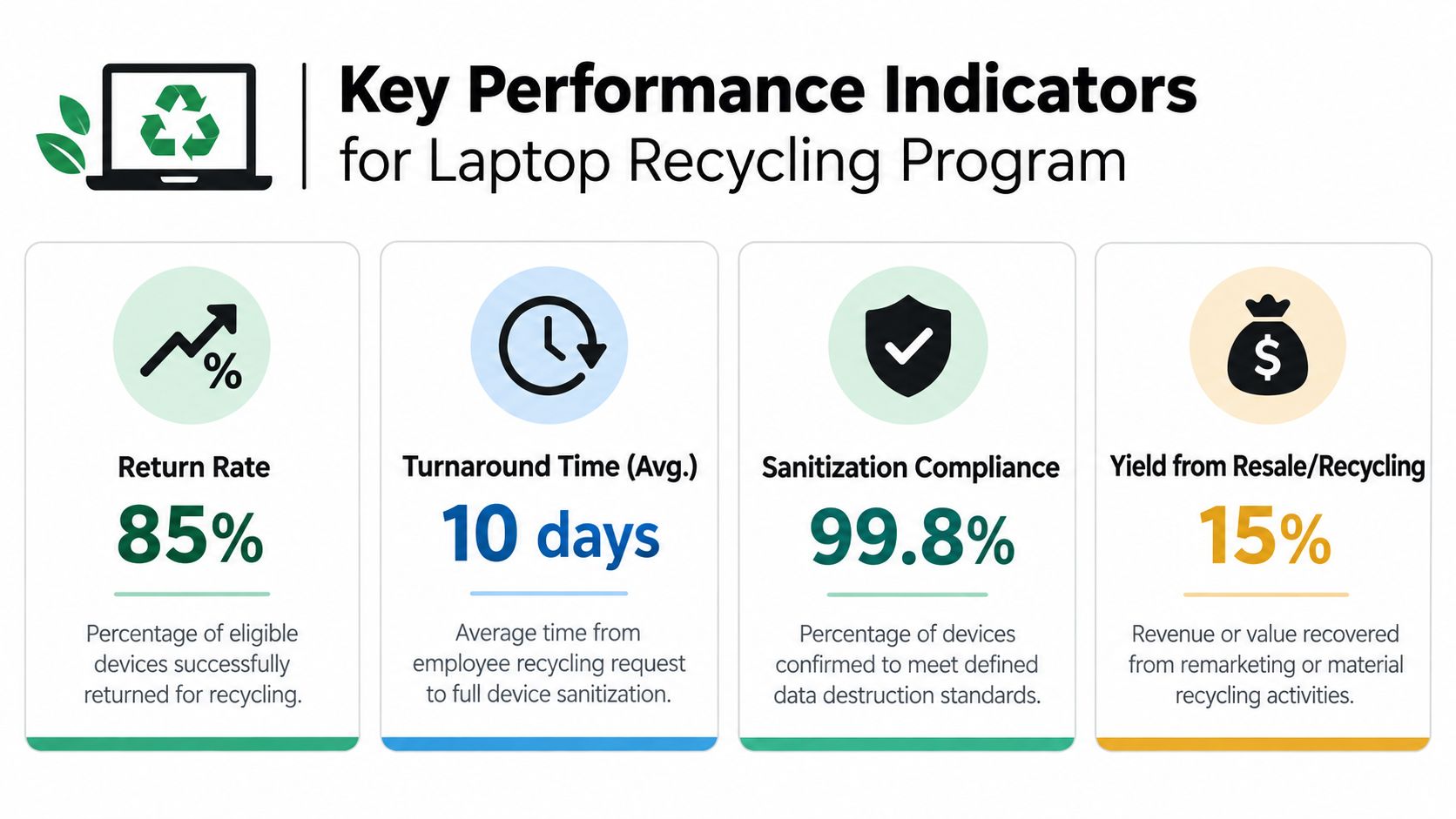
A mature program measures control and value together. A high return rate does not confirm secure processing if certificates are missing, and strong resale proceeds do not offset devices that remain untracked. The dashboard should connect logistics, chain-of-custody evidence, security outcomes, and financial recovery.
Track every device through a consistent status model:
- Return status: Requested, kit shipped, in transit, received, or exception.
- Processing status: Awaiting inspection, sanitization complete, failed wipe, or destruction required.
- Disposition status: Redeployed, remarketed, recycled, destroyed, or unresolved.
- Evidence status: Custody record complete, certificate issued, or documentation gap.
Build a useful review dashboard
Measure return completion, retrieval turnaround, sanitization completion, unresolved exceptions, recovery proceeds, processing cost, shipping cost, and environmental disposition. Define calculations plainly:
Net recovery = resale or buyback proceeds minus shipping, repair, processing, and destruction costs.
Separate reusable laptops from material-recycling outcomes. A recovered device should not be labeled “recycled” when redeployment or remarketing produced a better result. Review returned-laptop recovery and remarketing practices when setting disposition rules and comparing recovery options.
Review exceptions on a defined schedule. A missing serial number may indicate a receiving-control problem. Repeated packaging damage may justify a different kit. Delayed certificates require vendor escalation. An open remote-wipe case remains visible until the laptop is recovered, sanitized, or physically destroyed.
Documentation must show that reasonable measures were taken to prevent information from being read or reconstructed. Keep those records connected to policy reviews, vendor performance, and each device's custody history.
A quarterly review should assign actions, owners, and due dates. If the program cannot show where a laptop went, who handled it, how its media was sanitized, and why its final disposition was selected, a control gap remains.
Contact Beyond Surplus for secure retrieval, certified data destruction, IT asset recovery, electronics recycling, and documented disposition of remote-employee laptops. Visit Beyond Surplus to arrange a business pickup or discuss a chain-of-custody program for a distributed workforce.


