

An IT manager in Atlanta is preparing for an audit when a pallet of retired servers appears in the loading area. The equipment has been removed from production, but the hard drives still contain employee records, customer files, clinical information, or proprietary business data. One overlooked drive can create a serious exposure long after the hardware has left the server room.
Hard drive shredding in Atlanta gives businesses a clear end point for storage media that won't be reused. Instead of trusting a device to remain locked away or assuming that a basic format removed its contents, physical destruction eliminates the storage substrate itself. The right process also produces the inventory records and destruction evidence an auditor, regulator, or legal team may require.
Table of Contents
- The Reality of End-of-Life Data Security
- Understanding NIST Sanitization Standards
- Comparing Destruction and Wiping Methods
- Navigating Compliance and Regulatory Mandates
- Chain of Custody and Audit Defense
- Logistics of Scheduling Secure Pickups
- Common Misconceptions About Data Destruction
The Reality of End-of-Life Data Security
Retired equipment creates a gap between operational control and documented disposal. While a drive is installed in a managed server, access controls and monitoring protect it. Once that drive is removed, responsibility shifts to the people handling, storing, transporting, and processing it. A box marked “old IT equipment” doesn't establish who touched each device or what happened to its data.
That gap explains why organizations are moving away from ad hoc disposal. Enterprise IT asset disposition is becoming a broader compliance and risk-management function. The global enterprise IT asset disposition market was valued at USD 7.74 billion in 2025 and is projected to reach USD 21.51 billion by 2034, with a projected 12.3% CAGR, according to Fortune Business Insights' enterprise IT asset disposition market analysis. The same analysis describes data destruction as both the largest and fastest-growing segment, driven by regulations such as GDPR, HIPAA, and CCPA.
Why destruction is different from storage
A retired drive can remain readable even when the computer, server, or storage array no longer works. Removing the drive from its enclosure doesn't remove the information. Neither does placing it in a locked closet while a project team decides what to do next.
NIST treats shredding as a Destroy sanitization method. The media is physically broken into fragments small enough that recovery isn't feasible using state-of-the-art laboratory techniques. This matters when a business has no legitimate reason to reuse the drive and the information would create unacceptable risk if recovered.
Independent reporting also shows how frequently organizations choose destruction for end-of-life equipment. A 2025 enterprise data sanitization survey found that up to half of end-of-life assets are destroyed, while as many as 47% of data center assets were still operational when destroyed, according to Blancco's 2025 data sanitization report. The report says destroying functional devices costs large enterprises over USD 1 million every three years. That doesn't mean destruction is always the right answer. It does show why ITAD teams need a deliberate decision process instead of destroying every device automatically.
Practical rule: Destroy the media when the data sensitivity is high, reuse isn't approved, and your organization needs the strongest possible evidence that the storage substrate no longer exists.
For Atlanta companies, secure disposal should sit alongside electronics recycling, data center decommissioning, laptop disposal, medical equipment disposal, laboratory equipment disposal, and product destruction. The objective isn't only to clear floor space. It's to close the asset's lifecycle with a defensible outcome. Businesses evaluating the risk should also review this guide to the data security risks of improper computer disposal.
Understanding NIST Sanitization Standards
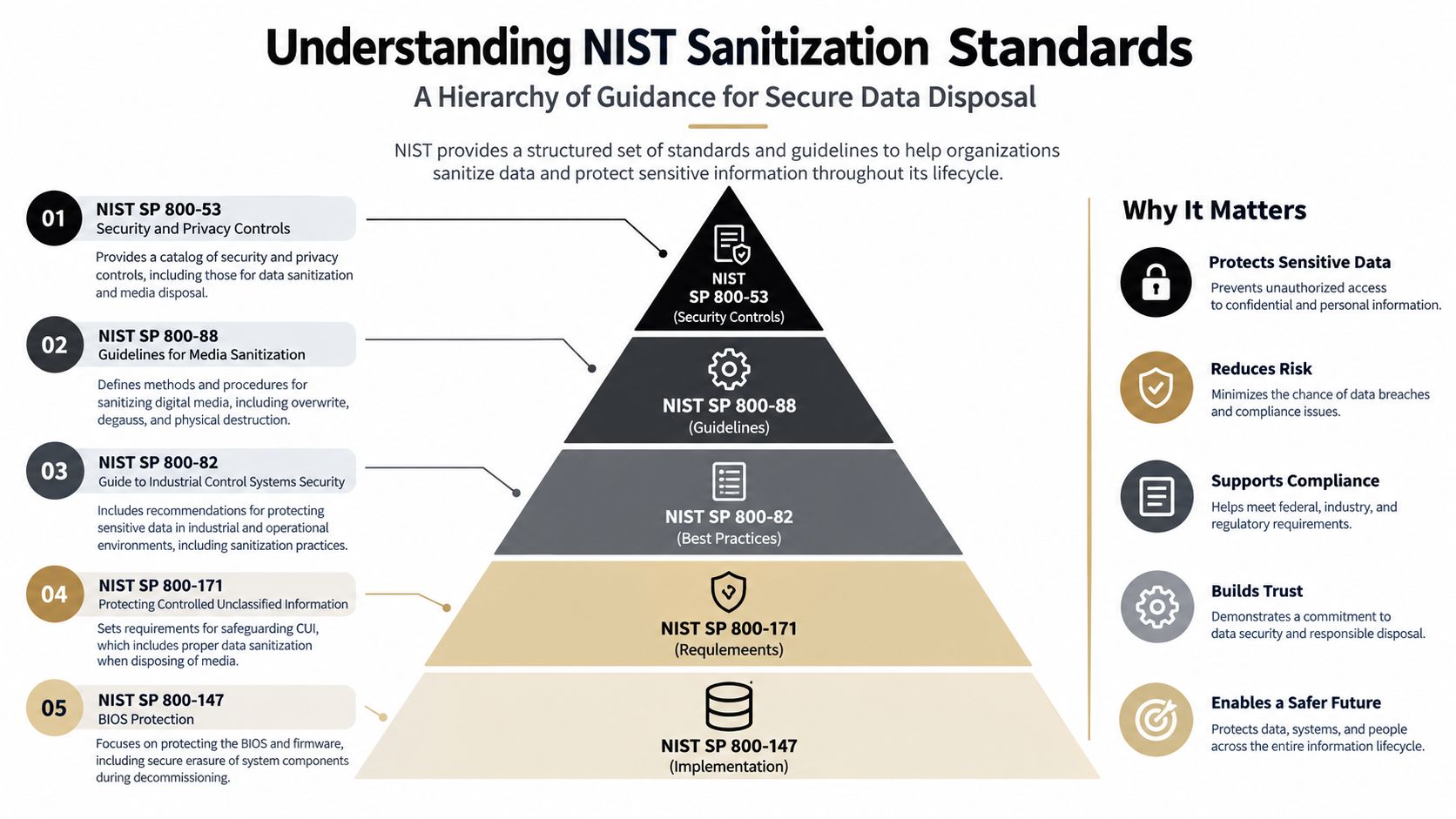
NIST SP 800-88 separates media sanitization into three broad categories: Clear, Purge, and Destroy. These categories help an IT director match the treatment to the device, the data, and the future use of the equipment. They also prevent a common mistake, treating every form of deletion as equivalent to physical destruction.
Clear for controlled reuse
Clear applies logical techniques to address user-accessible storage locations. In practical terms, that can mean an approved overwrite process on an intact hard disk. It may suit a drive that remains inside an organization's controlled asset pool and is being prepared for another authorized user.
Clear isn't a universal answer. It may not address hidden areas, damaged sectors, remapped sectors, or device-specific behavior. It also requires reliable execution, verification, and records. If the drive won't be reused, spending time on logical sanitization before physical destruction may add work without improving the final outcome.
Purge for stronger logical sanitization
Purge uses a method intended to make data recovery infeasible while preserving the media for reuse. Depending on the technology, that may involve a device-specific command, cryptographic erase, or another approved technique. Purge can support value recovery when an organization has a clear reuse pathway and can validate that the process worked.
The decision becomes more complicated with mixed fleets. A modern solid-state drive doesn't store information in the same way as a magnetic hard disk. Flash translation layers, overprovisioned space, and wear-leveling can make a generic overwrite unsuitable. The sanitization method must match the storage technology, not just the connector or external appearance.
Destroy when reuse isn't acceptable
Destroy physically breaks the media into fragments. NIST describes this as the option for situations where recovery must be infeasible using state-of-the-art laboratory techniques. Shredding, disintegration, pulverizing, and incineration fall within the physical-destruction family, although the specific process must be appropriate for the media and the organization's requirements.
A useful analogy is a whiteboard. Clear is like erasing the visible writing. Purge is like applying a more aggressive treatment that makes recovery difficult while keeping the board usable. Destroy is like shredding the board into pieces. The last option removes the object that held the information, which is why it fits end-of-life drives containing highly sensitive data.
Decision point: Don't select a sanitization label before identifying the device type, sensitivity of the information, reuse plan, and evidence your audit process requires.
A practical policy can route ordinary reusable HDDs toward verified wiping, high-value equipment toward an approved purge process, and failed or highly sensitive storage media toward shredding. The NIST 800-88 data destruction standards explained can help stakeholders understand why those paths aren't interchangeable.
Comparing Destruction and Wiping Methods
Atlanta businesses usually weigh three service models, on-site shredding, off-site shredding, and certified data wiping. Each can work, but each solves a different operational problem. The wrong choice either creates unnecessary cost or leaves a gap between the stated policy and what happened to the media.
| Method | Security Level | Best Use Case |
|---|---|---|
| On-site shredding | High visibility and physical destruction at the client location | Highly sensitive media, strict observation requirements, and projects where drives shouldn't leave the premises intact |
| Off-site shredding | Physical destruction supported by controlled transport and documented custody | Larger enterprise fleets, consolidated loads, and organizations with a secure logistics process |
| Certified data wiping | Logical sanitization with the possibility of reuse or resale | Functional equipment approved for IT asset recovery and value recovery |
On-site shredding
On-site mobile shredding lets the client observe the destruction at its own facility. It can reduce the time that intact drives remain in transit and gives facilities teams a clear visual endpoint. This model is useful for a healthcare site, financial office, government location, or data center with strict internal controls.
The trade-off is coordination. The site needs a suitable vehicle position, loading access, an accurate media inventory, and staff available to verify the handoff. A mobile operation may also be less efficient for a small, scattered collection than a consolidated off-site batch. Ask how the provider handles SSDs, damaged media, loose drives, and devices that aren't easily separated from larger equipment.
Off-site shredding
Off-site processing can make sense when a business has a large, consolidated fleet and wants the pickup, transport, sorting, destruction, and reporting managed as one project. It can also support nationwide IT asset disposition when equipment comes from multiple offices.
Security depends on the custody controls, not on the word “off-site.” The provider should identify assets at pickup, control access during loading, use documented transport procedures, and issue records tied to individual serial numbers. If those controls are missing, the client has effectively moved the risk from a storage room to a truck.
Certified wiping
Wiping is appropriate when equipment has approved residual value and the organization has decided that reuse is acceptable. A functional enterprise SSD, laptop, or server may be a candidate for recovery if the sanitization process matches the technology and the provider can verify the result.
Wiping doesn't work as a shortcut for every situation. Failed drives, damaged media, unknown configurations, and highly sensitive records may not be suitable for reuse. The comparison of hard drive shredding and data wiping is useful when procurement and security teams need to balance recovery value against assurance.
A sound policy doesn't ask whether shredding or wiping is universally better. It asks whether the method fits the data, the device, the disposition outcome, and the evidence standard. That decision prevents a finance department from destroying equipment that could safely be reused, while stopping a high-risk data set from being sent through an inadequately controlled wiping workflow.
Navigating Compliance and Regulatory Mandates
Compliance doesn't prescribe one identical disposal method for every business. It requires an organization to use reasonable controls for the data it holds and to demonstrate that its process prevents unauthorized access. The policy should therefore connect each information category to an approved sanitization method, a responsible owner, and a recordkeeping requirement.
FTC requirements for consumer report information
The FTC Disposal Rule applies to businesses that hold consumer report information. It requires reasonable measures to destroy or erase electronic files and media so the information can't be read or reconstructed. The rule also permits organizations to use a document destruction contractor when they exercise appropriate due diligence, as explained in the FTC's guidance on disposing of consumer report information.
For a business, that means a vendor handoff shouldn't be informal. The contract, pickup record, destruction method, and final certificate should support the conclusion that the media was rendered unreadable and unreconstructable. Physical shredding may be the clearest choice for end-of-life drives, while verified wiping may fit approved reuse.
HIPAA and regulated healthcare data
Healthcare organizations need a disposition policy that reflects the sensitivity of protected health information. That includes more than clinical systems. Billing platforms, imaging equipment, backup devices, laptops, and removable media may all contain information that requires controlled handling.
A healthcare provider should identify who authorizes destruction, how assets are inventoried, whether destruction happens on-site or at a secure facility, and which document closes the record. The policy should also address mixed loads so that a general electronics recycling stream doesn't receive an unidentified drive containing patient data.
Georgia handling considerations
Georgia doesn't have a statewide electronics-recycling mandate or a statewide landfill ban for most electronics. Commercial organizations therefore need to rely on federal data-protection requirements and their own disposal controls, rather than assuming a state e-waste program will establish secure data handling. Hazardous components can still fall under Georgia solid-waste requirements and federal RCRA rules, as outlined in this Georgia compliance summary for electronics disposal.
Audit test: Could a manager explain why this device received wiping, purge, or destruction, and produce the record that proves the process occurred?
A defensible policy should include:
- Data classification: Identify consumer report information, protected health information, financial records, credentials, and proprietary files.
- Device mapping: Distinguish HDDs, SSDs, removable media, servers, laptops, and damaged equipment.
- Disposition approval: Record whether each asset is being reused, remarketed, recycled, or destroyed.
- Vendor controls: Confirm the provider's custody, processing, downstream, and reporting procedures.
- Retention rules: Store certificates, inventories, and exception records according to the organization's legal and audit requirements.
Organizations reviewing broader risk controls may also find small business cyber liability advice useful as a companion resource. Insurance doesn't replace secure disposal, but risk transfer and operational controls should be considered together. Detailed compliance documentation for IT asset disposition helps turn a policy into evidence.
Chain of Custody and Audit Defense
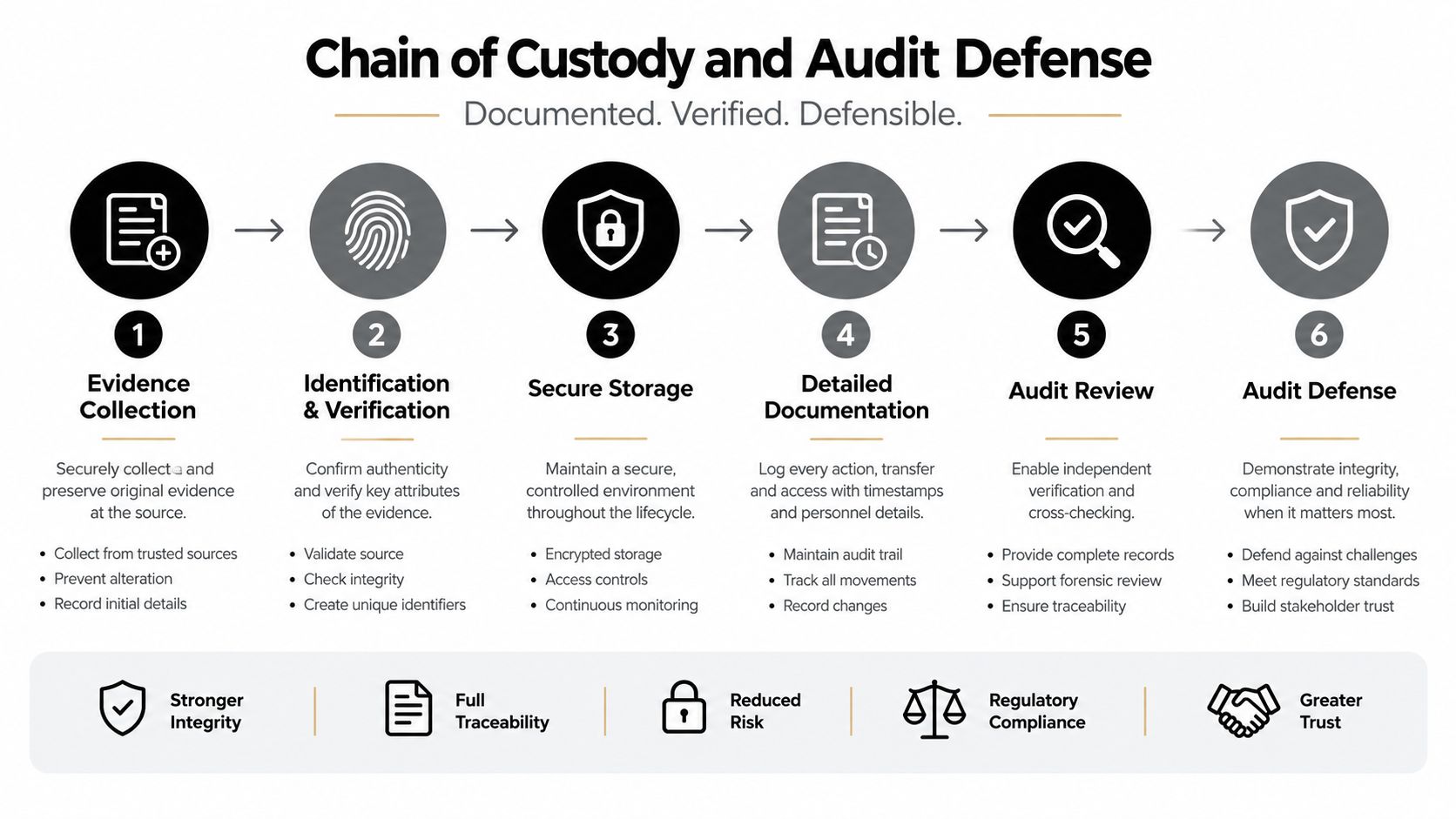
A shredded drive has no recovery value, but the destruction event still needs to be tied to the correct asset. If a certificate says that ten drives were destroyed without identifying which ten, the record may not answer an auditor's central question. The strongest workflow starts before pickup and remains traceable through final processing.
What the record should show
An unbroken chain of custody is a serialized record from collection through destruction. Each transfer should identify the time, handler, and item count. The asset record should connect the serial number to the device type, client location, selected method, and final outcome.
At pickup, the provider scans or records each eligible drive before loading. The client representative confirms the count and any exceptions, such as a missing label or a drive that remains installed in a server. During transport, access and custody are controlled. At processing, the provider records the destruction event and reconciles the completed batch against the intake list.
The final Certificate of Destruction should be more than a generic statement. Related guidance describes records that can include serial numbers, device details, the destruction method, and the NIST 800-88 category satisfied. Chain-of-custody guidance for IT asset disposition provides useful context for evaluating whether a provider's paperwork follows the physical movement of the assets.
Retention and exception handling
Keep the certificate with the original inventory and project authorization. If a serialized record is missing, a drive count changes, or an item is routed to wiping instead of shredding, the exception should be documented and approved. Silent substitutions weaken the credibility of the entire batch.
Data-destruction guidance states that related records should be retained for at least three years for batch recycling transactions, as described in Atlanta e-waste recycling laws and best practices. Your legal or compliance team may require a longer period based on the records involved.
The document isn't an administrative afterthought. It is the link between the asset you released and the destruction outcome you need to defend.
Logistics of Scheduling Secure Pickups
A secure pickup begins with a clean inventory, not with a truck request. Identify the sites, equipment categories, estimated drive count, and whether each asset is approved for reuse or physical destruction. Separate hard drives and SSDs when practical, and flag damaged, locked, encrypted, or still-installed media before the crew arrives.
Prepare the site
Consolidate equipment in a controlled staging area. Use pallets, carts, or labeled containers that let the pickup team count assets without repeatedly searching offices and storage rooms. Keep the inventory available to the site representative so serial numbers and exceptions can be verified at handoff.
The facility should also plan the route from the staging area to the loading point. Server racks, elevators, dock restrictions, security escorts, and after-hours access can affect the schedule. A short site review prevents the crew from discovering that a large decommissioning load must pass through a narrow public corridor.
Choose the processing route
For highly sensitive media, ask whether mobile shredding can be performed at the Atlanta facility and what the site must provide. For consolidated enterprise loads, ask about secure transport to an off-site processing location, access controls, intake scanning, and the timing of the Certificate of Destruction.
A provider may also evaluate equipment for IT asset recovery before sending it to destruction. That requires a clear separation between assets approved for reuse and assets that must be destroyed. Don't allow a recovery review to delay the destruction of media that your policy has already classified as non-reusable.
Build the quote around the real work
Pricing commonly reflects the project's volume, location, access conditions, transport requirements, device mix, and documentation needs. A quote should state whether labor includes packing and removal, whether palletization is required, and whether on-site mobile service differs from off-site processing.
Give the provider an accurate description of the load. Include the number of locations, approximate equipment categories, hard drive and SSD counts, and any requirements for serialized reporting. Clear information produces a more useful scope and reduces changes at the loading dock.
Common Misconceptions About Data Destruction
Myth one, degaussing works for every storage device. Degaussing targets magnetic media, so it isn't a universal method for solid-state drives. SSDs store data in flash memory rather than on magnetic platters, which means a magnet-based process doesn't address the underlying storage technology. For SSDs that won't be reused, use a destruction method designed for the media.
Myth two, deleting files or formatting the drive is enough. Deletion usually removes references to files rather than eliminating every underlying data area. Formatting can prepare a device for a new operating system, but it doesn't automatically establish that sensitive information can't be reconstructed. Treat logical erasure as a controlled sanitization process that requires the right tool, verification, and records, not as a casual desktop action.
Myth three, every electronics recycler provides the same security. General material recycling and commercial ITAD have different objectives. A business handling regulated or proprietary information should ask who inventories the assets, who controls transport, which method is used for each device, and whether the final report identifies the individual drives.
Myth four, destroying every device is always the safest policy. Physical destruction is the strongest end-of-life option, but it can eliminate recoverable value from equipment that could be safely reused. A defensible program distinguishes reusable assets from failed or high-risk media, then applies Clear, Purge, or Destroy according to the documented decision.
Beyond Surplus provides Atlanta-area businesses with on-site and off-site hard drive shredding, certified data wiping, electronics recycling, IT asset disposal, and serialized destruction documentation. Visit Beyond Surplus to arrange a secure pickup, discuss your device inventory, and select a disposition process that supports your compliance and audit requirements.


